Post Ratings - taking likes to the next level [Deleted]

Hello,

I've installed this plugin on my XF 1.3.5 site.

I'm getting errors like:

Thread Listing Page:

Template Errors: forum_view

  1. Illegal string offset 'dark_postrating_max' in /web/anna/library/Dark/PostRating/EventListener.php, line 393:
    392: $__compilerVar19 .= '
    393: ';
    394: if (trim($__compilerVar19) !== '')
Thread Detail Page:
  1. Illegal string offset 'like_count' in /web/anna/library/Dark/PostRating/EventListener.php, line 266:
    265:
    266: <div class="overlayScroll pollResultsOverlay">
    267:
Also, there's no rating bar displayed as well.

I'm using custom style for my site.
 
Hey Luke.

Any possibility of making this more mobile friendly? Example...

react_mobile.gif.c57fbe45056fe6639b99d7d0030622fb.gif
 
Hey Luke.

Any possibility of making this more mobile friendly? Example...

react_mobile.gif.c57fbe45056fe6639b99d7d0030622fb.gif

That doesn't look anything like I see on my phone.

I don't have any problem with the way it is, works well on mobiles.
 
Last edited:
That doesn't look anything like I see on my phone.

I don't have any problem with the way it is, works well on mobiles.

Nor mine, that's what I want.
In its current state, rating icons are too small and hard to touch.
 
Gmail have blocked the zip file in email so I can't obtain version 1.7.5 from my email any chance that this can be sent to a different mail or PM'd to me. Or is it available to download instead?
 
Is there any way to set up a post rating for just one thread? I know I can set it up for one forum node, but I want it in just the one thread. Possible?
 
Our users swear you used to be able to mouseover ratings and see who gave them to you, but you can't now -- is there a setting that controls this that I might have turned off?
 
I don't think you could ever mouse-over the rating and see who gave what, but you can click on it and view who gave the ratings (in an overlay) but I think that is also permissions-based IIRC

** yup, under Post Ratings > view ratings lists
 
@Luke F - as above, when will this be updated to support higher resolution images?

You could download emoji that are freely available or give users the option...

I love this add on but it's 2017, the world is using retina, mobile first etc etc...!
 
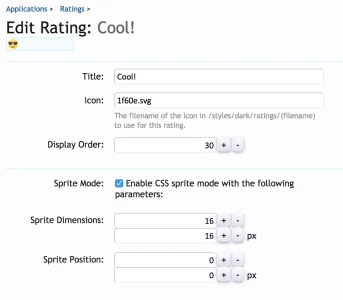
You just need to upload an svg file for each rating you want to the post ratings directory, then specify the file name and dimensions in the settings

upload_2017-5-14_16-36-58.webp
 
Back
Top Bottom