XF 2.3 Please enter valid username CSS rules.

CtrlV

Active member
Licensed customer
Im having problem in adding fontawesome icon after the username of every user in a group.

Based on my understanding on https://xenforo.com/community/resources/font-awesome-icons-2-3.9562/

code less should be like this
Code:
&:after{
    .m-faContent(@fa-var-icon-name);
}

but it always show error cant save.
Oops! We ran into some problems.
Please enter valid username CSS rules.

 

Attachments

  • Screenshot_3.webp
    Screenshot_3.webp
    34.6 KB · Views: 23
In the CSS rule block just add a neutral rule color: inherit; (for example) to activate the username--styleID class.
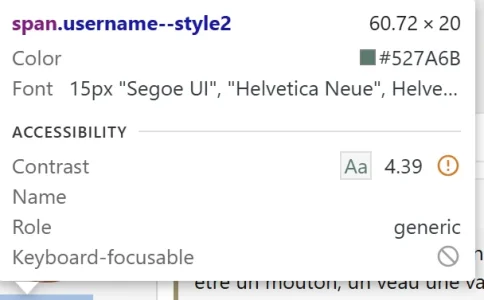
Then check with the browser inspector the ID:

1730102126970.webp

In my case the ID is 2, then in your extra.less template add:

Less:
.username--style2:after
{
    .m-faContent(@fa-var-icon-name);
    padding-right: 4px;
}
 
In the CSS rule block just add a neutral rule color: inherit; (for example) to activate the username--styleID class.
Then check with the browser inspector the ID:

View attachment 313084

In my case the ID is 2, then in your extra.less template add:

Less:
.username--style2:after
{
    .m-faContent(@fa-var-icon-name);
    padding-right: 4px;
}
Thanks for reply mine is style5 but whenever i save, it show this
Screenshot_4.webp
 
.m-faContent(fa-var-icon-name) won’t be a valid syntax in this CSS field. Maybe it’s a bug but it won’t be accepted, i guess because it’s a XenForo template syntax.
 
Back
Top Bottom