

- Affected version
- 2.3.9
Location: Admin CP > Setup > Options > Create or Edit option > Explanation field
The Explanation field on the option edit page shows the label "You may use HTML". However, if the explanation text contains a
This is purely a UI issue discovered during add-on development. It is not a security issue, reproducing it requires Admin CP access, and admins are already fully trusted users.
Edit any existing option (or create a new one)
In the Explanation field, enter any text containing a
Save the option
Navigate back to the option group page
Expected result:
The explanation text renders with the
Actual result: The raw script tag is injected into the page HTML. The options page stops rendering correctly after the affected option, and the Save button disappears.
The Explanation field on the option edit page shows the label "You may use HTML". However, if the explanation text contains a
<script> tag (for example, when documenting that an option outputs a <script type="application/ld+json"> block in the page head), the tag is rendered raw into the Admin CP options page. This causes the page to stop rendering correctly, and the Save button at the bottom of the options group page disappears entirely.This is purely a UI issue discovered during add-on development. It is not a security issue, reproducing it requires Admin CP access, and admins are already fully trusted users.
Steps to reproduce:
Go to Admin CP > Setup > OptionsEdit any existing option (or create a new one)
In the Explanation field, enter any text containing a
<script> tag, for example:
Code:
Outputs a <script type="application/ld+json"> block in the page head.Navigate back to the option group page
Expected result:
The explanation text renders with the
<script> tag safely escaped (displayed as <script> in plain text) or stripped, and the Save button remains visible.Actual result: The raw script tag is injected into the page HTML. The options page stops rendering correctly after the affected option, and the Save button disappears.
Workaround:
Replace the literal tag with plain text in the explanation, write "script tag" or use<script> written as HTML entities to display it safely without breaking the page.Fix:
Escape<script> Tags in the explanation field output on the options list template so they render as visible text instead of being injected raw into the page HTML. This is consistent with how XenForo handles untrusted output elsewhere and requires no changes to the save flow or field label.Before:
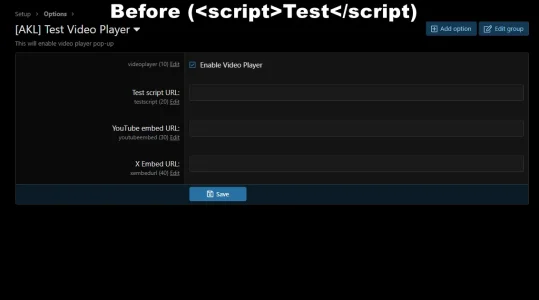
After:
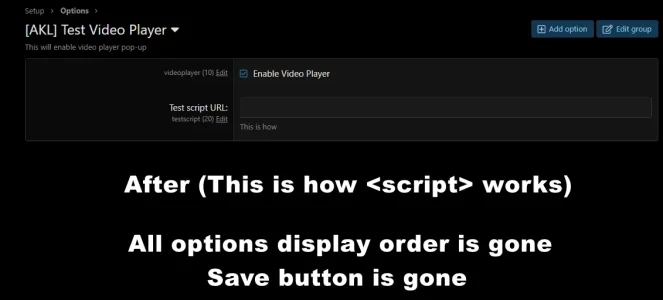
After:
Last edited:
