XF 2.3 No sitemap.xml created.

PaulyWalnuts

Member
Licensed customer
I go to ACP/option/XML sitemap generation, and click save.

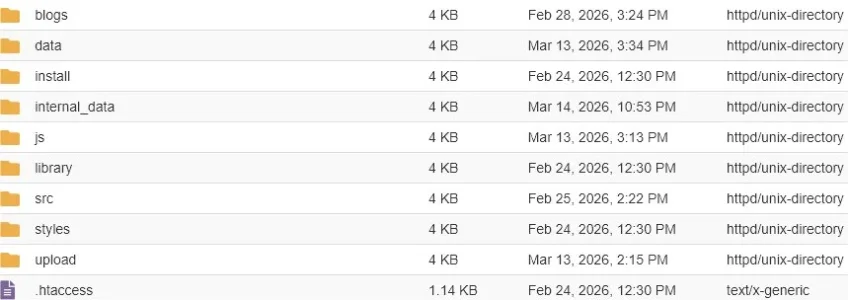
I get no indication that it was successful or not, and I search all folders within public_html, but see no sitemap.xml, except for the blogs. I DO have a sitemap.php.

I make no changes to the settings. All is set to the defaults including "Automatically submit sitemap to search engines", and the URL is: https://thevapeworkshop.com. Since we started with only a blog at the root of public_html, the forum is in a sub folder called xf.
 
I go to ACP/option/XML sitemap generation, and click save.

I get no indication that it was successful or not, and I search all folders within public_html, but see no sitemap.xml, except for the blogs. I DO have a sitemap.php.

I make no changes to the settings. All is set to the defaults including "Automatically submit sitemap to search engines", and the URL is: https://thevapeworkshop.com. Since we started with only a blog at the root of public_html, the forum is in a sub folder called xf.
You can see the generated sitemap here: https://thevapeworkshop.com/xf/sitemap.xml
 
You can see the generated sitemap here: https://thevapeworkshop.com/xf/sitemap.xml
Good grief! I know my age is reducing the number of brain cell in my cranium, but I don't even see a folder: https://thevapeworkshop.com/xf/forums/hardware-reviews.24. I see thevapeworkshop.com/xf, but I see no sub folder of forums.

How do you see that? What exactly do you do to access that? Is it a browser extension? Kinda scary to me, really.

Are those being seen by search engines? I'm really struggling with SEO as it applies to a forum.

I was running the forum on phpbb but I don't like it, (hence the move to xenforo) but any SEO analytics seems to see no difference between the two. They still says, 15 pages detected, 5 browsed and it whines about duplicate content (Some crap about canonical whatever...) As you can see from the sitemaps you found there are more than 15 pages.

As the site is brand new, I'm willing to risk sharing an admin login to someone that's willing to help for free. (Retired/fixed income)

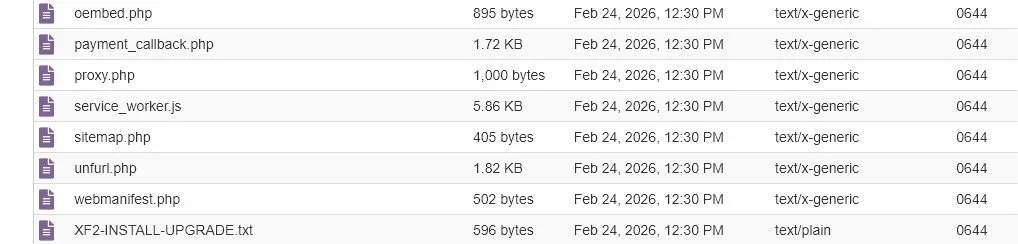
This is: https://thevapeworkshop.com/xf. I see no sitemap.xml. I see a .php, though.
 

Attachments

  • sitemap.webp
    sitemap.webp
    28.1 KB · Views: 6
Good grief! I know my age is reducing the number of brain cell in my cranium, but I don't even see a folder: https://thevapeworkshop.com/xf/forums/hardware-reviews.24. I see thevapeworkshop.com/xf, but I see no sub folder of forums.
That's not how it works. The Xenforo routing controller intercepts the request and redirects it where it needs to go. The key aspect in that URL are the 'forums' and '24'. The rest of that URL is just visually friendly to search engines and end users. It's a logical folder, not a physical one.

How do you see that? What exactly do you do to access that? Is it a browser extension? Kinda scary to me, really.

Are those being seen by search engines? I'm really struggling with SEO as it applies to a forum.
All XF sites function the same way, it's not a magical addon or browser thing. And yes, search engines can see those sitemap files.

This is: https://thevapeworkshop.com/xf. I see no sitemap.xml. I see a .php, though.
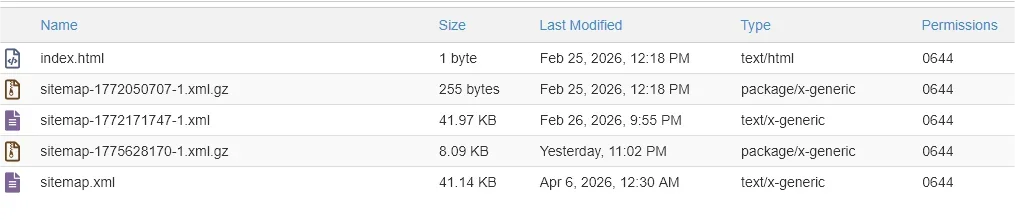
The sitemaps are actually in the sitemap folder. The sitemap.php is just a front end handler.

I was running the forum on phpbb but I don't like it, (hence the move to xenforo) but any SEO analytics seems to see no difference between the two. They still says, 15 pages detected, 5 browsed and it whines about duplicate content (Some crap about canonical whatever...) As you can see from the sitemaps you found there are more than 15 pages.
If I put "site:thevapeworkshop.com" into a google search page, I get 10+ pages of results and they all appear to be the correct XF links to your updated site. The first thing I suggest you do is to update your default robots.txt file (seen here https://thevapeworkshop.com/robots.txt). There's a lot of 'noise' that search engines don't need to see. It's also noted that your sitemap URL in your robots.txt is wrong.

I think at a minimum, you'd what to have something like this:

Code:
User-agent: *
Disallow: /xf/whats-new/
Disallow: /xf/account/
Disallow: /xf/attachments/
Disallow: /xf/goto/
Disallow: /xf/posts/
Disallow: /xf/login/
Disallow: /xf/search/
Disallow: /xf/admin.php
Allow: /

Sitemap: https://thevapeworkshop.com/xf/sitemap.xml

You can search Xenforo for other input on robots.txt configuration.
 
I'm not seeing a folder with that name. Forgive me, I'm too old and shouldn't be playing with this "stuff", but my doc says to keep challenging my deteriorating brain. And having been retired since 2008, I'm easily bored.

This is the robots.txt bluehost created in the folder public_html\xf.

Sitemap: https://thevapeworkshop.com/sitemap.xml
User-agent: *
allow: /
 

Attachments

  • sitemap.webp
    sitemap.webp
    26.3 KB · Views: 3
I'm not seeing a folder with that name. Forgive me, I'm too old and shouldn't be playing with this "stuff", but my doc says to keep challenging my deteriorating brain. And having been retired since 2008, I'm easily bored.
Apologies, my mistake, you should find the sitemap folder under /xf/internal_data - you should see the most recent, updated sitemap files in there.

This is the robots.txt bluehost created in the folder public_html\xf.
You should edit that file with at least the suggestions I mentioned above. Your sitemap URL would be https://thevapeworkshop.com/xf/sitemap.xml.

I don't see a robots.txt under /xf but I do see one at your website root: https://thevapeworkshop.com/robots.txt
 
Apologies, my mistake, you should find the sitemap folder under /xf/internal_data - you should see the most recent, updated sitemap files in there.


You should edit that file with at least the suggestions I mentioned above. Your sitemap URL would be https://thevapeworkshop.com/xf/sitemap.xml.

I don't see a robots.txt under /xf but I do see one at your website root: https://thevapeworkshop.com/robots.txt
Robots updated. First, how can you see the files and folders of my forum?

Also, the sitemap was named sitemap-1772171747-1.xml I renamed it and moved it to /xf.

Lastly (for now:) even though I've told the ACP to update the sitemap, the only file is dated Feb 24th. Seem like it's not updating it.
 
you shouldn't move around your sitemap files manually. they are created and managed by xenforo automatically.
Did some reading. The sitemap belongs in the root folder of the website. At least from what I'm understanding, but the file is located in a sub directory; internal_data. Also, the sitemap file is not named sitemap.xml. It's sitemap-1772171747-1.xml. Will search engines read that? I'd think they'd be looking for sitemap.xml only, and looking in the root directory.

Also, like I say, the one and only map I have was created around a month ago, even though I've told it to create one. I've even refreshed that.
 
as i said, xenforo handles it. the files might reside in a sub-folder but it is accessible from forum-folder/sitemap.xml (like here: https://xenforo.com/community/sitemap.xml). xenforo automatically maps the files created to the sitemap.xml file in the base folder. the actual files do not exist on the server in base folder. also, it is not mandatory to host sitemap in the base folder. sitemaps are different than robots.txt file. you have the ability to submit your sitemap manually to google and it can be any location. google search console even accept rss feed.


Sitemap file encoding and location: The sitemap file must be UTF-8 encoded. You can host your sitemaps anywhere on your site, but unless you submit your sitemap through Search Console, a sitemap affects only descendants of the parent directory. Therefore, a sitemap posted at the site root can affect all files on the site, which is where we recommend posting your sitemaps.

in any case, both:

https://thevapeworkshop.com/xf/sitemap.xml
https://thevapeworkshop.com/sitemap.xml

appear dead at my end.
 
as i said, xenforo handles it. the files might reside in a sub-folder but it is accessible from forum-folder/sitemap.xml (like here: https://xenforo.com/community/sitemap.xml). xenforo automatically maps the files created to the sitemap.xml file in the base folder. the actual files do not exist on the server in base folder. also, it is not mandatory to host sitemap in the base folder. sitemaps are different than robots.txt file. you have the ability to submit your sitemap manually to google and it can be any location. google search console even accept rss feed.


in any case, both:

https://thevapeworkshop.com/xf/sitemap.xml
https://thevapeworkshop.com/sitemap.xml

appear dead at my end.
Yeah, well, at the moment the site is down completely.

Internal Server Error​

The server encountered an internal error or misconfiguration and was unable to complete your request.

Please contact the server administrator at webmaster@xkb.xdt.mybluehost.me to inform them of the time this error occurred, and the actions you performed just before this error.

The only change I made was to the robots.txt. That can't harm the site from loading, can it? I tell ya I hate Bluehost. I can't even log into my account. Tells me my password is wrong. Hell, it's SAVED! I choose to get a code sent to my email to verify my account, but when I click the button nothing happens and I get no code.

Anyway. enough complaining about them... The biggest question in my mind at this point is why a sitemap is NOT being automatically generated, and why does the only one I have, named sitemap-WTF-.xml? Why, when I tell XF to create a new map does it not do it?
 
honestly, you just need to see if the top right link on this page works:

https://thevapeworkshop.com/xf/admin.php?logs/sitemap/

as long as the file linked here which should be https://thevapeworkshop.com/xf/sitemap.php works and the log (above link) shows that new files are being created, everything is fine. and you delete the moved files in the base folder. let xenforo handle it like it has handled it for years. you can try generating a new sitemap from here: https://thevapeworkshop.com/xf/admin.php?cron/sitemap/run and then check the logs from the above link.
 
Back
Top Bottom