Resource icon

Multiple accounts detector/Prevent multiple accounts registrations [Paid] 1.0.1

No permission to buy (€24.99)
It would be nice if the column didn't keep collapsing when accessing the admin menu.
that's how it is for me in XF 2.3.10.
After each setting change, you have to find the menu item again on the left.
 
It would be nice if the column didn't keep collapsing when accessing the admin menu.
that's how it is for me in XF 2.3.10.
After each setting change, you have to find the menu item again on the left.
Can you please give me a step by step on how to reproduce this?
 
I'll try it with my bad English and Google.

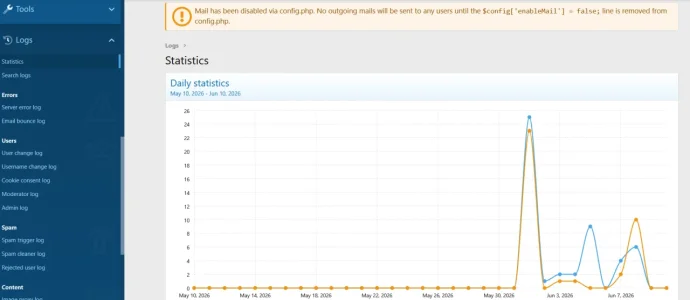
In the adminCP, for example, I click on logs, the menu opens, I click on Statistics, the statistics appear in the right window, and the menu on the left remains open.

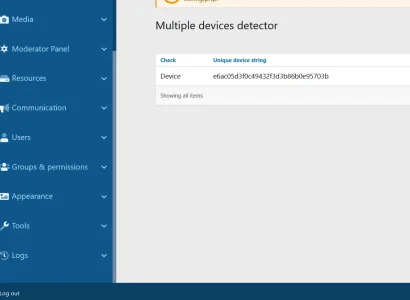
I click on users device check on the left, the Multiple Devices Detector appears on the right, but the log submenu closes.

md1.webp

md2.webp
 
I'll try it with my bad English and Google.

In the adminCP, for example, I click on logs, the menu opens, I click on Statistics, the statistics appear in the right window, and the menu on the left remains open.

I click on users device check on the left, the Multiple Devices Detector appears on the right, but the log submenu closes.

View attachment 339636

View attachment 339637

Thank you for the explanation. This doesn't seem to be related to my add-on by the looks of it. Nor it's a bug. That's how sidebar menus are being handled in XenForo as my add-on doesn't modify the Logs menu at all. It simply adds its links in there.
 
Yes, it adds them, but when I click on them, it opens on the right and closes on the left simultaneously; this doesn't happen with any of the others.
See my pictures above; in one, the tools are open, and in the other, they're closed. This happens when I click on your add-on; it should stay open on the left.
 
Yes, it adds them, but when I click on them, it opens on the right and closes on the left simultaneously; this doesn't happen with any of the others.
See my pictures above; in one, the tools are open, and in the other, they're closed. This happens when I click on your add-on; it should stay open on the left.
I see what you mean. I don't remember if it was always like this since the 2.3.7. version when I coded it first, or is it something that happened on the ltest version only. I have made a note of this and I will look into it next weekend when I have some free time. Thank you for reporting it.
 
Last edited:
Back
Top Bottom