
You are using an out of date browser. It may not display this or other websites correctly.
You should upgrade or use an alternative browser.
You should upgrade or use an alternative browser.

Mitch-Seasonal Effects Hub 22.2.0
No permission to download
- Thread starter Mitchy71
- Start date

Mitchy71 updated Mitch-Seasonal Effects Hub with a new update entry:
Fixed install error caused by emoji in copyright
Read the rest of this update entry...
Fixed install error caused by emoji in copyright
Fixed install error caused by emoji in copyright
Read the rest of this update entry...
Sure here's the link: https://xenforo.com/community/resources/xb-xmas-garland.9714/
Mitchy71 updated Mitch-Seasonal Effects Hub with a new update entry:
Seasonal Effects Suite Update: Day/Night Mode + Weather Forecast Overlay
Read the rest of this update entry...
Seasonal Effects Suite Update: Day/Night Mode + Weather Forecast Overlay
Release Notes – Seasonal Effects Suite Update: Day/Night Mode + Weather Forecast Overlay
Concise Version (Short + User-Friendly)
New Features
Automatic Day/Night Mode
Forum visuals now adapt to local time or real sunrise/sunset data from OpenWeather.
Includes smooth ambient lighting, moon/sun overlays, and configurable brightness levels.
Enhanced Night Environment
Added dynamic twinkling stars across the entire screen and optional moon image overlay.
Weather Forecast Overlay (NEW!)...
Read the rest of this update entry...
Hi @Mitchy71
I entered the weather plugin, but apart from the snow for the "Winter" holiday, I don't see anything else. The Christmas option doesn't add any graphic effects to the sites. Even with the paid plugin, the weather effects don't show anything. I don't even see the day and night effects from the latest update. Another thing, if possible, is that the snow should change direction every so often, and it would be nice if it stopped at the end of the screen and then slowly melted. I use another plugin that can do this.
I use xenforo 2.3 with PHP 8.3. Server: Apache2. MySQL database.
I entered the weather plugin, but apart from the snow for the "Winter" holiday, I don't see anything else. The Christmas option doesn't add any graphic effects to the sites. Even with the paid plugin, the weather effects don't show anything. I don't even see the day and night effects from the latest update. Another thing, if possible, is that the snow should change direction every so often, and it would be nice if it stopped at the end of the screen and then slowly melted. I use another plugin that can do this.
I use xenforo 2.3 with PHP 8.3. Server: Apache2. MySQL database.
Yes I installed your add-on and added your zip named "mitchseasonal" in: forum/styles/turbo/img/mitchseasonal
Which is my default style directory
+
web/forum/immagini/mitchseasonal
For options: For eather – Rain image 1 - 2 - 3 etc...
( Example> Weather – Rain image 1: immagini/mitchseasonal/rain1.png
Do I need to set anything else? For example, permissions for groups? Various settings beyond the basic ones present on:
/admin.php?options/groups/mitchWinterEffects/
Which is my default style directory
+
web/forum/immagini/mitchseasonal
For options: For eather – Rain image 1 - 2 - 3 etc...
( Example> Weather – Rain image 1: immagini/mitchseasonal/rain1.png
Do I need to set anything else? For example, permissions for groups? Various settings beyond the basic ones present on:
/admin.php?options/groups/mitchWinterEffects/
No group permissions at all. If you want to send me access I will look over your settings. Or simply send me some screenshots. But basically. If the very top option is checked, then it will override everything and make the holidays shown dependent on dates. If it's unchecked then you can select the holiday you want from the list and save. If you have No holiday selected and the top option is unchecked, then you can go down the options list to the day/night settings and selct those options for auto day/night mode
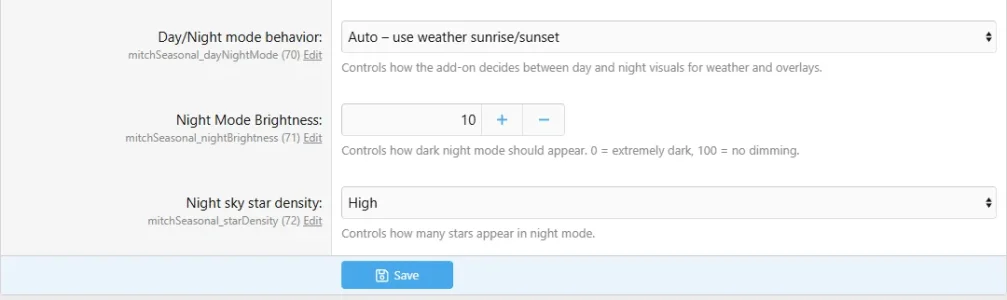
Also make sure you have this setting

Also make sure you have this setting
Here's my configuration: What I noticed is that the "Day/Night mode behavior" settings are missing, as in your screenshot.
The styles/mitchseasonal/ folder does not contain the weather_rain1.png, weather_rain2.png, weather_rain3.png, etc. files specified in the options.
The styles/mitchseasonal/ folder does not contain the weather_rain1.png, weather_rain2.png, weather_rain3.png, etc. files specified in the options.
Attachments
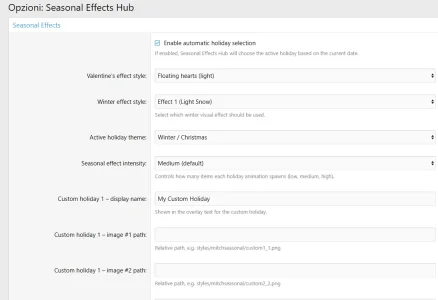
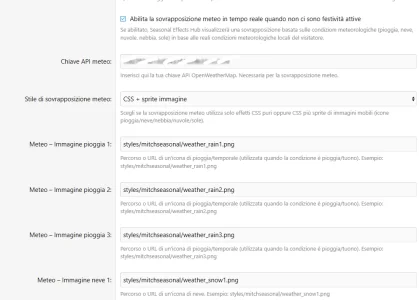
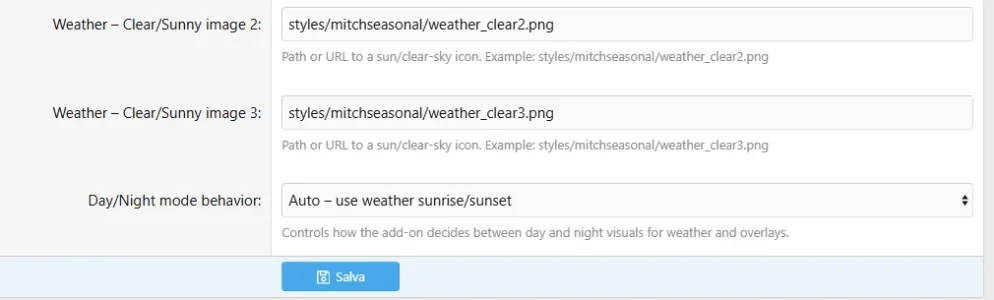
Ok that's your issue right there. Take the weather_ OUT from the start of the image paths. it should just be rain1.png rain2.png etc.. and the same for the others like clouds
Plus you have the very top option enabled meaning you will NOT be able to manually pick a holiday from the list.
Plus you have the very top option enabled meaning you will NOT be able to manually pick a holiday from the list.
I have correct the url in : styles/mitchseasonal/raindrop1.png - styles/mitchseasonal/snowflake1.png etc.. and disabled "Enable automatic holiday selection" but the problem persists. I only see snow falling. The day and night weather functions don't work.
Mitchy71 updated Mitch-Seasonal Effects Hub with a new update entry:
Seasonal Effects Hub — 2.19.0 Beta Released!
Read the rest of this update entry...
Seasonal Effects Hub — 2.19.0 Beta Released!
Seasonal Effects Hub — 2.19.0 Beta Released!
This is one of the biggest upgrades yet — your forum now reacts to the time of day, the weather, and even the sky above.

NEW DAY / NIGHT SYSTEM — FULLY LIVE!
Your forum now changes personality depending on the time:
Day Mode Enhancements
Soft atmospheric tinting
New sun sprite with subtle animation
Optional daytime airplanes that fly across the screen (image-based, not CSS!)
Beautiful animated...
Read the rest of this update entry...

No, It's a free addonThe copyright must stay intact to support the addon
Thanks. Then it’s a big NO. Just uninstalled from my both forum.
I hate addons with Footer copyright at the bottom. You either make it paid or make it free.
Anyway, thanks for your reply. Good luck.

Maybe you don't try telling me what to do with my addons, ThanksYou either make it paid or make it free.
