Oops, this only supports Font Awesome icons, which is limited versus having an emoji, which has vast options.Right now though, if you install @Xon's Font Awesome node icons add-on, then the node icon will take place over the cover if no image is set.

You are using an out of date browser. It may not display this or other websites correctly.
You should upgrade or use an alternative browser.
You should upgrade or use an alternative browser.
![[MC] Forum Layouts](/community/data/resource_icons/10/10429.jpg?1777136947)
[MC] Forum Layouts [Paid] 1.3.2
No permission to buy ($30.00)
- Thread starter Matt C.
- Start date

So, instead of each forum card under every category, you just want to display N topics from each forum?
Yeah, I'm aware. I thought that was implied in the title of the add-on
Oops, this only supports Font Awesome icons, which is limited versus having an emoji, which has vast options.
Yeah, I'm aware. I thought that was implied in the title of the add-on
Last edited:
I can see that idea functioning well in my head. Per category option, so the card layout can be mix and matched.
As for the emoji's, this might force me to to build an integrated way of managing node icons.
The whole reason I am using Xon's add-on is because I'm not making any changes to the default table layout. So any icon set also extends to my layouts.
But I do have ideas on adding certain additions to the table layout in the future, so it might makes to just integrate anyway. That way you can choose both FontAwesome icons and emoji's
As for the emoji's, this might force me to to build an integrated way of managing node icons.
The whole reason I am using Xon's add-on is because I'm not making any changes to the default table layout. So any icon set also extends to my layouts.
But I do have ideas on adding certain additions to the table layout in the future, so it might makes to just integrate anyway. That way you can choose both FontAwesome icons and emoji's
So, instead of each forum card under every category, you just want to display N topics from each forum?
Per category option, so the card layout can be mix and matched.
I want to only display 5 topics per category instead of per forum.
Example for XF community category:
Official forums - https://xenforo.com/community/#official-forums.1
Public forums - https://xenforo.com/community/#public-forums.17
XenForo bug reports - https://xenforo.com/community/#xenforo-bug-reports.46
Less clatter on the forum list page.
New option request for "Card view": Default sort order
I'll see about applying that to the topic preview.
Bug? Link forums has no color option to customize.
Yeah, that's my fault. It's already wired, I forgot to create the template modification for link forums. I'll get that in the next update. FYI, if you use the randomize color feature, it will touch the color column regardless.
Matt C. updated [MC] Forum Layouts with a new update entry:
Emergency patch
Read the rest of this update entry...
Emergency patch
Emergency patch for an issue reported by @rdn
- Fixed an issue where the color picker for link forums was not appearing.
Read the rest of this update entry...
Bug with the card view?Forum list: Below nodesWidgets aren't showing for this layout.
Looks like I forgot to add the forum list top and bottom widget positions. Current widget positions on card view is Forum overview top and bottom. I'll add the forum list positions in the next update.

@Matt C.
I think I’ve detected a bug with pinned threads. If I select the 'ignore' option and enter the node from the fluid view, the pinned posts are not displayed at the top; instead, they are sorted by their last update date. My understanding is that the 'ignore' option allows pinned posts to be shown in the main view by update date (without respecting the pin), but when entering a specific node, they should indeed appear pinned at the top. Is that correct?
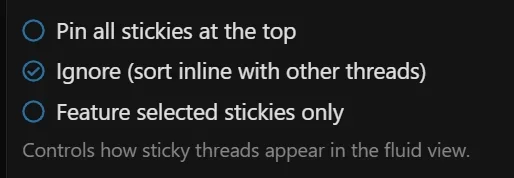
I think I’ve detected a bug with pinned threads. If I select the 'ignore' option and enter the node from the fluid view, the pinned posts are not displayed at the top; instead, they are sorted by their last update date. My understanding is that the 'ignore' option allows pinned posts to be shown in the main view by update date (without respecting the pin), but when entering a specific node, they should indeed appear pinned at the top. Is that correct?
@Matt C.
I think I’ve detected a bug with pinned threads. If I select the 'ignore' option and enter the node from the fluid view, the pinned posts are not displayed at the top; instead, they are sorted by their last update date. My understanding is that the 'ignore' option allows pinned posts to be shown in the main view by update date (without respecting the pin), but when entering a specific node, they should indeed appear pinned at the top. Is that correct?
View attachment 340002
I did not design it that way for stickies to maintain "top" behavior if an individual forum is selected. It only covers the overall feed. But I can see the confusion now that you brought that issue up. I'm gonna look into, maybe add it as option, or just integrate it.
I understood that this option was designed, for example, for forums with multiple nodes and several pinned threads in each of them. If, for instance, the forum had 10 nodes and each one had a pinned threads, it wouldn't make sense to show them all on the main view because it would hide the rest of the threads. However, if the user filters by that specific node, they should be displayed. I've used a specific case so you can better understand what I mean, although I think you already got me 
I understood that this option was designed, for example, for forums with multiple nodes and several pinned threads in each of them. If, for instance, the forum had 10 nodes and each one had a pinned threads, it wouldn't make sense to show them all on the main view because it would hide the rest of the threads. However, if the user filters by that specific node, they should be displayed. I've used a specific case so you can better understand what I mean, although I think you already got me
Yeah I agree with your logic. I'll probably fit that in with rdn's bug. There's a larger update I'm gonna start working on soon as I get my current project out.
Matt C. updated [MC] Forum Layouts with a new update entry:
1.0.10 Released
Read the rest of this update entry...
1.0.10 Released
We have released a new version with new features and improvements!
- Added card view default sort order to nodes! This is a per-node setting. Default is Last message. Under Advanced options. Requested by @rdn
- Supports Last threadmark and Watchers from Threadmarks Pro by Xon
- We've had a reaction score sort available in fluid view (now present in card view), but I've also added it to default forum sorts as well.
- When clicking on an individual...
Read the rest of this update entry...

@Matt C. - Can you please add compatibility with @Painbaker's Scheduled Content add-on? Currently, scheduled threads are still shown on the cards when they're scheduled but not yet live. It would be amazing if these were hidden (until publicly published/live) too.
@Matt C. - Can you please add compatibility with @Painbaker's Scheduled Content add-on? Currently, scheduled threads are still shown on the cards when they're scheduled but not yet live. It would be amazing if these were hidden (until publicly published/live) too.
I would be happy to if @Painbaker is willing to provide me a copy for development purposes.
Last edited:
@Matt C. - Can you please add compatibility with @Painbaker's Scheduled Content add-on? Currently, scheduled threads are still shown on the cards when they're scheduled but not yet live. It would be amazing if these were hidden (until publicly published/live) too.
This will be supported in the next major update.
Beautiful! Thank you so much for consistently working on updates to this amazing add-on. I appreciate you and all your hard work on this!This will be supported in the next major update.
