Keep the XenForo Editor Toolbar Sticky While Scrolling

Keep the XenForo Editor Toolbar Sticky While Scrolling

Osman

Well-known member
Licensed customer
Osman submitted a new resource:

Keep the XenForo Editor Toolbar Sticky While Scrolling - Keep the XenForo editor toolbar visible while scrolling with this simple LESS snippet.

Hello everyone,

Today I'd like to share a simple yet useful LESS snippet.

If you've ever wanted the editor toolbar to remain visible while writing or editing long posts, this small LESS snippet does exactly that.

With this code, you can keep the editor toolbar fixed at the top of the page as you scroll, without relying on any third-party add-ons. This means you no longer have to scroll back to the top of the editor to access formatting options such as Bold, Italic, Insert Link, Insert...

Read more about this resource...
 
Osman submitted a new resource:

Keep the XenForo Editor Toolbar Sticky While Scrolling - Keep the XenForo editor toolbar visible while scrolling with this simple LESS snippet.


Read more about this resource...
Thank you so much for sharing this helpful resource @Osman

Works flawlessly on our cloud hosted XF v2.3.11 site, exactly as described.

Just wondering if perhaps you might know whether it may be possible to apply this same toolbar sticky effect while the editor interface is active/is focused as well as it currently does while the editor interface is inactive/is not focused?
 
Thank you so much for sharing this helpful resource @Osman

Works flawlessly on our cloud hosted XF v2.3.11 site, exactly as described.

Just wondering if perhaps you might know whether it may be possible to apply this same toolbar sticky effect while the editor interface is active/is focused as well as it currently does while the editor interface is inactive/is not focused?
 
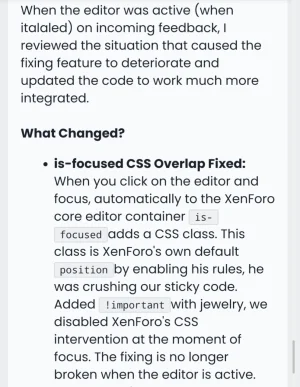
Thanks for that, unfortunately I'm unfamiliar with the Turkish language and my browser's automated English translation seems questionable at best.

Screenshot_2026-08-08-01-59-28-34_99c04817c0de5652397fc8b56c3b3817.webp

Going off this English translation, it appears to suggest adding !important to some particular attribute in order to override XF's is-focused class, although it isn't clear which attribute that may be.

Any chance you could clarify exactly where to add the !important?
 
Just wondering if perhaps you might know whether it may be possible to apply this same toolbar sticky effect while the editor interface is active/is focused as well as it currently does while the editor interface is inactive/is not focused?
Update: Disregard the above query from my initial post.

After further investigation and dozens of unsuccessful attempts using slightly modified versions of the original code resource, it would seem unlikely possible to achieve such a fully persistent scrollable sticky effect (ie: both while the editor input is-focused—and when not focused) just with CSS and/or LESS alone, (*although I could of course be mistaken).
 
It would appear than when @_sticky-editorOffset: (@header-navHeight); is used, in particular @header-navHeight, it is not validating against the Style -> Header And Navigation -> Navigation -> Sticky navigation element (publicNavSticky (1200)) when Primary and sub-navigation rows is utilized. Which is something on average of 67 or 68px of height.
 
Back
Top Bottom