I'm not much of an iphone user, so I should preface this by apologizing in advance if I'm missing something obvious...
I was waiting for someone today and had an iphone with me, and honestly I couldn't figure out how to get the Install App button to work on the iphone. I had 10 minutes waiting, and I could not get it to work on the iphone. (Safari default browser on IOS 26.5)
I couldn't get it to work on my own site, so I tried xenforo.com/community and had the same result.
When I clicked the Menu - Install App button, I was expecting it to "do something" and was expecting there to be some button on that screen under the video or somewhere to do it. I watched the video, but couldn't see exactly where to add it to the homepage. I was looking and looking for a button to actually add it to the home screen.
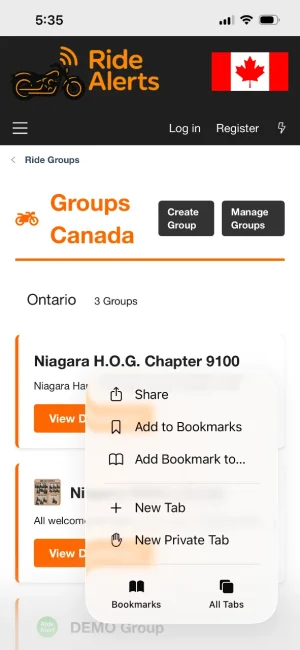
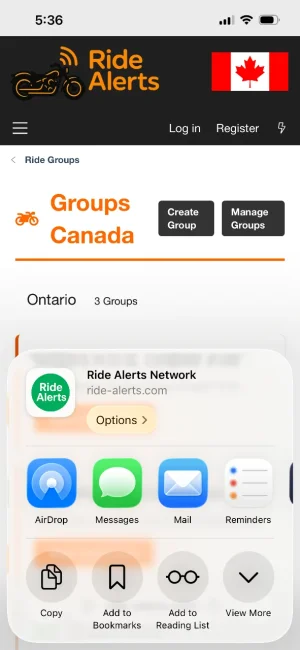
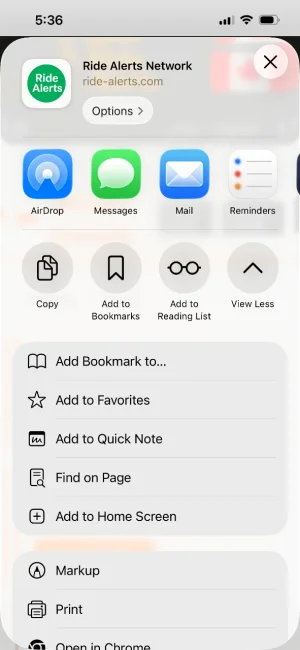
When I click the ... all I see is "Add Bookmark to" and clicking that, it only gives me the option of Location Favorites. There is no visible option to add to the home screen.
Am I missing something obvious? If so, I think I need to make it more obvious in the video (unless all the iphone users have more of a clue than I do, as a non iphone user...)
Otherwise, I wonder if it's possible to hide the Install App for iphone users only using some css rule or other method to detect iphones?
I was waiting for someone today and had an iphone with me, and honestly I couldn't figure out how to get the Install App button to work on the iphone. I had 10 minutes waiting, and I could not get it to work on the iphone. (Safari default browser on IOS 26.5)
I couldn't get it to work on my own site, so I tried xenforo.com/community and had the same result.
When I clicked the Menu - Install App button, I was expecting it to "do something" and was expecting there to be some button on that screen under the video or somewhere to do it. I watched the video, but couldn't see exactly where to add it to the homepage. I was looking and looking for a button to actually add it to the home screen.
When I click the ... all I see is "Add Bookmark to" and clicking that, it only gives me the option of Location Favorites. There is no visible option to add to the home screen.
Am I missing something obvious? If so, I think I need to make it more obvious in the video (unless all the iphone users have more of a clue than I do, as a non iphone user...)
Otherwise, I wonder if it's possible to hide the Install App for iphone users only using some css rule or other method to detect iphones?