Immersive Messenger: real-time chat, voice and video calls on native DMs

Immersive Messenger: real-time chat, voice and video calls on native DMs [Paid] 2.7.4

No permission to buy (€49.00)

SenseiXS

Well-known member
Licensed customer
SenseiXS submitted a new resource:

Immersive Messenger - A premium, real-time Discord/Telegram-style messenger for XenForo 2.3, built on native Direct Messa

Immersive Messenger​

Give your members the modern chat experience they already expect.

▶ Try the live demo​

See it running on a real forum: https://forum.xen-support.com/direct-messages/
Log in with the demo account (demo / demo) and open your Direct Messages to explore the full immersive experience — floating dock, reactions, typing indicators, voice notes and more. (Direct Messages require an account, so please log in or...

Read more about this resource...
 
SenseiXS updated Immersive Messenger with a new update entry:

Immersive Messenger 1.1.0

Immersive Messenger 1.1.0

Upgrade first: upload the whole upload folder (this release adds two new files) and run the add-on upgrade in the Admin CP.

New
  • Paste an image into the composer with Ctrl+V
  • Drag and drop files onto a conversation
  • Instant send feedback, with a one click retry when a send fails
  • Messages written offline are sent automatically once the connection returns
  • Notification sound, unread counter in the...

Read the rest of this update entry...
 
IMG_1118.webp
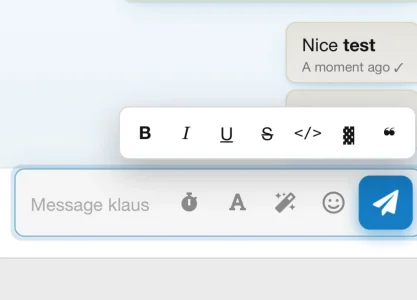
When I submit a message, the button bar stays floating and covers my message.

I think to get the full experience you need to receive some messages in real time
 
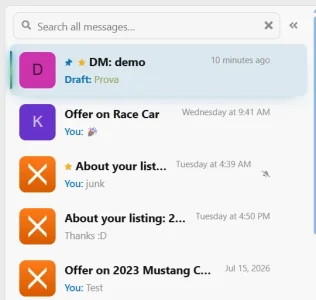
it would be nice if you could expand the message list to view full titles.....you think you might add that ability? like make it expand to collapse the right sidebar i think would be enough space even...

also, honestly, id prefer if the default "show all" list, opened on a proper list rather than the last message sent and a crunched up list you cant read, you know what i mean?
 
it would be nice if you could expand the message list to view full titles.....you think you might add that ability? like make it expand to collapse the right sidebar i think would be enough space even...

also, honestly, id prefer if the default "show all" list, opened on a proper list rather than the last message sent and a crunched up list you cant read, you know what i mean?
Hello, thank you for your feedback!

I understand completely; I'll implement all of this in an upcoming update. ;)


Best regards
 
1786053738703.webp

few more things ive noticed...
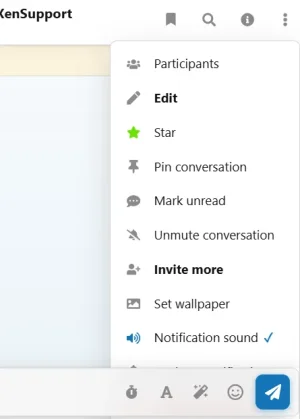
the options menu is cutoff...
starring a message doesnt add an icon to the list view...
i was curious about the voice messaging too, is that turned off by permissions in the demo or?

kind regards
 
ok thank you...i have a couple other questions while i am still looking that might help...

  • where is the dedicated pinned message list link?
  • can you please explain more about the slash commands?
also, about the self destruct messages...im assuming that is one sided only? or is it based on the conversation starter?

kind regards
 
SenseiXS updated Immersive Messenger with a new update entry:

1.1.1

Immersive Messenger 1.1.1

Upgrade: upload the whole upload folder and run the add-on upgrade in the Admin CP. This release adds one permission, Upload a custom conversation wallpaper (granted to members and staff by default), and one option, Open on the conversation list (left disabled).

Wallpapers
  • Ten new wallpapers, twenty in total: patterns (hearts, bubbles, paper planes, sparks, waves, confetti, diamonds...

Read the rest of this update entry...
 
with the discussion list its still kind of crunching....can you put the date stamp on the second line? and/or pop out a full list perhaps which could also be the landing for the "show all" link...idk how you wanna do that exactly im just thinking a list of topic titles with no ... would be helpful somewhere

1786090942221.webp
 
SenseiXS updated Immersive Messenger with a new update entry:

2.0.0: rebuilt from the ground up, native design and a sync engine that never loses a message

Immersive Messenger jumps from 1.1.1 to 2.0.0 here. Two big steps since this page was last updated.

2.0.0: a complete rewrite.
  • A new sync engine: every new message, edit, deletion, reaction and pin reaches every participant, with Pusher in about a second and without it on its own, including changes made from the native inbox.
  • Sending never blocks: messages are queued and retried through a network cut, members can send several in a row, and nothing is lost when two people...

Read the rest of this update entry...
 
SenseiXS updated Immersive Messenger: real-time chat, voice and video calls on native DMs with a new update entry:

2.0.3: calls rebuilt like a phone messenger, one-click reactions and a calmer admin side

Three releases since 2.0.0.

2.0.3: message tools. React, reply and more in one tidy pill beside the bubble, your forum's reactions in one click, double-click to like, and a long-press sheet on phones with large reactions, reply, quote, copy and select text.

2.0.2: calls that feel like a phone messenger.
  • Your own camera shows from the first ring; the other camera only turns on once they answer.
  • On phones, an incoming call takes the whole screen with Accept, Accept...

Read the rest of this update entry...
 
SenseiXS updated Immersive Messenger: real-time chat, voice and video calls on native DMs with a new update entry:

2.1.0: make every conversation its own, with shared themes, nicknames, polls and more

Members can now make a conversation feel like theirs, and every change shows up for everyone in it at once.

  • Chat themes: sixteen colours for the bubbles and accents of a conversation, the same for everyone in it.
  • Shared wallpapers: a preset, a photo or the theme background for the whole chat, or each member keeps their own.
  • Nicknames: rename anyone in a conversation; everyone sees it in the header, above messages, in the list, in quotes and read...

Read the rest of this update entry...
 
SenseiXS updated Immersive Messenger: real-time chat, voice and video calls on native DMs with a new update entry:

2.1.1: a single clean frame around the message box on every style

A small fix found on a live forum: on styles that put a border, rounded corners and a focus glow on every field inside an input group, the message box showed a second frame inside the composer. The field now stays frameless on any style and only the composer lights up when focused.

Install the archive over 2.1.0, 2.0.x or any 1.x version from the Admin CP. No database change.
Full changelog on the version...

Read the rest of this update entry...
 
SenseiXS updated Immersive Messenger: real-time chat, voice and video calls on native DMs with a new update entry:

2.1.2: choose where sender names and avatars appear

A request from a customer: in fast conversations, or when members keep the default avatar, it helps to see who wrote what.

  • Sender names above messages: in group conversations only (as before), in every conversation including one-to-one chats, or never.
  • Avatars next to messages: group conversations only (as before), every conversation, or never.
  • Optionally repeat the name above every message, and show your own name above your own messages.
  • Nicknames and the...

Read the rest of this update entry...
 
SenseiXS updated Immersive Messenger: real-time chat, voice and video calls on native DMs with a new update entry:

2.6.1: a new dock, an organised inbox, events, polls, group calls and bots

Immersive Messenger 2.6.1 brings together everything built since 2.1.2: five versions of work in one upgrade.

For your members
  • A new dock and a full page. Chat heads and up to three mini windows on every page of the forum, and a three-column page with an info panel for members, media, pins, reminders and scheduled messages.
  • A faster new message. Pick people as chips, name the group, choose a photo and drop pictures into a live upload tray.
  • An...

Read the rest of this update entry...
 
SenseiXS updated Immersive Messenger: real-time chat, voice and video calls on native DMs with a new update entry:

2.6.4: images open full size from the dock, readable received messages on dark styles

Three small releases in one, all fixes from your feedback.

  • Images open full size everywhere. In the dock windows and the mobile chat sheet, clicking a photo did nothing. It now opens in XenForo's lightbox, like on the full page, including photos received while the chat is open. On the full page, a single photo also takes more room in the conversation.
  • Received messages on dark styles. Two new style properties, Received message background and Received...

Read the rest of this update entry...
 
SenseiXS updated Immersive Messenger: real-time chat, voice and video calls on native DMs with a new update entry:

2.6.5: works alongside other add-ons that extend conversation notifications

On boards that also run an add-on extending XenForo's conversation notifications (for example SV Warning Improvements), sending a new message failed with "Oops! We ran into some problems" and a fatal error in the server log.

Messenger now declares those methods exactly like XenForo does, so both add-ons work together. Every class extension of the add-on is now checked against XenForo's own signatures before each release.

Install the archive over any 2.x version from Admin CP >...

Read the rest of this update entry...
 
Back
Top Bottom