
XF 2.2 How to modify a template for a specific style

FoxSecrets

Well-known member
Licensed customer
I've installed a new style and one of template modification is reading 1/1/0, so it didn't applied to the new style.

When I open template modification I see the replacement, but seems to be master style.

How can I fix this issue for the new template?
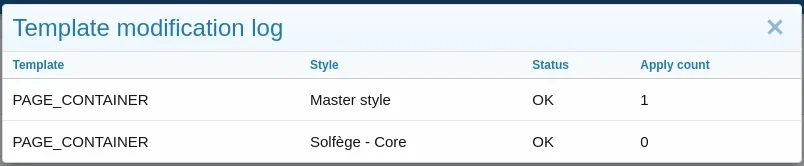
1702152524843.webp
 
You can't target a specific style with a template modification. Ideally you would update the template modification to apply to both styles. You can open the template and use the 'View custom changes' button to see what may be causing compatibility issues.
 
You can't target a specific style with a template modification. Ideally you would update the template modification to apply to both styles. You can open the template and use the 'View custom changes' button to see what may be causing compatibility issues.
Jeremy, how can I use if/else in template modification to attend both templates? Or do I have to create 2 modifications, one for each template?
I see the difference is only the "tab" before text. How to cover that? Any wildcard?
 
Last edited:
You can use a regex replacement.
I tried this but it's not working, didn't find the code, any idea?

Code:
#(<div class=\"p-navgroup p-account {{ $xf.visitor.user_id ? 'p-navgroup--member' : 'p-navgroup--guest' }}\".*?)#si
 
Back
Top Bottom