
You are using an out of date browser. It may not display this or other websites correctly.
You should upgrade or use an alternative browser.
You should upgrade or use an alternative browser.
XF 2.0 How to change message links in XF2?
- Thread starter WoodiE
- Start date

Thanks @Heffalump I'll give that a try.
I looked on a XF 1.5 forum and there is an option for this in the style properties.
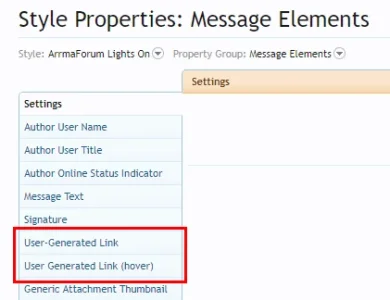
It seems the XF team has removed this ability in XF2.
I looked on a XF 1.5 forum and there is an option for this in the style properties.
It seems the XF team has removed this ability in XF2.

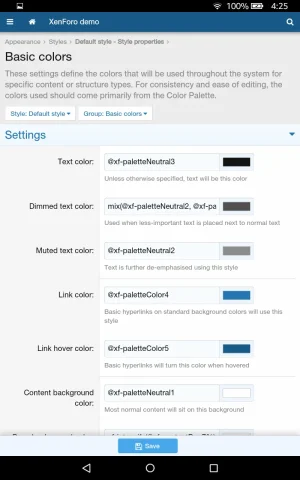
@ozzy47 and that would be incorrect. Sure it will change the link colors of user submitted links but it will also change every single link on the site far outside of the use message. The one in your screen shot is a global change where as the one in my screen shot only affects user submitted links in posts.

Use this (add in extra.less and change color etc... to what you like)I seem to recall seeing a style property (user generated link, or something along those lines) for user submitted links in XF1.x.
Has this ability been removed from us in XF2 or am I just overlooking it?
CSS:
/* START Link in posts */
.message-userContent a
{
    color:#0e0588;
    text-decoration:underline;
    font-weight:normal;
}

.message-userContent a:hover
{
    color:#C30000;
    font-weight:normal;
    text-decoration:underline;
}
/* END Link in posts */Similar threads

- Question
- Replies
- 2
- Views
- 923