Brandon Sheley Well-known member Licensed customer Jul 7, 2011 #1 I've looked around but I don't see how I can view all users in each usergroup like I could with vbulletin? sorry if this is the wrong section, feel free to move it. thx
I've looked around but I don't see how I can view all users in each usergroup like I could with vbulletin? sorry if this is the wrong section, feel free to move it. thx
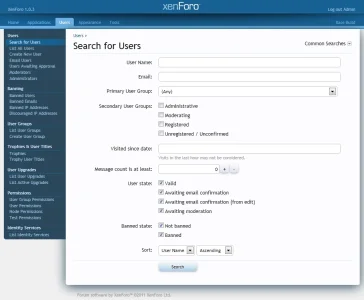
R RobParker Well-known member Licensed customer Jul 7, 2011 #2 Search for users and then tick the usergroup. It's not as intuitive as it could be (coming from VB) but very obvious once you realise ;-) Upvote 0 Downvote
Search for users and then tick the usergroup. It's not as intuitive as it could be (coming from VB) but very obvious once you realise ;-)
Brandon Sheley Well-known member Licensed customer Jul 7, 2011 #3 RobParker said: Search for users and then tick the usergroup. It's not as intuitive as it could be (coming from VB) but very obvious once you realise ;-) Click to expand... okay I see how I can search for a user, but I don't see anything about groups? this is in the admin control panel right? Upvote 0 Downvote
RobParker said: Search for users and then tick the usergroup. It's not as intuitive as it could be (coming from VB) but very obvious once you realise ;-) Click to expand... okay I see how I can search for a user, but I don't see anything about groups? this is in the admin control panel right?
R RobParker Well-known member Licensed customer Jul 7, 2011 #4 ACP -> Users -> Seach For Users You should see a load of input boxes (name, email primary group, etc). Just leave the rest blank and select the group. Upvote 0 Downvote
ACP -> Users -> Seach For Users You should see a load of input boxes (name, email primary group, etc). Just leave the rest blank and select the group.
P Paul B XenForo moderator Staff member Licensed customer Jul 7, 2011 #5 Select primary and/or secondary user groups. Upvote 0 Downvote
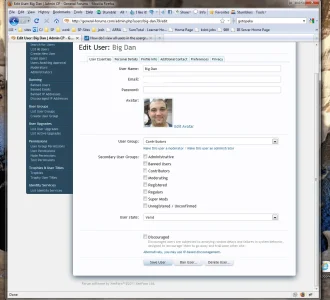
Brandon Sheley Well-known member Licensed customer Jul 7, 2011 #7 RobParker said: ACP -> Users -> Seach For Users You should see a load of input boxes (name, email primary group, etc). Just leave the rest blank and select the group. Click to expand... There is nothing to select? Attachments usergroup.webp 99.3 KB · Views: 8 Upvote 0 Downvote
RobParker said: ACP -> Users -> Seach For Users You should see a load of input boxes (name, email primary group, etc). Just leave the rest blank and select the group. Click to expand... There is nothing to select?
P Paul B XenForo moderator Staff member Licensed customer Jul 7, 2011 #8 You're editing a user, not searching the users. Upvote 0 Downvote
Brandon Sheley Well-known member Licensed customer Jul 7, 2011 #10 Brogan said: View attachment 16690 Select primary and/or secondary user groups. Click to expand... oooh ok next, how can I mass move all the users from one group (my old registered users) to the new "regular" users? I have 2500 users that needs to be moved to the correct "main" group.. thx for the help Upvote 0 Downvote
Brogan said: View attachment 16690 Select primary and/or secondary user groups. Click to expand... oooh ok next, how can I mass move all the users from one group (my old registered users) to the new "regular" users? I have 2500 users that needs to be moved to the correct "main" group.. thx for the help
P Paul B XenForo moderator Staff member Licensed customer Jul 7, 2011 #11 Presumably that's a custom group from the import? Just delete it and the users will default to the Registered group. Upvote 0 Downvote
Presumably that's a custom group from the import? Just delete it and the users will default to the Registered group.
Brandon Sheley Well-known member Licensed customer Jul 7, 2011 #12 Brogan said: Presumably that's a custom group from the import? Just delete it and the users will default to the Registered group. Click to expand... yup, it's a group from the vb install I had okay, thx wish me luck thx, looks like it worked Upvote 0 Downvote
Brogan said: Presumably that's a custom group from the import? Just delete it and the users will default to the Registered group. Click to expand... yup, it's a group from the vb install I had okay, thx wish me luck thx, looks like it worked