sub_ubi Well-known member Licensed customer Jun 4, 2018 #1 Just wondering if there's a guide to making anchor links in bbcode, we have some big posts with a table of contents, anchor links would be great!
Just wondering if there's a guide to making anchor links in bbcode, we have some big posts with a table of contents, anchor links would be great!
sub_ubi Well-known member Licensed customer Jun 4, 2018 #2 figured it out. just add two bb codes with these replacements: anchor link (simple replacement) <a href="#{option}">{text}</a> anchor (simple replacement) <a name="{option}">{text}</a> Upvote 1 Downvote
figured it out. just add two bb codes with these replacements: anchor link (simple replacement) <a href="#{option}">{text}</a> anchor (simple replacement) <a name="{option}">{text}</a>
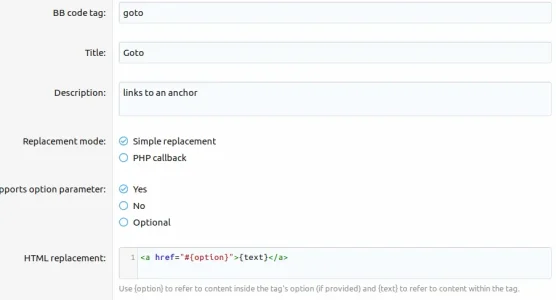
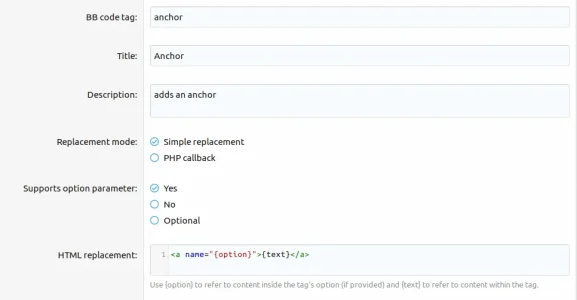
G Grumpy Squid Member Licensed customer Aug 21, 2019 #3 I'm having issues getting this to work... The goto tag replacement The anchor tag replacement then to use it you would do [goto=key]{text}[/goto] [anchor=key][/anchor] Is that correct? What am I doing wrong? Upvote 0 Downvote
I'm having issues getting this to work... The goto tag replacement The anchor tag replacement then to use it you would do [goto=key]{text}[/goto] [anchor=key][/anchor] Is that correct? What am I doing wrong?
G Grumpy Squid Member Licensed customer Aug 26, 2019 #4 Anyone have any suggestions? Anyone gotten anchors to work in XF2? Upvote 0 Downvote
Infopro Well-known member Licensed customer Aug 27, 2019 #5 Grumpy Squid said: then to use it you would do [goto=key]{text}[/goto] [anchor=key][/anchor] Is that correct? What am I doing wrong? Click to expand... Not sure what your key is in the example. Try something like this: goto: <a href="#{option}">{text}</a> [goto=This takes you to a new location within a post]This takes you to a new location within a post[/goto] anchor: <a name="{option}">{text}</a> [anchor=This is where you jump to]This is where you jump to[/anchor] Upvote 0 Downvote
Grumpy Squid said: then to use it you would do [goto=key]{text}[/goto] [anchor=key][/anchor] Is that correct? What am I doing wrong? Click to expand... Not sure what your key is in the example. Try something like this: goto: <a href="#{option}">{text}</a> [goto=This takes you to a new location within a post]This takes you to a new location within a post[/goto] anchor: <a name="{option}">{text}</a> [anchor=This is where you jump to]This is where you jump to[/anchor]
G Grumpy Squid Member Licensed customer Aug 27, 2019 #6 Yeah in my screenshot that is what I have... Clicking the link doesn't jump anywhere. It just does nothing... Upvote 0 Downvote
Yeah in my screenshot that is what I have... Clicking the link doesn't jump anywhere. It just does nothing...
Infopro Well-known member Licensed customer Aug 27, 2019 #7 This works for me, check it here: forums.cpanel.net/resources/common-exim-commands.557/ Upvote 0 Downvote
G Grumpy Squid Member Licensed customer Sep 1, 2019 #8 Infopro said: This works for me, check it here: forums.cpanel.net/resources/common-exim-commands.557/ Click to expand... Hmmm might just be user error then on my end. Could you get me some raw bbcode data for that post so I can compare it with what I'm trying to do? Upvote 0 Downvote
Infopro said: This works for me, check it here: forums.cpanel.net/resources/common-exim-commands.557/ Click to expand... Hmmm might just be user error then on my end. Could you get me some raw bbcode data for that post so I can compare it with what I'm trying to do?
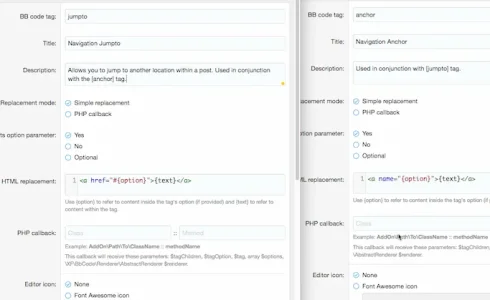
Infopro Well-known member Licensed customer Sep 2, 2019 #9 Wierd. Try this: Paste this into a post: Code: [jumpto=1]This takes you to a new location within a post[/jumpto] . . . . . . . [jumpto=2]Hello world![/jumpto] . . . . . . . . . . . . . . . . . . . . . . . . . . . . . . . . . . . . . [anchor=2]See you soon![/anchor] . . . . . . . . . . [anchor=1]This is where you jump to[/anchor] Upvote 0 Downvote
Wierd. Try this: Paste this into a post: Code: [jumpto=1]This takes you to a new location within a post[/jumpto] . . . . . . . [jumpto=2]Hello world![/jumpto] . . . . . . . . . . . . . . . . . . . . . . . . . . . . . . . . . . . . . [anchor=2]See you soon![/anchor] . . . . . . . . . . [anchor=1]This is where you jump to[/anchor]