Hotlink Converter

Hotlink Converter 1.1.0

No permission to download

qubn

Active member
Licensed customer
qubn submitted a new resource:

Hotlink Converter - Batch convert hotlinked images in XFRM resources to local attachments

Hotlink Converter is an admin tool that batch-converts externally hotlinked images in XFRM resource descriptions into locally-stored XenForo attachments. It scans [IMG]https://external.com/pic.jpg[/IMG] BB code tags, downloads the images, creates proper XF attachments, and replaces the BB code with [ATTACH=full]id[/ATTACH].

Built as a one-time migration tool for forums with legacy resource content that hotlinks images from external hosts that may go...

Read more about this resource...
 
Thanks for releasing this @qubn ! I just started with XenForo and imported a phpBB with 20 years worth of externally linked images :)

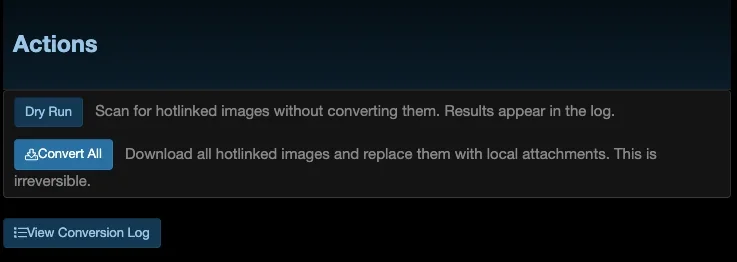
However, when I press either buttons, it moves to the 'progress screen' but after 0.5 seconds it comes back to this screen.
Nowhere in the logfiles I can find indications that anything happens. Not the conversion log, neither any other log.

Any idea? Happy to help debugging etc..

Running XF 2.3.latest and XFRM 2.3.10

1778790344028.webp
 
Thanks for releasing this @qubn ! I just started with XenForo and imported a phpBB with 20 years worth of externally linked images :)

However, when I press either buttons, it moves to the 'progress screen' but after 0.5 seconds it comes back to this screen.
Nowhere in the logfiles I can find indications that anything happens. Not the conversion log, neither any other log.

Any idea? Happy to help debugging etc..

Running XF 2.3.latest and XFRM 2.3.10

View attachment 337665
My pleasure! I will investigate the issue locally and come up with a new version. If I can't find anything on my end, I'll be in touch with you so you can send me a bit more details. I'll get back to you as soon as possible.
 
qubn updated Hotlink Converter with a new update entry:

Hotlink Converter v1.1.0 - Now converts forum posts, profile posts & conversations

Hotlink Converter v1.1.0 - Now converts forum posts, profile posts & conversations​

The big one: Hotlink Converter no longer only scans Resource Manager resource updates. It now converts hotlinked images across your whole board - and you choose what it touches.


New​

  • Multi-content-type conversion - Hotlinked [IMG] images are now converted in forum posts, profile posts, conversation messages, and XFRM...

Read the rest of this update entry...
 
@qubn were you able to have a look? Any findings?
Here's what was happening: v1.0.0 only scanned XenForo Resource Manager resource updates. When you imported your phpBB board, those 20 years of images went into XenForo forum posts, which the old version never looked at. So pressing Dry Run / Convert All kicked off a job that found zero matching resource updates, finished in a fraction of a second, and bounced you back - and because it never processed anything, it never wrote a log line. That's exactly why nothing showed up anywhere. (If you check the dashboard's "Resource updates with hotlinks" count on v1.0.0, it reads 0 - that was the tell.)

v1.1.0 fixes this properly:
  • It now converts hotlinked images in forum posts, profile posts, conversation messages, and resource updates - you pick which ones under AdminCP → Options → Hotlink Converter. Forum posts are on by default, which is what you want for a phpBB import.
  • The dashboard now shows a per-type count of what it found, and if there's genuinely nothing to convert it tells you so instead of silently doing nothing.
  • Converted images render inline as local attachments, the original poster stays the author, and the posts are not marked "edited."
  • Detection is broader now too (it also catches the [IMG=url] form some importers produce).

Grab v1.1.0, enable "Scan forum posts" (it's on by default), and run a Dry Run first - the dashboard will show how many posts have hotlinked images and the log will list exactly what it would convert, without changing anything. Then Convert All when you're happy.

One heads-up: there's also a "Scan conversation messages" option, but it's off by default on purpose - converting images in private conversations permanently re-hosts them locally, so only enable that one if your members are okay with it.

Appreciate you taking the time to report it clearly - that's what made it easy to pin down. Let me know how the conversion goes on your board.
 
Back
Top Bottom