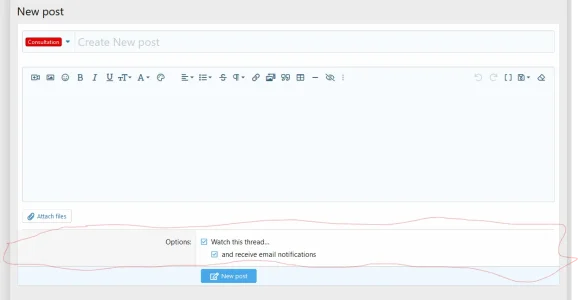
XF 2.2 Hide watch this thread and receive email notifications

Omar Adil

Member
Licensed customer
Can I use extra.less to hide this part that lined by red color line?
Leave it working but hide it from members

Screenshot 2023-06-11 081149.webp


thank you
 
You can use the extra.less template to hide it but that won't affect the checkboxes.

That would need to be done by manually editing the template.
 
Or removing this code:
HTML:
<xf:macro template="helper_thread_options" name="watch_input" arg-thread="{$thread}" />

From the forum_post_thread template, is that enough?
 
Thank you very much guys
I used both solutions to remove and hide all this part
first to remove check boxes and options I removed this code as rdn told me:
Code:
<xf:macro template="helper_thread_options" name="watch_input" arg-thread="{$thread}" />

then I add this code to the extra.less as Brogan mentioned the way:
Code:
[data-template="forum_post_thread"]
{
.js-threadTypeData
    {
        display: none;
    }
}


now what I need to define the template of overlay in extra to also hide this part when the member click on (post thread) button and open thread creation in overlay view
I tried these in extra but did not succeed:

Code:
[data-template="core_overlay.less"]
{
.js-threadTypeData
    {
        display: none;
    }
}


any help about this?
thank you very much for your efforts, I really appreciate it
 
Back
Top Bottom