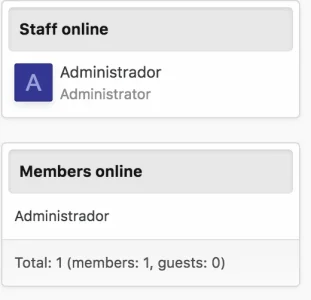
R robRol New member Licensed customer Jun 22, 2018 #1 Hello, How can I hide these 2 box? Thanks you. Attachments Captura de pantalla 2018-06-22 a las 11.59.37.webp 9.9 KB · Views: 22
Martok Well-known member Licensed customer Jun 22, 2018 #2 ACP > Appearance > Widgets Edit the Members Online widget and untick the options that you don't want. Upvote 0 Downvote
ACP > Appearance > Widgets Edit the Members Online widget and untick the options that you don't want.
B bullet-tooth Member Licensed customer Aug 14, 2018 #3 Thank you Martok. Do you know of a way to hide the Super Admin account from showing up in the Staff section? Upvote 0 Downvote
Thank you Martok. Do you know of a way to hide the Super Admin account from showing up in the Staff section?
Martok Well-known member Licensed customer Aug 14, 2018 #4 bullet-tooth said: Thank you Martok. Do you know of a way to hide the Super Admin account from showing up in the Staff section? Click to expand... Edit the Super Admin user in the ACP and untick "Display user as staff" Upvote 0 Downvote
bullet-tooth said: Thank you Martok. Do you know of a way to hide the Super Admin account from showing up in the Staff section? Click to expand... Edit the Super Admin user in the ACP and untick "Display user as staff"
B bullet-tooth Member Licensed customer Aug 14, 2018 #5 That did it. you're the man..err klingon! Upvote 0 Downvote