

These is a little collection of customization tricks I picked up by going through this forum pages and pages deep as well as some from members who have kindly answered when I asked questions. As a new user to all of this I am happy to find little things that make my forum mine and want to share my favorites. No add-ons or special themes are required. All work in 2.3.13
Included tips and tricks
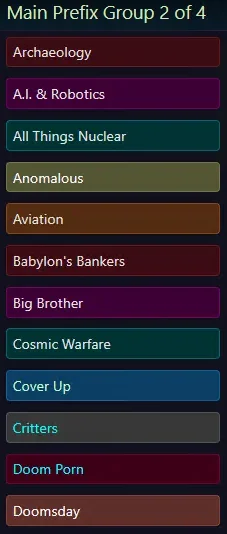 All of my prefixes are using a custom color as defined in the template: core_labels.less
This thread showed me how to do it. It also includes instructions for adding a FA icon but I haven't tried that in order to keep my prefixes a little shorter.
Basically, you add a line to core_labels.less under the existing lines with a name and colors of your choice, then for your prefix, you can define the custom CSS class names with the syntax: label label--customname
Here is just an example of lines addes to core_labels.less:
Here's a tip - when assigning an order number for your prefixes within groups, start with 2, skip a number then do 4, skip a number and so on. If you need to add a new prefix in later and want to keep things in alpha order, leaving a blank number between each prefix will make adding one in later easier because you usually don't have to reorder the entire list.
This thread will provide full instructions.
Here is a sample of my app_user_banners.less template.
In the CSS field for your banner, it is entered with the syntax: userBanner userBanner--YourBannerName
I have setup up user groups such as VIP Members, Contest Winners, etc. and add a member to the group to give them the badge for that group.
You will notice above I have defined custom user badges for the administrator and moderator groups. This will make the next trick much easier.
This time you will be working with the template: extra.less There is a lot of magic in this template and it is a good idea to copy everything off somewhere safe as a backup.
If you want to have your administrators only show one badge instead of two, add this to the extra.less template
You can see why having defined banner names for your admin and mod groups makes this easy. You should put this before any other entries in the extra.less that involve banners.
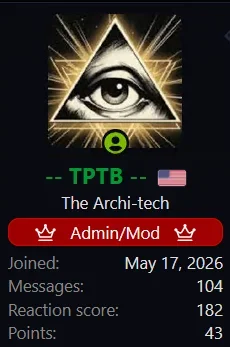 The example image shown is a combined administrator & moderator badge with rounded corners and FA icons. Country flag is from the fantastic IP Threat Monitor add-on.

Again, this is in the template: extra.less

Included tips and tricks
- Custom prefix colors and tips
- Custom group badge colors
- Combining Administrator & Moderator badges
- Adding Font Awesome icons to group badges
- Adding a corner radius to group badges
- Adding Font Awesome icons to the navigation bar
Prefix Tips & Tricks
I have somewhere around 95 prefixes separated into four groups. Some are distinctly colored, others more or less follow a repeating pattern and they are in alphabetical order in each group. Nearly all of our prefixes have been suggested by members.All of my prefixes are using a custom color as defined in the template: core_labels.lessThis thread showed me how to do it. It also includes instructions for adding a FA icon but I haven't tried that in order to keep my prefixes a little shorter.
Basically, you add a line to core_labels.less under the existing lines with a name and colors of your choice, then for your prefix, you can define the custom CSS class names with the syntax: label label--customname
Here is just an example of lines addes to core_labels.less:
CSS:
    &.label--space { .m-labelVariation(white, #009aa1); }
    &.label--relations { .m-labelVariation(black, #00c756); }
    &.label--history { .m-labelVariation(white, #402a34); }
    &.label--contest { .m-labelVariation(#99ff00, #3d0034); }
    &.label--anomalous { .m-labelVariation(#330099, #f1df69); }
    &.label--society { .m-labelVariation(#ffff99, #666633); }
    &.label--fact { .m-labelVariation(black, #90d3b1); }
    &.label--sick { .m-labelVariation(#ccff66, #6d5b00); }
}
Here's a tip - when assigning an order number for your prefixes within groups, start with 2, skip a number then do 4, skip a number and so on. If you need to add a new prefix in later and want to keep things in alpha order, leaving a blank number between each prefix will make adding one in later easier because you usually don't have to reorder the entire list.
Group Badges
Custom colors can be added to user group badges much the same way as with prefixes. This time you will be working with the template: app_user_banners.lessThis thread will provide full instructions.
Here is a sample of my app_user_banners.less template.
In the CSS field for your banner, it is entered with the syntax: userBanner userBanner--YourBannerName
CSS:
    &.userBanner--winner1 { .m-userBannerVariation(yellow, #006633); }
    &.userBanner--lex { .m-userBannerVariation(#c2fcfc, #0c2638); }
    &.userBanner--batman { .m-userBannerVariation(yellow, #6b3600); }
    &.userBanner--special2 { .m-userBannerVariation(white, #3b0313); }
    &.userBanner--administrator { .m-userBannerVariation(white, #A00000); }
    &.userBanner--moderator { .m-userBannerVariation(white, green); }
}
I have setup up user groups such as VIP Members, Contest Winners, etc. and add a member to the group to give them the badge for that group.
You will notice above I have defined custom user badges for the administrator and moderator groups. This will make the next trick much easier.
Combining Administrator and Moderator Badges
Having two badges for my admins annoyed the heck out of me and although I can't find the thread again that showed how to do it, it isn't hard.This time you will be working with the template: extra.less There is a lot of magic in this template and it is a good idea to copy everything off somewhere safe as a backup.
If you want to have your administrators only show one badge instead of two, add this to the extra.less template
CSS:
/* Makes Administrators not show moderator badge */
.userBanner.userBanner--administrator + .userBanner.userBanner--moderator,
.userBanner.userBanner--moderator + .userBanner.userBanner--administrator
{display: none;}Adding a Font Awesome icon to group badges
This is easy too. You can add a badge icon before the title, after or both. Again this is in the template extra.less
CSS:
/* ADD admin/mod badge FA icon before and after */
.userBanner.userBanner--administrator .userBanner-before
    {.m-faContent(@fa-var-crown);
    margin-right: 10px;}
.userBanner.userBanner--administrator .userBanner-after
    {.m-faContent(@fa-var-crown);
    margin-left: 10px;}

/* ADD moderator badge FA icon before and after */
.userBanner.userBanner--moderator .userBanner-before
    {.m-faContent(@fa-var-siren-on);
    margin-right: 10px;}
.userBanner.userBanner--moderator .userBanner-after
    {.m-faContent(@fa-var-siren-on);
margin-left: 10px;}More Badge Tricks
If you want to round the corners of your badges, add this to extra.less - pick a number that gives the desired effect
CSS:
.userBanner
{border-radius: 8px;}
To add FA icons to your nav bar
Again, this is in the template: extra.less
C#:
/* Adds FA icons to nav bar */
[data-nav-id="home"]:before
    {.m-faIcon(@fa-var-home);
    margin-right:5px}

[data-nav-id="forums"]:before
    {.m-faIcon(@fa-var-comments);
    margin-right:5px}

[data-nav-id="whatsNew"]:before
    {.m-faIcon(@fa-var-bolt);
    margin-right:5px}

[data-nav-id="members"]:before
    {.m-faIcon(@fa-var-user-friends);
    margin-right:5px}
Other tricks I can share if anyone is interested:
- Change the background color of Accent and Dark notices
- Add images, including gifs, and links to notices & custom formatting
- Increase the amount of quoted text before "click to expand"
- Move the XenForo Editor Toolbar to the Bottom