I do not, no. Maybe a question for your server administrator?@digitalpoint any ideas why the uploads are taking many seconds to finally get uploaded?

![[DigitalPoint] App for Cloudflare®](/community/data/resource_icons/8/8750.jpg?1692633961)
I do not, no. Maybe a question for your server administrator?@digitalpoint any ideas why the uploads are taking many seconds to finally get uploaded?

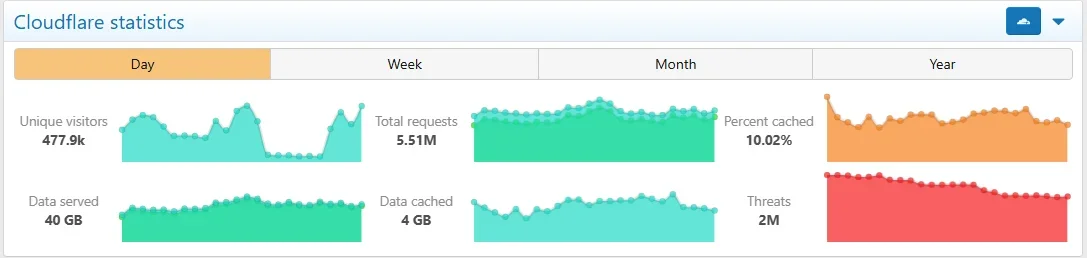


admin.php?options/groups/cloudflare/#cloudflareShowStats
admin.php?options/groups/cloudflare/#cloudflareShowStats
addon settings does have the option to disable the stat box.
When the addon added support for Cloudflare Analytics, it seemed more appropriate to use the "analytics" XenForo endpoint for that and what was the analytics endpoint before that was changed to "stats".So, I'm having an odd issue. We have more than one admin, and only one of us can manage cloudflare. What this means, though, is the other admins when they log in, the cloudflare widget is on the admin main page, but when they login they get a popup that they dont have permission. This happens at admincp login, and if you click one of the tabs.
Is there a way, besides just emptying out the template, to make it either not show, or just give them permission to view the stats window. Its definitely the cloudflare window, because when i disable the plugin the issue stops happening.
The stats in question:
View attachment 337331
Error:View attachment 337330
if ($action === 'Analytics')if ($action === 'Stats')When the addon added support for Cloudflare Analytics, it seemed more appropriate to use the "analytics" XenForo endpoint for that and what was the analytics endpoint before that was changed to "stats".
Long story short is the permission check was inadvertently not changed to the new endpoint. It's been fixed for the next version, but if you want to fix it now, edit the src/addons/DigitalPoint/Cloudflare/Admin/Controller/Cloudflare.php file, near the top, change this:
PHP:if ($action === 'Analytics')
to this:
PHP:if ($action === 'Stats')

Access has nothing to do with Turnstile. Not sure where they might have moved the Enable Access button to though (but either way... nothing to do with Turnstile).ok. New issue. When clicking "Access" on under the cloudflare tab, i get this:
View attachment 337379
But, I go to the above page, and there is no 'Enable Access' button. So... kinda stuck.
Im trying to turn on turnstile. i could do it from within cloudflare, but i think id need to do some template changing to add cloudflare javascript that the plugin might handle directly.
Access has nothing to do with Turnstile. Not sure where they might have moved the Enable Access button to though (but either way... nothing to do with Turnstile).
Blocked is blocked (no challenge).View attachment 338163
If I block a country with the button here in xf,
does it present the user with a challenge, or are they completely blacklisted?
What rule are you referring to exactly? I assume it's one in the addon?My XF is at forums.mysite.com, with numerous other subdomains running different apps. When you configure rules at CF, do they apply to the domain where XF is running, or do they get applied to everything in the zone?

Let me rephrase. If I use your addon, are the changes made to the CF config going to apply to mysite.com and every other subdomain therein, or will the changes only apply to forums.mysite.com. In other words, I don't want to install your addon and have it make changes that affect all of the other subdomains that have nothing to do with XF. I know some CF settings apply globally to everything in the zone, but most Security Rules allow you to filter where they apply, i.e. specific URI. Forgive me if my terminology is too generic.What rule are you referring to exactly? I assume it's one in the addon?
Would still need to know which rule you are planning on applying. No rules are created (or anything else really) within your Cloudflare account simply by installing the addon.Let me rephrase. If I use your addon, are the changes made to the CF config going to apply to mysite.com and every other subdomain therein, or will the changes only apply to forums.mysite.com. In other words, I don't want to install your addon and have it make changes that affect all of the other subdomains that have nothing to do with XF. I know some CF settings apply globally to everything in the zone, but most Security Rules allow you to filter where they apply, i.e. specific URI. Forgive me if my terminology is too generic.


The problem is a bit of a catch-22... when it comes down to it, you want to make the determination on Cloudflare's side (before the request makes it to your server) if an attachment should be cacheable or not (it would need to know that in order to retrieve from it's edge cache).After digging into an ton of increasing 522 and 524 errors (in general not your add-on) mostly stemming from AI crawlers .. was looking for some better ways to optimize PHP and CF's lift ...
It would be really awesome if we could specify which attachments really need private URLs so the ones in publicly-viewable forums be emitted as direct, token-less on-domain URLs cached on the edge. Exactly like you do for data buckets. 90% of the public side of my forum does not need that extra PHP permissions check that waits on the image. DMs and a few private forums do. This would also allow better use of CF's edge caching so each image isn't being pulled from the host 100x in a public forum.
The more and more AI crawlers there are out ... there the mo-betteh these small things would be for performance. For now I needed to bump PHP's Max Children value from 30 to 40 as a temp fix ... but this kind of option would be huge.

It already works that way.Have you ever considered doing targeted page purges for the guest page cache based on events in the forum? You could put extremely long cache periods in the CF config, especially in lower traffic forums, and purge pages based on system events (e.g. purge a thread cache based on a new reply to that thread).
We use essential cookies to make this site work, and optional cookies to enhance your experience.