[DigitalPoint] App for Cloudflare®

[DigitalPoint] App for Cloudflare® 1.9.9

No permission to download
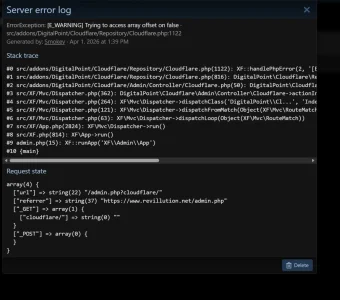
I get this error in settings?

Edit: If it's the same error as above (seems like it might be) and i'm hitting an allotment of API calls, it could be cuz i have over 1000 guests on my site......not sure where they're coming from, i'm betting they're AI bots, but isn't cloudflare supposed to help prevent them from hitting my site all together?
 

Attachments

  • cloudflare_settings.webp
    cloudflare_settings.webp
    67.8 KB · Views: 8
I get this error in settings?

Edit: If it's the same error as above (seems like it might be) and i'm hitting an allotment of API calls, it could be cuz i have over 1000 guests on my site......not sure where they're coming from, i'm betting they're AI bots, but isn't cloudflare supposed to help prevent them from hitting my site all together?
That’s not an API limit error, rather the API calls worked, but have unexpected results. Could be a temporary issue on Cloudflare’s side.

Is it still happening?
 
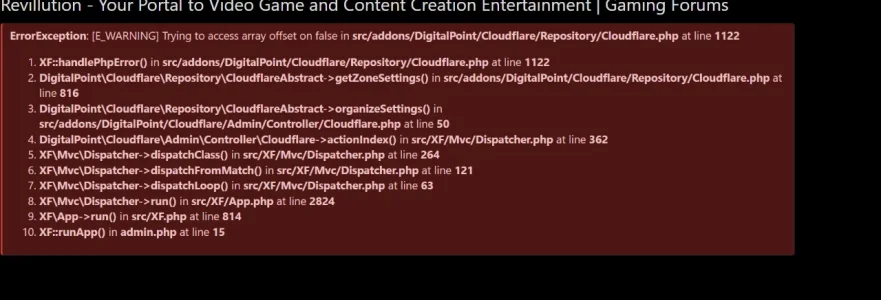
Yes, and on top of that, it results in an internal server error after:
View attachment 335828

View attachment 335829
If it’s happening 100% of the time, I’d double check your API token has the correct permissions and also make sure the domain your site is on is within that Cloudflare account (you can’t edit Cloudflare settings for a domain/zone that doesn’t exist on the Cloudflare account that your API token is from). If you’ve manually added API token restrictions (like IP restrictions, date restrictions l or account/zone) restrictions, you may want to check that as well (or remove the restrictions).
 
I have a query. I have guest page caching turned on. I have recently adjusted the default theme but struggling to get the updated version as a guest (trying it out via private mode). I have purged the cache several times but still cannot see the updated version. How can I get the updated version to show for guests?
 
If you purged the cache, it’s coming from your origin server somehow (nothing to do with Cloudflare). If you have a URL, it’s easy enough to check.
 
Hi, Is it possible via custom config.php to exclude a specific directory on R2 storage?
Like the /data/video/ folder, mine is growing rapidly and expensively now; I'm planning to host this specific folder on a separate HDD server.

1776555168648.webp
 
Hi, Is it possible via custom config.php to exclude a specific directory on R2 storage?
Like the /data/video/ folder, mine is growing rapidly and expensively now; I'm planning to host this specific folder on a separate HDD server.

View attachment 336456
I haven't tested it, but I believe this should do it:
PHP:
$config['fsAdapters']['data/video'] = function()
{
    return \XF\FsMounts::getLocalAdapter('data/video');
};

data/video is more granular than just data, so that should allow you to use an R2 bucket for data, but then override data/video specifically to use the local filesystem adapter instead.

Keep in mind, that will not move existing content from your bucket back to local, would want to use something like rsync for that.
 
  • Love
Reactions: rdn
I just discovered this add-on and have a quick question. I have cloudflare implemented on my site but I noticed that when I'm in the XF Admin console, there are certain templates that I can't edit such as MAIL_CONTAINER for example. If I try to edit that template, I get the "Oops, we ran into a problem" error message. For some reason, the error only happens when I try to edit certain templates, but others I can edit with no problem. When I disable Cloudflare temporarily, I can then edit the templates that I previously couldn't and I get no error message at all. I was just wondering if anyone else has ran into this issue before, and more importantly, will this addon help me manage and/or fix this problem I'm running into?
 
This addon won’t change anything there. It controls your Cloudflare settings, but you can do that in your dashboard. Probably you have your “security level” set too high on your zone settings. For XenForo, it should be “essentially off”. It doesn’t make your site more secure (it’s a terrible setting name), rather it looks for things like code trying to be injected via forms… it seems template edits as a form submission that looks like code being submitted and will block it when you use that zone setting.
 
Cloudflare Email service is quickly expanding:


Are you keeping an eye on this?
This looks very attractive compared to AWS.
 
Cloudflare Email service is quickly expanding:


Are you keeping an eye on this?
This looks very attractive compared to AWS.
I saw it… seems like a rather expensive way to send emails though. Like I’m not trying to spend thousands per month to send normal transactional emails. 🤷🏻‍♂️
 
Cloudflare Email service is quickly expanding:


Are you keeping an eye on this?
This looks very attractive compared to AWS.
With this and my average monthly emails, I will be paying $17.50 instead of $5 from AWS SES.
 
Yes, it seems quite expensive. But AWS has hidden costs as that counts retries and can count SNS / feedback, so you are paying multiple times for the same email. For example, I pay for 490k emails while I'm only sending around 370k emails. That's a 32% hidden cost. If you deduct that 32% then CF is still much more expensive.

I would expect that CF will become cheaper, as they are very cheap with domains, R2 and a few other things.

SES/SNS just does my head in now and then. Its great when you have set everything up and runs fine, but once you run into trouble, then its quite the headache and good luck with their AI support.
 
  • Like
Reactions: rdn
Back
Top Bottom