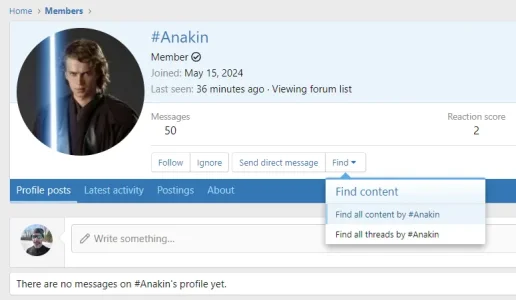
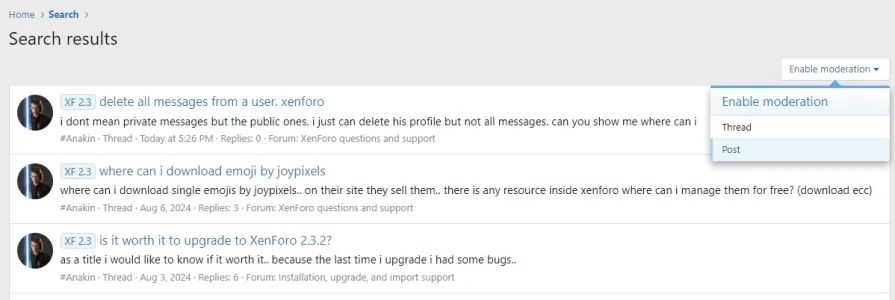
#Anakin Member Licensed customer Aug 21, 2024 #1 i dont mean private messages but the public ones. i just can delete his profile but not all messages. can you show me where can i
i dont mean private messages but the public ones. i just can delete his profile but not all messages. can you show me where can i
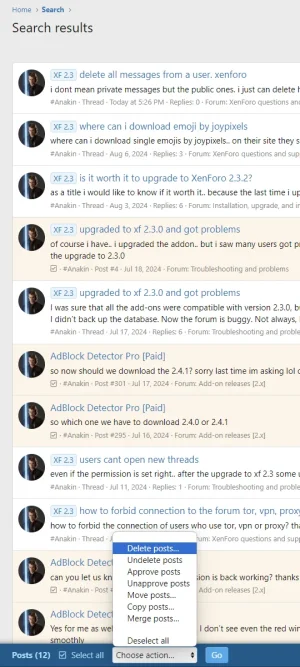
P Paul B XenForo moderator Staff member Licensed customer Aug 21, 2024 #2 Using inline moderation. Upvote 1 Downvote
#Anakin Member Licensed customer Aug 21, 2024 #3 so i have to do it page by page manually.. Upvote 0 Downvote
P Paul B XenForo moderator Staff member Licensed customer Aug 21, 2024 #4 You can select all on each page and then mass delete, but yes, you have to navigate to each page. Or you could use the spam cleaner. Upvote 1 Downvote
You can select all on each page and then mass delete, but yes, you have to navigate to each page. Or you could use the spam cleaner.
AndyB Well-known member Licensed customer Aug 21, 2024 #5 You might like these add-ons: https://xenforo.com/community/resources/delete-posts-by-username.8101/ https://xenforo.com/community/resources/delete-posts-keywords.5984/ The Delete posts by keywords add-on is very useful for deleting quoted posts of a member. Upvote 0 Downvote
You might like these add-ons: https://xenforo.com/community/resources/delete-posts-by-username.8101/ https://xenforo.com/community/resources/delete-posts-keywords.5984/ The Delete posts by keywords add-on is very useful for deleting quoted posts of a member.
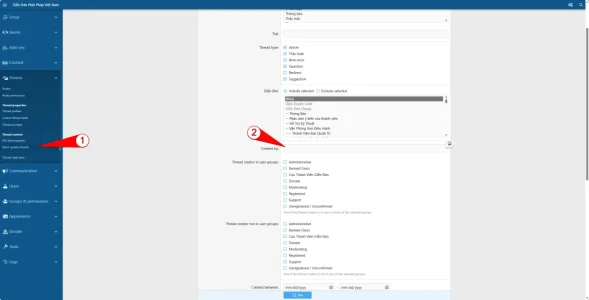
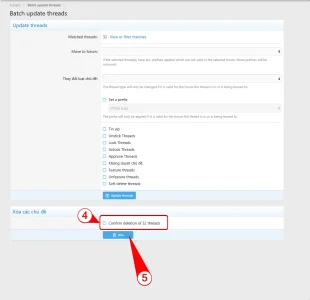
thaidt Member Licensed customer Jul 13, 2026 #7 Visit domain/admin.php?threads/batch-update or see images Login admincp -> Forums -> Batch update threads -> Enter username on Created by - > Click Find Check to Confirm deletion of ... -> click Delete. Done Upvote 0 Downvote
Visit domain/admin.php?threads/batch-update or see images Login admincp -> Forums -> Batch update threads -> Enter username on Created by - > Click Find Check to Confirm deletion of ... -> click Delete. Done