
You are using an out of date browser. It may not display this or other websites correctly.
You should upgrade or use an alternative browser.
You should upgrade or use an alternative browser.
DarkTabbed (9 Colors) [Deleted]
- Thread starter Nulumia
- Start date

Ambient Vibe
Active member
Crimson released for sale?
If you mean the one shown here, then it comes bundled with the Dark Tabbed style as its newest preset.

Trueprime
Well-known member
Thank you for the clarificationIf you mean the one shown here, then it comes bundled with the Dark Tabbed style as its newest preset.

Trueprime
Well-known member
I just bought this theme and also the branding removal. I checked my email, and it gave me a couple zip file links, when I clicked the links I had a message saying invalid product. I did pay for this, and see no other area to get my download. I opened ticket as well. Am I doing something wrong?
Ambient Vibe
Active member
I just bought this theme and also the branding removal. I checked my email, and it gave me a couple zip file links, when I clicked the links I had a message saying invalid product. I did pay for this, and see no other area to get my download. I opened ticket as well. Am I doing something wrong?
I just re-downloaded mine from customer downloads area and it was fine, so I'm not sure, but hopefully @whitesky will help fix your issue.
Try logging into Nulumia.com and then go to https://www.nulumia.com/my-account/downloads/ - they should be there, if anything.
Good luck!
Trueprime
Well-known member
Says no downloads available yetI just re-downloaded mine from customer downloads area and it was fine, so I'm not sure, but hopefully @whitesky will help fix your issue.
Try logging into Nulumia.com and then go to https://www.nulumia.com/my-account/downloads/ - they should be there, if anything.
Also it says my item is on hold. My payment did process already. Checked my bank as well as my PayPal
Ambient Vibe
Active member
Hmm, I'm not sure - maybe give it 10-15 minutes and see if it works then. 
Trueprime
Well-known member
Thank you, yea I'll wait for their support.Hmm, I'm not sure - maybe give it 10-15 minutes and see if it works then.

Nulumia
Well-known member
Sorry TruePrime and anyone else that may have caught a bug with their downloads. The Nulumia.com shop had a few backend upgrades which may have thrown off a Paypal transaction or two, I've checked that all orders/download permissions are clear and up to date.Thank you, yea I'll wait for their support.
Please let me know if there's any questions or issues,
-Robert
Trueprime
Well-known member
we are good to go, thank you for fixing thisSorry TruePrime and anyone else that may have caught a bug with their downloads. The Nulumia.com shop had a few backend upgrades which may have thrown off a Paypal transaction or two, I've checked that all orders/download permissions are clear and up to date.
Please let me know if there's any questions or issues,
-Robert
Trueprime
Well-known member
very excited, good thinking! look forward to playing with thisAlso, DarkTabbed update with Grid nodes & TH Node compatibility will be live this evening, all theme customers should receive an email notification or can keep an eye here at XF.com
Trueprime
Well-known member
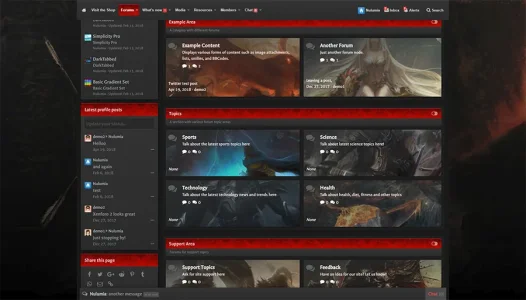
Looks amazing and clean. Nice workCrimson preset is looking very nice with the node grid feature
View attachment 182018
Nulumia
Well-known member
whitesky updated DarkTabbed with a new update entry:
NulumiaBase Upgrade, Node Grid Layout, [TH] Node Grid Compatibility
Read the rest of this update entry...
NulumiaBase Upgrade, Node Grid Layout, [TH] Node Grid Compatibility
August 12th, 2018 | Theme Version 1.1.0
To view this latest version live, please visit the Demo Forum here:
https://demo.nulumia.com/xf2/index.php?misc/style&style_id=5
To update your theme, please download the latest version at:
https://www.nulumia.com/my-account/downloads/
Overview
This update adds the node grid layout feature from the XF1 DarkTabbed edition, as well as compatibility with the popular [TH] Node Grid addon...
Read the rest of this update entry...
Ambient Vibe
Active member
Nulumia
Well-known member
That is actually this mod by ALMUSA:
https://xenforo.com/community/resources/collapsible-category.6190/
It's free and works perfectly in the theme, though I'm still looking into including a similar feature into the theme itself.
Ambient Vibe
Active member

Trueprime
Well-known member
Couple questions @whitesky in the new node design, is there a way to change the images and the sizes? Example if I want to stack it 3x3 is there a way to implement this? Also if someone has UI.X is that needed to make it work, or enabling it not needed? Otherwise I love it, I do wish to make them just a tad bit smaller so I can perhaps stack them 3 nodes in same row.Also what is the correct way to change the background node images? thank you
Nulumia
Well-known member
Hey there, using the built in feature is fairly easy to edit and doesn't require UIX or TH Node add-on at all. The compatibility in the latest patch was just to help the theme's custom templates work with TH Node grid add-on, should you wish to use it instead.Couple questions @whitesky in the new node design, is there a way to change the images and the sizes? Example if I want to stack it 3x3 is there a way to implement this? Also if someone has UI.X is that needed to make it work, or enabling it not needed? Otherwise I love it, I do wish to make them just a tad bit smaller so I can perhaps stack them 3 nodes in same row.Also what is the correct way to change the background node images? thank you
To assign images with the built in feature, you just need to edit the nl_custom_nodes.less template. There's also examples and more instructions on this in the documentation/readme file, though let me know if you have still need any help!
If you're running TH Nodes add-on though, I'd suggest just continuing to use that so it's consistent with your other themes, and disable both the built-in grid and image modes.
To change the image size displayed on your forum, you can adjust the image minimum height in the [Nulumia] Node Settings group. This is only helpful though when selecting to place the image above the node as a banner, not as node background. When placed behind the node content, they will fill the available space.
Lastly, as for 3 by 3, apologies as I believe this feature was cut before release due to a mobile bug and I forgot to make note of this in the changelog
 . It will definitely be in the next patch, if not sooner via a hotfix.
Let me know if you have any other questions!
