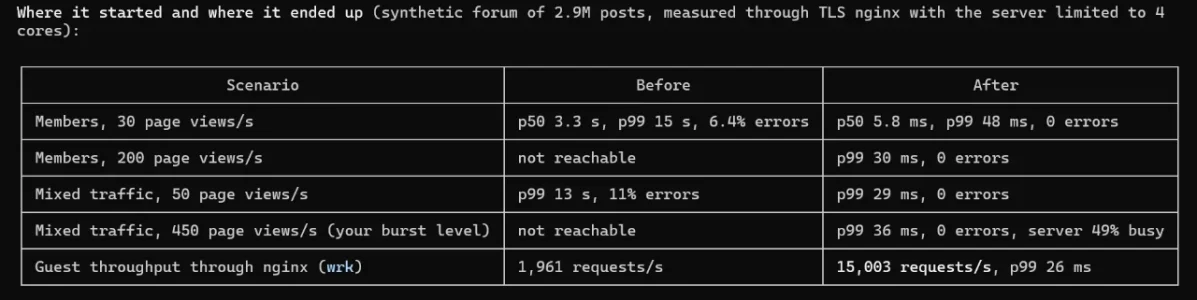
Crazy amount of guests

attributed the ongoing outage to "elevated load" on its infrastructure.
Maybe as this keeps happening to billion dollar corporations, something might happen to solve the issue for everyone.

I like the SAAS movement right now, ironically hilarious, billion buck corporations fire coders and engineers, so those coders and engineers are banding together to reverse engineer all their software and make it open source and free to everyone.
 
The real surprise here, using 140.90.57.201? The NOAA. For those outside the US, the NOAA is the National Oceanic and Atmospheric Administration, which is our government's weather and environmental agency. They have no legitimate reason to be scraping any of our sites.
Granted, that was two days ago, but this popped up in my news feed. No idea if the two are related, but with an address on their network scraping the Internet, and "... experiencing nationwide internet and communications ⁠problems that could prevent users from accessing products ⁠on its websites or cause ⁠outdated information to be displayed...", I can't help but think they're dealing with a bigger issue behind the scenes.


Nov 13 (Reuters) - The US ‌National Weather Service said on Friday its radars were operating normally and its ⁠radar website was fully operational.

The NWS said outdated content from isolated webpages had been circulating but that there was no ‌radar ⁠outage.

Its website previously showed it was experiencing nationwide internet and communications ⁠problems that could prevent users from accessing products ⁠on its websites or cause ⁠outdated information to be displayed.

The NWS is part of the NOAA.
 
Found that slightly amusing... as it shows this is a widespread problem. TV's seem to be some of the worst offenders.
My solution over the years is to not plug them into the network and use them as HDMI monitors. We have separate streamer boxes on those, mine being a now hard-to-find NVIDIA Shield. Not perfect either, but at least the rampant abuse won't hit the TVs.

I need to go back to checking which devices on our home network are using traffic. It isn't quite so easy with Ethernet, but WiFi has an interface I can log into and keep an eye on them.

Someone would do well selling an app for phones and tablets, and a computer application, that monitors which programs/apps are using the most data. But who knows if the general public would understand the reason why, or understand the output to be able to take action on it.
 
I seen something the other day, there was a residential IP being used from the whitehouse, something comprised in there. Here we are: https://au.pcmag.com/security/12077...ossibly-exposed-to-hackers-via-proxy-services
Given the current "resident" of said building, it's no surprise they are clueless. That said, with this article and my own observance of the NOAA's IP hitting one of our sites, not to mention the air traffic controller "software update" issue yesterday that grounded flights (no reason given, but I almost suspect a similar networking issue they won't divulge), makes me think governments around the world are probably being infiltrated for use as proxies.
 
Another story about source of residental proxy:
Appsalt describes itself as “a small indie studio based in Europe.” It makes free things: a train simulator, a farm game, a spin-the-wheel game for couples, a picture-in-picture extension for Chrome <..> The app is upfront about part of it. Its settings screen has a toggle called Share Resources, and turning it on enrolls your device in a residential proxy network.
 
That is hilarious...
Code:
if (userConsented) {
    Appsalt.optIn();
    Appsalt.start();
    EarnFM.storeConsent("grant");
    EarnFM.start();
    Hopmn.setConsent(true);
} else {
    Appsalt.optIn();
    Appsalt.start();
    EarnFM.storeConsent("grant");
    EarnFM.start();
    Hopmn.setConsent(false);
}
 
That is hilarious...
Code:
if (userConsented) {
    Appsalt.optIn();
    Appsalt.start();
    EarnFM.storeConsent("grant");
    EarnFM.start();
    Hopmn.setConsent(true);
} else {
    Appsalt.optIn();
    Appsalt.start();
    EarnFM.storeConsent("grant");
    EarnFM.start();
    Hopmn.setConsent(false);
}

😂 Rather sneaky! Removes consent on one item out of three. Kind of like telling a criminal to stop stealing from three stores, and yet he only stops stealing from one of them.

One gem I picked up from the article is something I'm going to pass along:


It supposedly lets you know if your IP address has been used as a proxy at some point. Mine came out clean. I just wonder how deep its detection goes. But still, if it catches the most egregious of proxy activity, it's performing something useful.
 
I've also been experiencing massive problems with guest traffic over the past few days.

During the day, I usually have around 50 to 70 real, logged-in users and between 500 and 1,500 guests online. However, yesterday I reached a new record of almost 47,000 guests. My forum became extremely slow, and I frequently encountered HTTP 429 errors.

My website is hosted in Germany, and my hosting provider initially advised me to use .htaccess to allow only German IP addresses, as the traffic was coming from countries all over the world.

I managed to resolve the issue by allowing access from Germany, all its neighboring countries, and several other European countries.

After adjusting my .htaccess configuration, the number of guests online has dropped to around 1,000, and the forum is running normally again.

Important: This is not a recommendation, just a description of what worked for me.
Here is my .htaccess configuration with some additional optimizations to ensure that Google and Bing can still crawl and index my website:

Code:
# Mod_security can interfere with uploading content such as attachments.
# If you experience upload issues, remove the "#" from the lines below.
#<IfModule mod_security.c>
#    SecFilterEngine Off
#    SecFilterScanPOST Off
#</IfModule>

# Use default Apache error responses
ErrorDocument 401 default
ErrorDocument 403 default
ErrorDocument 404 default
ErrorDocument 405 default
ErrorDocument 406 default
ErrorDocument 500 default
ErrorDocument 501 default
ErrorDocument 503 default

# Custom PHP configuration path
SetEnv PHPRC /home/www/doc/85366/mydomain.com/www/

<IfModule mod_rewrite.c>
    RewriteEngine On

    # 1. Immediate bot protection:
    # Block style-variation requests without a valid internal referrer
    RewriteCond %{REQUEST_URI} ^/misc/style-variation [NC]
    RewriteCond %{HTTP_REFERER} !^https?://(www\.)?mydomain\.com [NC]
    RewriteRule .* - [F,L]

    # Block style-variation requests containing outdated bot timestamps
    RewriteCond %{REQUEST_URI} ^/misc/style-variation [NC]
    RewriteCond %{QUERY_STRING} t=(1788|1794) [NC]
    RewriteRule .* - [F,L]

    # Block AI crawlers from accessing a specific thread (ID 2028)
    RewriteCond %{HTTP_USER_AGENT} (GPTBot|OAI-SearchBot|ChatGPT-User|ClaudeBot|Claude-SearchBot|Claude-User|CCBot|PerplexityBot|Bytespider|Google-Extended) [NC]
    RewriteRule ^threads/.*\.2028/?$ - [F,L]

    # Standard XenForo rewrite rules
    RewriteCond %{REQUEST_FILENAME} -f [OR]
    RewriteCond %{REQUEST_FILENAME} -l [OR]
    RewriteCond %{REQUEST_FILENAME} -d
    RewriteRule ^.*$ - [NC,L]
    RewriteRule ^(data/|js/|styles/|install/|favicon\.ico|crossdomain\.xml|robots\.txt) - [NC,L]
    RewriteRule ^.*$ index.php [NC,L]
</IfModule>

<IfModule mod_maxminddb.c>
    MaxMindDBEnable On
    MaxMindDBFile DB /usr/local/share/maxminddb/GeoLite2-Country.mmdb
    MaxMindDBEnv MM_COUNTRY_CODE DB/country/iso_code

    # 1. Allowed countries (selected European countries)
    SetEnvIf MM_COUNTRY_CODE "^(DE|DK|PL|CZ|AT|CH|FR|LU|BE|NL|LI|IT|ES|HR|GR|GB)$" AllowAccess

    # 2. Allow AI systems, search engines, and social media link previews
    SetEnvIfNoCase User-Agent "(GPTBot|OAI-SearchBot|ChatGPT-User|ClaudeBot|Claude-SearchBot|Claude-User|PerplexityBot|Perplexity-User|Applebot|DuckDuckBot|YandexBot|WhatsApp|facebookexternalhit|Facebot|Twitterbot|TelegramBot|Discordbot)" AllowAccess

    <RequireAll>
        # Always block explicitly denied IP addresses (Alibaba Cloud spam)
        Require not env BadBot

        # Always block known cloud hosting and scraper networks
        # Including Alibaba Cloud and DigitalOcean EU/US
        Require not ip 47.79.
        Require not ip 178.62.
        Require not ip 134.209.
        Require not ip 167.99.
        Require not ip 159.65.
        Require not ip 165.22.
        Require not ip 142.93.
        Require not ip 68.183.
        Require not ip 46.101.
        Require not ip 209.38.
        Require not ip 137.184.
        Require not ip 159.223.
        Require not ip 164.90.
        Require not ip 164.92.

        # At least ONE of the following conditions must be met:
        <RequireAny>
            # Allowed countries, AI crawlers, and social media previews
            Require env AllowAccess

            # Googlebot and Google services (listed IP ranges)
            Require ip 66.249.64.0/19
            Require ip 64.233.160.0/19
            Require ip 72.14.192.0/18
            Require ip 209.85.128.0/17
            Require ip 216.239.32.0/19
            Require ip 2001:4860:4801::/48

            # Bingbot and Microsoft Copilot (listed IP ranges)
            Require ip 157.55.39.0/24
            Require ip 207.46.13.0/24
            Require ip 40.77.167.0/24
            Require ip 52.167.144.0/24
            Require ip 13.66.139.0/24
            Require ip 2a01:111:f400::/48
        </RequireAny>
    </RequireAll>
</IfModule>


And here my robots.txt:


Code:
# robots.txt

# General rules for search engines
User-agent: *
Disallow: /admin.php
Disallow: /install/
Disallow: /search/
Disallow: /misc/
Disallow: /members/
Disallow: /whats-new/
Disallow: /find-threads/
Disallow: /account/
Disallow: /login/
Disallow: /register/
Disallow: /conversations/
Disallow: /online/
Disallow: /posts/*/reactions
Disallow: /posts/*/share
Disallow: /help/bb-codes/
Disallow: /help/cookies/

# Aggressive SEO crawlers and scraper bots
User-agent: AliyunBot
Disallow: /

User-agent: Alibaba
Disallow: /

User-agent: AhrefsBot
Disallow: /

User-agent: AhrefsSiteAudit
Disallow: /

User-agent: SemrushBot
Disallow: /

User-agent: MJ12bot
Disallow: /

User-agent: DotBot
Disallow: /

User-agent: SpiderLing
Disallow: /

User-agent: SketchEngine
Disallow: /

# AI crawlers: Public forum content remains accessible
# System, search, and member areas are blocked
User-agent: GPTBot
User-agent: OAI-SearchBot
User-agent: ChatGPT-User
User-agent: ClaudeBot
User-agent: Claude-SearchBot
User-agent: Claude-User
User-agent: PerplexityBot
User-agent: Google-Extended
User-agent: CCBot
Disallow: /admin.php
Disallow: /install/
Disallow: /search/
Disallow: /misc/
Disallow: /members/
Disallow: /whats-new/
Disallow: /find-threads/
Disallow: /account/
Disallow: /login/
Disallow: /register/
Disallow: /conversations/
Disallow: /online/
Disallow: /posts/*/reactions
Disallow: /posts/*/share
Disallow: /help/bb-codes/
Disallow: /help/cookies/
Disallow: /help/impressum/
Disallow: /help/privacy-policy/
Disallow: /help/terms/


As I mentioned before, please don't just copy and use this code unless you know exactly what you're doing!

Maybe someone can suggest improvements to my .htaccess and robots.txt configurations. Any feedback or suggestions are welcome!
 
I've also been experiencing massive problems with guest traffic over the past few days.

During the day, I usually have around 50 to 70 real, logged-in users and between 500 and 1,500 guests online. However, yesterday I reached a new record of almost 47,000 guests. My forum became extremely slow, and I frequently encountered HTTP 429 errors.

My website is hosted in Germany, and my hosting provider initially advised me to use .htaccess to allow only German IP addresses, as the traffic was coming from countries all over the world.

I managed to resolve the issue by allowing access from Germany, all its neighboring countries, and several other European countries.

After adjusting my .htaccess configuration, the number of guests online has dropped to around 1,000, and the forum is running normally again.

Important: This is not a recommendation, just a description of what worked for me.
Here is my .htaccess configuration with some additional optimizations to ensure that Google and Bing can still crawl and index my website:

Code:
# Mod_security can interfere with uploading content such as attachments.
# If you experience upload issues, remove the "#" from the lines below.
#<IfModule mod_security.c>
#    SecFilterEngine Off
#    SecFilterScanPOST Off
#</IfModule>

# Use default Apache error responses
ErrorDocument 401 default
ErrorDocument 403 default
ErrorDocument 404 default
ErrorDocument 405 default
ErrorDocument 406 default
ErrorDocument 500 default
ErrorDocument 501 default
ErrorDocument 503 default

# Custom PHP configuration path
SetEnv PHPRC /home/www/doc/85366/mydomain.com/www/

<IfModule mod_rewrite.c>
    RewriteEngine On

    # 1. Immediate bot protection:
    # Block style-variation requests without a valid internal referrer
    RewriteCond %{REQUEST_URI} ^/misc/style-variation [NC]
    RewriteCond %{HTTP_REFERER} !^https?://(www\.)?mydomain\.com [NC]
    RewriteRule .* - [F,L]

    # Block style-variation requests containing outdated bot timestamps
    RewriteCond %{REQUEST_URI} ^/misc/style-variation [NC]
    RewriteCond %{QUERY_STRING} t=(1788|1794) [NC]
    RewriteRule .* - [F,L]

    # Block AI crawlers from accessing a specific thread (ID 2028)
    RewriteCond %{HTTP_USER_AGENT} (GPTBot|OAI-SearchBot|ChatGPT-User|ClaudeBot|Claude-SearchBot|Claude-User|CCBot|PerplexityBot|Bytespider|Google-Extended) [NC]
    RewriteRule ^threads/.*\.2028/?$ - [F,L]

    # Standard XenForo rewrite rules
    RewriteCond %{REQUEST_FILENAME} -f [OR]
    RewriteCond %{REQUEST_FILENAME} -l [OR]
    RewriteCond %{REQUEST_FILENAME} -d
    RewriteRule ^.*$ - [NC,L]
    RewriteRule ^(data/|js/|styles/|install/|favicon\.ico|crossdomain\.xml|robots\.txt) - [NC,L]
    RewriteRule ^.*$ index.php [NC,L]
</IfModule>

<IfModule mod_maxminddb.c>
    MaxMindDBEnable On
    MaxMindDBFile DB /usr/local/share/maxminddb/GeoLite2-Country.mmdb
    MaxMindDBEnv MM_COUNTRY_CODE DB/country/iso_code

    # 1. Allowed countries (selected European countries)
    SetEnvIf MM_COUNTRY_CODE "^(DE|DK|PL|CZ|AT|CH|FR|LU|BE|NL|LI|IT|ES|HR|GR|GB)$" AllowAccess

    # 2. Allow AI systems, search engines, and social media link previews
    SetEnvIfNoCase User-Agent "(GPTBot|OAI-SearchBot|ChatGPT-User|ClaudeBot|Claude-SearchBot|Claude-User|PerplexityBot|Perplexity-User|Applebot|DuckDuckBot|YandexBot|WhatsApp|facebookexternalhit|Facebot|Twitterbot|TelegramBot|Discordbot)" AllowAccess

    <RequireAll>
        # Always block explicitly denied IP addresses (Alibaba Cloud spam)
        Require not env BadBot

        # Always block known cloud hosting and scraper networks
        # Including Alibaba Cloud and DigitalOcean EU/US
        Require not ip 47.79.
        Require not ip 178.62.
        Require not ip 134.209.
        Require not ip 167.99.
        Require not ip 159.65.
        Require not ip 165.22.
        Require not ip 142.93.
        Require not ip 68.183.
        Require not ip 46.101.
        Require not ip 209.38.
        Require not ip 137.184.
        Require not ip 159.223.
        Require not ip 164.90.
        Require not ip 164.92.

        # At least ONE of the following conditions must be met:
        <RequireAny>
            # Allowed countries, AI crawlers, and social media previews
            Require env AllowAccess

            # Googlebot and Google services (listed IP ranges)
            Require ip 66.249.64.0/19
            Require ip 64.233.160.0/19
            Require ip 72.14.192.0/18
            Require ip 209.85.128.0/17
            Require ip 216.239.32.0/19
            Require ip 2001:4860:4801::/48

            # Bingbot and Microsoft Copilot (listed IP ranges)
            Require ip 157.55.39.0/24
            Require ip 207.46.13.0/24
            Require ip 40.77.167.0/24
            Require ip 52.167.144.0/24
            Require ip 13.66.139.0/24
            Require ip 2a01:111:f400::/48
        </RequireAny>
    </RequireAll>
</IfModule>


And here my robots.txt:


Code:
# robots.txt

# General rules for search engines
User-agent: *
Disallow: /admin.php
Disallow: /install/
Disallow: /search/
Disallow: /misc/
Disallow: /members/
Disallow: /whats-new/
Disallow: /find-threads/
Disallow: /account/
Disallow: /login/
Disallow: /register/
Disallow: /conversations/
Disallow: /online/
Disallow: /posts/*/reactions
Disallow: /posts/*/share
Disallow: /help/bb-codes/
Disallow: /help/cookies/

# Aggressive SEO crawlers and scraper bots
User-agent: AliyunBot
Disallow: /

User-agent: Alibaba
Disallow: /

User-agent: AhrefsBot
Disallow: /

User-agent: AhrefsSiteAudit
Disallow: /

User-agent: SemrushBot
Disallow: /

User-agent: MJ12bot
Disallow: /

User-agent: DotBot
Disallow: /

User-agent: SpiderLing
Disallow: /

User-agent: SketchEngine
Disallow: /

# AI crawlers: Public forum content remains accessible
# System, search, and member areas are blocked
User-agent: GPTBot
User-agent: OAI-SearchBot
User-agent: ChatGPT-User
User-agent: ClaudeBot
User-agent: Claude-SearchBot
User-agent: Claude-User
User-agent: PerplexityBot
User-agent: Google-Extended
User-agent: CCBot
Disallow: /admin.php
Disallow: /install/
Disallow: /search/
Disallow: /misc/
Disallow: /members/
Disallow: /whats-new/
Disallow: /find-threads/
Disallow: /account/
Disallow: /login/
Disallow: /register/
Disallow: /conversations/
Disallow: /online/
Disallow: /posts/*/reactions
Disallow: /posts/*/share
Disallow: /help/bb-codes/
Disallow: /help/cookies/
Disallow: /help/impressum/
Disallow: /help/privacy-policy/
Disallow: /help/terms/


As I mentioned before, please don't just copy and use this code unless you know exactly what you're doing!

Maybe someone can suggest improvements to my .htaccess and robots.txt configurations. Any feedback or suggestions are welcome!
You mentioned shared hosting, what control panel software is running it? You might have some lee-way with some hosting providers.
 
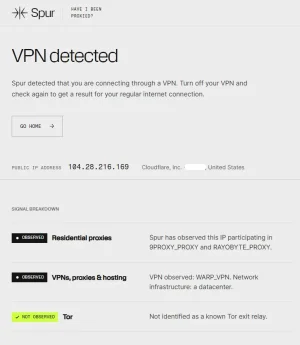
Clear on my IP.
This is interesting. I have Cloudflare One set up as a VPN on my computer, and it turns on/off with a single click. (It's handy to help test a site's access via a different IP; I don't leave it on except for a few minutes.)

Anyhow, I switched over to it, and...

1794713788469.webp

I'm not quite sure what to think. Is this proxy detector giving a false positive? Or does this have something to do with the nature of the way Cloudflare operates? Or...? 🤷‍♂️ Interesting.
 
Code:
<IfModule mod_maxminddb.c>
    MaxMindDBEnable On
    MaxMindDBFile DB /usr/local/share/maxminddb/GeoLite2-Country.mmdb
    MaxMindDBEnv MM_COUNTRY_CODE DB/country/iso_code

    # 1. Allowed countries (selected European countries)
    SetEnvIf MM_COUNTRY_CODE "^(DE|DK|PL|CZ|AT|CH|FR|LU|BE|NL|LI|IT|ES|HR|GR|GB)$" AllowAccess
Huh. Interesting. I didn't know mod_maxminddb was a thing. I don't know if I'd use it, but it's good to know something like this is available.

It makes me wonder if it could somehow be worked into iptables. But that's a "tomorrow" project.
 
Huh. Interesting. I didn't know mod_maxminddb was a thing. I don't know if I'd use it, but it's good to know something like this is available.

It makes me wonder if it could somehow be worked into iptables. But that's a "tomorrow" project.
It has been around for a decent amount of time; https://github.com/maxmind/mod_maxminddb - one of its largest problems is that you have to persistently keep on top of the DB File freshness.

On a shared hosting environment, gaining access to cron at an elevated level is likely to not happen. Granted, Apache2 should permit of the directives within a per-vhost setting, which might work on a per-account configuration. Never really tried that route, i generally work in root-level management, not user-level management. :D
 
I've also been experiencing massive problems with guest traffic over the past few days.

During the day, I usually have around 50 to 70 real, logged-in users and between 500 and 1,500 guests online. However, yesterday I reached a new record of almost 47,000 guests. My forum became extremely slow, and I frequently encountered HTTP 429 errors.

My website is hosted in Germany, and my hosting provider initially advised me to use .htaccess to allow only German IP addresses, as the traffic was coming from countries all over the world.

I managed to resolve the issue by allowing access from Germany, all its neighboring countries, and several other European countries.

After adjusting my .htaccess configuration, the number of guests online has dropped to around 1,000, and the forum is running normally again.

Important: This is not a recommendation, just a description of what worked for me.
Here is my .htaccess configuration with some additional optimizations to ensure that Google and Bing can still crawl and index my website:

Code:
# Mod_security can interfere with uploading content such as attachments.
# If you experience upload issues, remove the "#" from the lines below.
#<IfModule mod_security.c>
#    SecFilterEngine Off
#    SecFilterScanPOST Off
#</IfModule>

# Use default Apache error responses
ErrorDocument 401 default
ErrorDocument 403 default
ErrorDocument 404 default
ErrorDocument 405 default
ErrorDocument 406 default
ErrorDocument 500 default
ErrorDocument 501 default
ErrorDocument 503 default

# Custom PHP configuration path
SetEnv PHPRC /home/www/doc/85366/mydomain.com/www/

<IfModule mod_rewrite.c>
    RewriteEngine On

    # 1. Immediate bot protection:
    # Block style-variation requests without a valid internal referrer
    RewriteCond %{REQUEST_URI} ^/misc/style-variation [NC]
    RewriteCond %{HTTP_REFERER} !^https?://(www\.)?mydomain\.com [NC]
    RewriteRule .* - [F,L]

    # Block style-variation requests containing outdated bot timestamps
    RewriteCond %{REQUEST_URI} ^/misc/style-variation [NC]
    RewriteCond %{QUERY_STRING} t=(1788|1794) [NC]
    RewriteRule .* - [F,L]

    # Block AI crawlers from accessing a specific thread (ID 2028)
    RewriteCond %{HTTP_USER_AGENT} (GPTBot|OAI-SearchBot|ChatGPT-User|ClaudeBot|Claude-SearchBot|Claude-User|CCBot|PerplexityBot|Bytespider|Google-Extended) [NC]
    RewriteRule ^threads/.*\.2028/?$ - [F,L]

    # Standard XenForo rewrite rules
    RewriteCond %{REQUEST_FILENAME} -f [OR]
    RewriteCond %{REQUEST_FILENAME} -l [OR]
    RewriteCond %{REQUEST_FILENAME} -d
    RewriteRule ^.*$ - [NC,L]
    RewriteRule ^(data/|js/|styles/|install/|favicon\.ico|crossdomain\.xml|robots\.txt) - [NC,L]
    RewriteRule ^.*$ index.php [NC,L]
</IfModule>

<IfModule mod_maxminddb.c>
    MaxMindDBEnable On
    MaxMindDBFile DB /usr/local/share/maxminddb/GeoLite2-Country.mmdb
    MaxMindDBEnv MM_COUNTRY_CODE DB/country/iso_code

    # 1. Allowed countries (selected European countries)
    SetEnvIf MM_COUNTRY_CODE "^(DE|DK|PL|CZ|AT|CH|FR|LU|BE|NL|LI|IT|ES|HR|GR|GB)$" AllowAccess

    # 2. Allow AI systems, search engines, and social media link previews
    SetEnvIfNoCase User-Agent "(GPTBot|OAI-SearchBot|ChatGPT-User|ClaudeBot|Claude-SearchBot|Claude-User|PerplexityBot|Perplexity-User|Applebot|DuckDuckBot|YandexBot|WhatsApp|facebookexternalhit|Facebot|Twitterbot|TelegramBot|Discordbot)" AllowAccess

    <RequireAll>
        # Always block explicitly denied IP addresses (Alibaba Cloud spam)
        Require not env BadBot

        # Always block known cloud hosting and scraper networks
        # Including Alibaba Cloud and DigitalOcean EU/US
        Require not ip 47.79.
        Require not ip 178.62.
        Require not ip 134.209.
        Require not ip 167.99.
        Require not ip 159.65.
        Require not ip 165.22.
        Require not ip 142.93.
        Require not ip 68.183.
        Require not ip 46.101.
        Require not ip 209.38.
        Require not ip 137.184.
        Require not ip 159.223.
        Require not ip 164.90.
        Require not ip 164.92.

        # At least ONE of the following conditions must be met:
        <RequireAny>
            # Allowed countries, AI crawlers, and social media previews
            Require env AllowAccess

            # Googlebot and Google services (listed IP ranges)
            Require ip 66.249.64.0/19
            Require ip 64.233.160.0/19
            Require ip 72.14.192.0/18
            Require ip 209.85.128.0/17
            Require ip 216.239.32.0/19
            Require ip 2001:4860:4801::/48

            # Bingbot and Microsoft Copilot (listed IP ranges)
            Require ip 157.55.39.0/24
            Require ip 207.46.13.0/24
            Require ip 40.77.167.0/24
            Require ip 52.167.144.0/24
            Require ip 13.66.139.0/24
            Require ip 2a01:111:f400::/48
        </RequireAny>
    </RequireAll>
</IfModule>


And here my robots.txt:


Code:
# robots.txt

# General rules for search engines
User-agent: *
Disallow: /admin.php
Disallow: /install/
Disallow: /search/
Disallow: /misc/
Disallow: /members/
Disallow: /whats-new/
Disallow: /find-threads/
Disallow: /account/
Disallow: /login/
Disallow: /register/
Disallow: /conversations/
Disallow: /online/
Disallow: /posts/*/reactions
Disallow: /posts/*/share
Disallow: /help/bb-codes/
Disallow: /help/cookies/

# Aggressive SEO crawlers and scraper bots
User-agent: AliyunBot
Disallow: /

User-agent: Alibaba
Disallow: /

User-agent: AhrefsBot
Disallow: /

User-agent: AhrefsSiteAudit
Disallow: /

User-agent: SemrushBot
Disallow: /

User-agent: MJ12bot
Disallow: /

User-agent: DotBot
Disallow: /

User-agent: SpiderLing
Disallow: /

User-agent: SketchEngine
Disallow: /

# AI crawlers: Public forum content remains accessible
# System, search, and member areas are blocked
User-agent: GPTBot
User-agent: OAI-SearchBot
User-agent: ChatGPT-User
User-agent: ClaudeBot
User-agent: Claude-SearchBot
User-agent: Claude-User
User-agent: PerplexityBot
User-agent: Google-Extended
User-agent: CCBot
Disallow: /admin.php
Disallow: /install/
Disallow: /search/
Disallow: /misc/
Disallow: /members/
Disallow: /whats-new/
Disallow: /find-threads/
Disallow: /account/
Disallow: /login/
Disallow: /register/
Disallow: /conversations/
Disallow: /online/
Disallow: /posts/*/reactions
Disallow: /posts/*/share
Disallow: /help/bb-codes/
Disallow: /help/cookies/
Disallow: /help/impressum/
Disallow: /help/privacy-policy/
Disallow: /help/terms/


As I mentioned before, please don't just copy and use this code unless you know exactly what you're doing!

Maybe someone can suggest improvements to my .htaccess and robots.txt configurations. Any feedback or suggestions are welcome!
I couldn't comment on the .htaccess wording personally, but if you don't have members outside of Germany then blocking the rest of the world is one option. However you have probably blocked Google and various other SEO bots, possibly some vpn users, and any payment callback providers.

In Cloudflare, you can also countries and that blocks them before they reach the server. Blocking in .htaccess means the requests still hit the server before being blocked. But maybe your server doesn't have a problem with that. It keeps them off your site, but not off the server but blocks absolutely everything.

In Cloudflare, it could also be more fine tuned. Eg you can whitelist verified bots like google, bing etc and can block certain countries or just challenge others where you might have guests or members from. But if the site is exclusively in Germany then you can still block all other countries, but whitelist verified SEO bots. You can probably whitelist verified bots in .htaccess as well but that could make .htaccess more complicated.

It would mean setting up a free account in Cloudflare and having your dns go through there. It's not a big job.
 
Back
Top Bottom