
I set up a Honeypot via a Snippet in Cloudflare - it seems to be working well (for now). I asked Claude to write the code (after specifying honeypot options).
Again this might be site dependent but might be useful to be adapted per site?
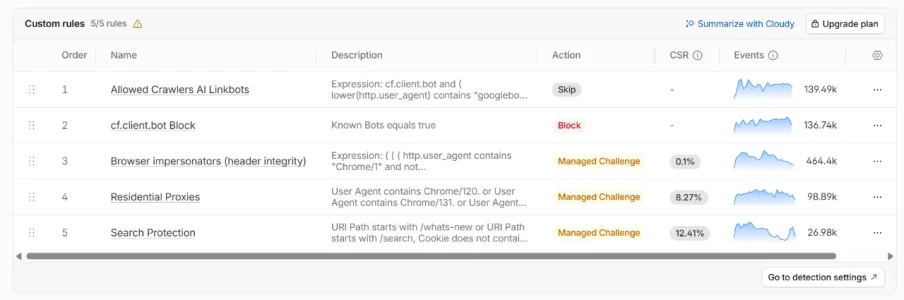
So the first part of code below is in the snippet. The second part is in the snippet rule. The last part is in a block rule under custom rules (it blocks any bot that carries the cookie from the honeypot).
It excludes xf_user, mobile users, and includes a referer. So a fairly low risk of a real guest or member (logged out or otherwise) being asked to click a button. eg if bookmarking a thread, clicking on a thread link from an email or typing the thread address in the address bar. On my site that is low risk as it's quite a small site. But if a real user did get to the page, they just get a button to click saying "click to continue" and go straight to the thread.
The bots only see the code (I assume) and in the code there are three buttons for them to choose. Two fake buttons called "Verify you are Human" and "Click to continue". The real click to continue button is called "Report a problem" in the code. The idea being that the bots are unlikely to click on "Report a problem" (the real button) and if they hit either of the fake buttons they get a particular cookie and are then blocked. Or if they hit either fake button and the real button they also get the cookie and are blocked. The only way they get through is if they only click the real button and work out which one it is.
I tested it as a user and clicking the button just takes you straight to the thread.
So am trying it for now. Results so far - it stopped the bots that solved the challenges going to those paths. No bots got blocked in the custom rule. They just stopped when they got to the page - they're not getting through (this shows in the server log).
The snippet runs after the custom rules, so the ones that have solved the cloudflare challenges then get to the honeypot snippet and stopped.
The snippet code needs a secret string adding which I've removed on the code below (it just says "removed"). Any cookie names also have been replaced with "removed", so need a name. Btw this isn't a "diary" - I thought it might be useful to share in case anyone wanted to adapt it.
Note: This has referer eq "" because the bots solving challenges from the rp swarm don't carry referers on my site (they just solve challenges instead) and to avoid real people getting the page. That might change but so far this large swarm have had no referer.
It took Claude literally 5 minutes to produce. And another 30 minutes of discussion and tweaking to what I wanted.
Haven't worked out how to log things yet other than checking server logs because the cloudflare rules statistics don't change so you can't see what's happening - because the snippet runs last.
Snippet code:
Snippet rule expression:
Custom block rule:
Again this might be site dependent but might be useful to be adapted per site?
So the first part of code below is in the snippet. The second part is in the snippet rule. The last part is in a block rule under custom rules (it blocks any bot that carries the cookie from the honeypot).
It excludes xf_user, mobile users, and includes a referer. So a fairly low risk of a real guest or member (logged out or otherwise) being asked to click a button. eg if bookmarking a thread, clicking on a thread link from an email or typing the thread address in the address bar. On my site that is low risk as it's quite a small site. But if a real user did get to the page, they just get a button to click saying "click to continue" and go straight to the thread.
The bots only see the code (I assume) and in the code there are three buttons for them to choose. Two fake buttons called "Verify you are Human" and "Click to continue". The real click to continue button is called "Report a problem" in the code. The idea being that the bots are unlikely to click on "Report a problem" (the real button) and if they hit either of the fake buttons they get a particular cookie and are then blocked. Or if they hit either fake button and the real button they also get the cookie and are blocked. The only way they get through is if they only click the real button and work out which one it is.
I tested it as a user and clicking the button just takes you straight to the thread.
So am trying it for now. Results so far - it stopped the bots that solved the challenges going to those paths. No bots got blocked in the custom rule. They just stopped when they got to the page - they're not getting through (this shows in the server log).
The snippet runs after the custom rules, so the ones that have solved the cloudflare challenges then get to the honeypot snippet and stopped.
The snippet code needs a secret string adding which I've removed on the code below (it just says "removed"). Any cookie names also have been replaced with "removed", so need a name. Btw this isn't a "diary" - I thought it might be useful to share in case anyone wanted to adapt it.
Note: This has referer eq "" because the bots solving challenges from the rp swarm don't carry referers on my site (they just solve challenges instead) and to avoid real people getting the page. That might change but so far this large swarm have had no referer.
It took Claude literally 5 minutes to produce. And another 30 minutes of discussion and tweaking to what I wanted.
Haven't worked out how to log things yet other than checking server logs because the cloudflare rules statistics don't change so you can't see what's happening - because the snippet runs last.
Snippet code:
// =====================================================================
// Cloudflare Snippet: honeypot
// =====================================================================
//
// WHAT PEOPLE SEE
// A page with "Click to continue" button.
//
// WHAT BOTS SEE IN THE CODE
// - a "Verify you are human" tick box -> TRAP (hidden off-screen)
// - a "Click to continue" button -> TRAP (hidden off-screen)
// - a "Report a problem" button -> the real button
// Anyone who ticks the box or presses the hidden button gets an
// xxx (removed name) cookie for 24 hours, and the Custom rule blocks them.
//
// SETUP
// 1. Change SECRET below to a long random string (letters and numbers).
// 2. Snippet rule and Custom block rule
// =====================================================================
const SECRET = "removed";
// What the real button is called in the code (people never see this).
const REAL_LABEL = "Report a problem";
const PASS_COOKIE = "removed";
const TRAP_COOKIE = "removed";
const PASS_MINUTES = 30;
const PASS_PAGES = 25;
const TRAP_HOURS = 24;
const MIN_WAIT_MS = 1500; // faster than this = not a person; page is simply shown again
const MAX_WAIT_MS = 15 * 60 * 1000; // page older than this = shown again
const enc = new TextEncoder();
async function sign(msg) {
const key = await crypto.subtle.importKey(
"raw", enc.encode(SECRET), { name: "HMAC", hash: "SHA-256" }, false, ["sign"]
);
const sig = await crypto.subtle.sign("HMAC", key, enc.encode(msg));
return btoa(String.fromCharCode(...new Uint8Array(sig)))
.replace(/\+/g, "-").replace(/\//g, "_").replace(/=+$/, "");
}
function getCookie(req, name) {
const m = (req.headers.get("Cookie") || "").match(new RegExp("(?:^|;\\s*)" + name + "=([^;]+)"));
return m ? m[1] : null;
}
function safePath(to) {
return typeof to === "string" && to.startsWith("/") && !to.startsWith("//") && !to.startsWith("/sv/");
}
function esc(s) {
return String(s).replace(/[&<>"]/g, c => ({ "&": "&", "<": "<", ">": ">", '"': """ }[c]));
}
// ---- Pass cookie: expiry.pagecount.signature ----
async function readPass(req) {
const v = getCookie(req, PASS_COOKIE);
if (!v) return null;
const [exp, count, sig] = v.split(".");
if (!exp || count === undefined || !sig) return null;
if (Date.now() > Number(exp) || Number(count) >= PASS_PAGES) return null;
if (sig !== (await sign(pass:${exp}:${count}))) return null;
return { exp: Number(exp), count: Number(count) };
}
async function passCookie(exp, count) {
const sig = await sign(pass:${exp}:${count});
const maxAge = Math.max(0, Math.floor((exp - Date.now()) / 1000));
return${PASS_COOKIE}=${exp}.${count}.${sig}; Path=/; Max-Age=${maxAge}; Secure; HttpOnly; SameSite=Lax;
}
function trapCookie() {
return${TRAP_COOKIE}=1; Path=/; Max-Age=${TRAP_HOURS * 3600}; Secure; HttpOnly; SameSite=Lax;
}
function redirect(url, to, cookie) {
const h = new Headers({ Location: url.origin + to, "Cache-Control": "no-store" });
if (cookie) h.append("Set-Cookie", cookie);
return new Response(null, { status: 303, headers: h });
}
// Fallback only - normally the WAF rule blocks trapped visitors before this runs.
function plainBlock() {
return new Response("<!doctype html><title>Access denied</title><p>Access denied.</p>", {
status: 403,
headers: { "Content-Type": "text/html; charset=utf-8", "Cache-Control": "no-store" },
});
}
// ---- The page ----
// One form. In the code, the traps come first and have the obvious labels.
// The real button's code label (REAL_LABEL) is moved off-screen; people
// only see "Click to continue", drawn on it by the styling.
function page(to, t, sig) {
return `<!doctype html><html lang="en"><head><meta charset="utf-8">
<meta name="viewport" content="width=device-width,initial-scale=1">
<meta name="robots" content="noindex,nofollow"><title>The Hamster Forum</title>
<style>
body{margin:0;min-height:100vh;display:flex;align-items:center;justify-content:center;padding:16px;box-sizing:border-box;background:linear-gradient(#e6efe6,#bfdcc6);font:16px/1.6 system-ui,sans-serif}
.b7{font:600 1.1rem system-ui,sans-serif;padding:14px 32px;border:0;border-radius:10px;background:#ef8517;color:#fff;cursorointer;box-shadow:0 2px 0 #c96a0c}
.b7:hover{background:#f39431}
.b7::after{content:"Click to continue"}
.v{position:absolute;left:-10000px;top:-10000px;width:1px;height:1px;overflow:hidden}
@media(prefers-color-scheme:dark){body{background:#0a170f}}
</style></head><body>
<form method="post" action="/sv/c">
<input type="hidden" name="to" value="${esc(to)}">
<input type="hidden" name="t" value="${t}">
<input type="hidden" name="sig" value="${sig}">
<div class="v">
<label><input type="checkbox" name="verify" value="1" tabindex="-1" onchange="this.form.submit()"> Verify you are human</label>
<button type="submit" name="act" value="continue" tabindex="-1">Click to continue</button>
</div>
<button type="submit" name="act" value="report" class="b7"><span class="v">${esc(REAL_LABEL)}</span></button>
</form>
</body></html>`;
}
// ---- Main ----
export default {
async fetch(request) {
const url = new URL(request.url);
const path = url.pathname;
if (path === "/sv/c") {
if (request.method !== "POST") return redirect(url, "/");
let f;
try { f = await request.formData(); } catch { return redirect(url, "/"); }
const to = safePath(f.get("to")) ? f.get("to") : "/";
// Trap: hidden tick box ticked, or anything other than the real button pressed.
if (f.get("verify") || f.get("act") !== "report") {
return redirect(url, to, trapCookie());
}
const t = f.get("t");
const sig = f.get("sig");
const age = Date.now() - Number(t);
const ok = t && sig && sig === (await sign(ch:${t}:${to}))
&& age >= MIN_WAIT_MS && age <= MAX_WAIT_MS;
if (!ok) return redirect(url, to); // too fast / stale / tampered: show page again
const exp = Date.now() + PASS_MINUTES * 60 * 1000;
return redirect(url, to, await passCookie(exp, 0));
}
if (getCookie(request, TRAP_COOKIE)) return plainBlock();
// Valid pass: let through and count the page.
const pass = await readPass(request);
if (pass) {
const resp = await fetch(request);
const out = new Response(resp.body, resp);
out.headers.append("Set-Cookie", await passCookie(pass.exp, pass.count + 1));
return out;
}
// Everyone else: show the page.
const to = path + url.search;
const t = String(Date.now());
const sig = await sign(ch:${t}:${to});
return new Response(page(to, t, sig), {
status: 200,
headers: {
"Content-Type": "text/html; charset=utf-8",
"Cache-Control": "no-store",
"X-Robots-Tag": "noindex, nofollow",
},
});
},
};
Snippet rule expression:
starts_with(http.request.uri.path, "/removed/")
or (
http.request.method eq "GET"
and (starts_with(http.request.uri.path, "/threads/")
or starts_with(http.request.uri.path, "/posts/")
or starts_with(http.request.uri.path, "/goto/"))
and ip.src.country ne "GB"
and not http.cookie contains "xf_user="
and not http.user_agent contains "Mobile"
and not cf.client.bot
and http.referer eq ""
)
Custom block rule:
http.cookie contains "removed=1"
and not http.cookie contains "xf_user="
and not cf.client.bot
and (starts_with(http.request.uri.path, "/threads/")
or starts_with(http.request.uri.path, "/posts/")
or starts_with(http.request.uri.path, "/goto/")
or starts_with(http.request.uri.path, "/removed/"))



![[XB] Search Spaminator: Search Bot Protection, AI Scraper Blocking & Honeypot](/community/data/resource_icons/10/10953.jpg?1792894918)


