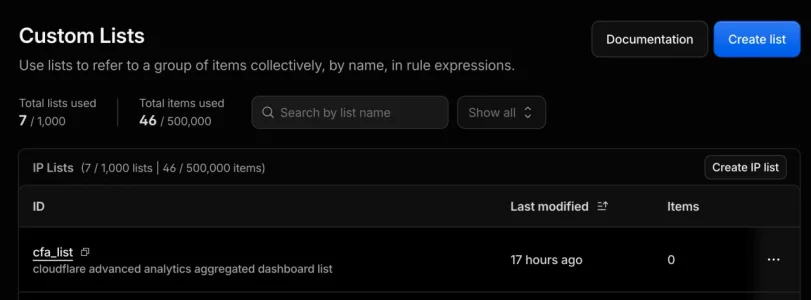
Crazy amount of guests

Sorry to hear about 5090 :(
Argh!... I hoped for the best, but expected the worst, on this one. Reviews told to much of the story. Just purchased one from Scorptec, will go over and pick it up today.
Why not just whitelist a handful of approved bots (legit scrapers identified in Cloudflare's bot categories) and issue a managed challenge to all guests?
You can do that with CF bot allow, then non-interactive challenge the world.
I threw these in the skip 2 years ago, and they were fully decked out with 192GB of RAM and 1TB SAS drives :(
That's the equivalent of tossing gold bars in the bin today. :LOL:
 
You can do that with CF bot allow, then non-interactive challenge the world.
I've wondered what would happen with non-interactive challenge vs. managed challenge. I mean, many (most?) human guests would probably pass, but if not, does CF just deny access, or does it still toss a challenge to the computer visiting it?

In my current setup, I use the managed challenge. And I don't keep it enabled--I only enable it when scrapers/bots are crushing the server. And during those times (usually only a few hours at a time), we've never really had any complaints. We do have an email contact and that's where we'll often see the complaints when someone can't access us.

It's an idea I'm keeping on the back burner for now.

As I mentioned originally, I did this on another forum and had no complaints, and the allowed bots were happy. But, it broke the images hosted in our R2 buckets for that site. I probably need some sort of exception to fix that. (So, that's a "tomorrow" problem, as I say. 😉 )
 
It uses Turnstile. So nobody sees anything. If you are human, it looks at your fingerprint and passes you showing nothing. If you are a bot, it places you in a loop going nowhere.
 
I found out that in 'under attack mode', my list of allowed bots was not respected on cloudflare. So now i have to build a mechanism for capturing IP addresses and whitelisting them.

My system i'm building also has to whitelist - friendly crawlers and things typically can't handle any captcha.
 
Just an update on the "GDPR" critique offered earlier in relation to Bot Guard:

A note on GDPR / the "privacy-assured" mode now available in XF Bot Guard:

Bot Guard now provides a GDPR-compatible operating mode called Privacy-assured protection mode. When enabled, it reduces passive browser fingerprinting and persistent browser storage on ordinary page views while still allowing enhanced browser validation when protected traffic needs proof. Pair it with Light-DB runtime mode when database minimisation is also required.

This supports a privacy-conscious security posture, but it is not a legal compliance guarantee by itself, so your site’s privacy, cookie and storage notices should still reflect your actual configuration.

With the new feature option, Bot Guard is intended to support security processing under GDPR Article 6(1)(f), where a forum has a legitimate interest in protecting its service from abuse, automated scraping, credential attacks, spam, denial-of-service pressure and other malicious or unlawful activity. Recital 49 recognises strictly necessary and proportionate processing for network and information security as a legitimate interest, and Article 32 requires appropriate technical and organisational measures to protect the confidentiality, integrity, availability and resilience of systems. Sites should still disclose this processing in their privacy/cookie notices under Article 13, apply the Article 5 principles of transparency, minimisation and storage limitation, and consider any ePrivacy rules that apply to cookies, localStorage or browser fingerprinting.

Sources: GDPR Articles 5, 6, 13, 32 and Recital 49 on EUR-Lex; EDPB Guidelines 2/2023 on ePrivacy Article 5(3).
 
😅 luckily I got the replacement a couple weeks later
Very fortunate - I imagine would be harder these days though
Mandated as EOL and not to be deployed. Anything < G7 went in the skip.
Wow such a waste, skip bin diving would've had a handsome ROI :D
Yeah, but that doesn't make them less annoying.

I really wish it would be possible to distinguish trusted logged in accounts from others at CF WAF level zo bypass challenges for them, but that's not possible (out of the box).
Hmmm now you have me thinking, Xenforo members have a full IP history that can be accessed and can leverage Cloudflare custom Lists in WAF :unsure:

1783386743029.webp
 
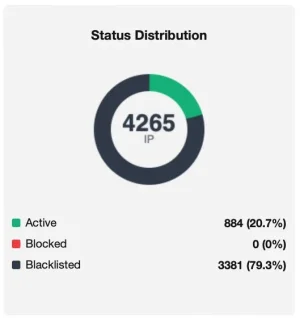
Once more a small wave is going on in comparison to the usual numbers per 24h in my small forum (~1200-1650):

Bildschirm­foto 2026-07-07 um 16.39.42.webp

IP Thread Guard in combination with the ruleset it uses stands its man, the pass rate dropped to 21% and the absolute numbers that pass are only slightly (~100-150) higher than usual and those are then handled by Bot Guard.

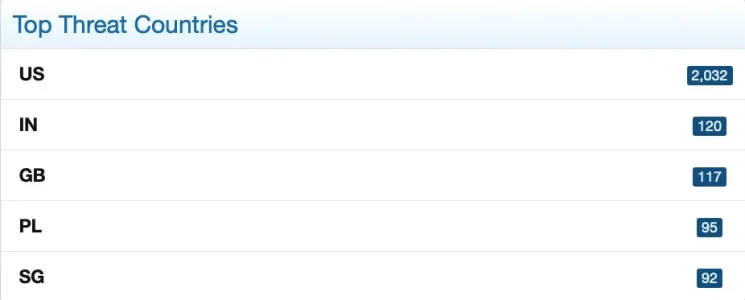
Main source is once more the US:

Bildschirm­foto 2026-07-07 um 16.27.47.webp


Beyond that, what users don't like is when CF's captcha leads them into an endless loop; that however would be a problem on their end, I would think. They may be one of the tinfoil hat conspiracy theorists who think the entire Internet is out to get them, and have everything disabled on their browsers, as well as a few anti-virus/anti-malware suites stacked up on their computer.
In your eyes I probably would count as "conspiracy theorist" as in my main browser I run uBlock origin along with uMatrix, which per default does not allow most calls to 3rd party sources, they have to be manually approved. However: While this is annoying with most captchas (as it needs typically a couple of site reloads until they work) there is no issue with Cloudflare TS. I don't use this for tinfoil reasons but as many websites today have excessive tracking and calling of external sources w/o being necessary and I am curious whose they call and what for. Turns out: Most of the time the pages work flawlessly with half of the calls it requests being blocked/not done. I don't have an antivirus program, so maybe I am not that much of a tinfoil-head in the end. Adblockers have sadly become a necessity on most websites if you want them to be usable w/o eye cancer and w/o being annoyed, so most browsers I use do have one activated for good reasons.

I ended however up in a CF captcha loop quite a couple of times on some websites independent from the browser, its age and its configuration - possibly it depends a lot from how CF is configured. And indeed some "pseudointelligent" anti-bot mechanisms make it impossible to visit some websites with not bleeding edge (but also not brutally old) browsers due to a spinning wheel of death when trying to verify whatever they try to verify.

On my forum we have quite a couple of older members that do use older hardware and older browsers as well. To exclude those would not be adequate and harm the forum, however: No one needs to support IE6 any more, thank good. But something that is not absolutely bleeding edge should work (and typically does work flawlessly).
 
I know a couple people with accessibility problems that use browser plugins galore and get stuck in the cloudflare doom loop.

I've had problems rarely using brave browser with no plugins ( it has adblock integrated into the browser code ). I may have had problems with a stock google chrome at one point.

A bigger impact is when cloudflare goes down, part of the internet goes down with it.
 
In your eyes I probably would count as "conspiracy theorist" as in my main browser I run uBlock origin along with uMatrix, which per default does not allow most calls to 3rd party sources, they have to be manually approved. However: While this is annoying with most captchas (as it needs typically a couple of site reloads until they work) there is no issue with Cloudflare TS.
No, because I do the same. 😁 I'm talking more about those with limited computer knowledge who take advice from others and load up all sorts of anti-malware on their computer, and other things on their browser, to make them "safe." Where all it does is cause problems on sites they visit, or slows down their older computers due to running so many of these programs at the same time.

For many years I went without anti-virus and never had an issue. Largely because I realize the problem usually sits between the screen and the keyboard. 😉 Go back 25 or more years and I tried to help a few friends clean up their computers. Without fail, they let the family use their computers unsupervised and they became heavily infected (usually adware/popups). Many even used Norton but that didn't help either; in fact, Norton used to hamper my efforts to clean things up. I do run some protection now, but it's only one program, and even over a decade on my previous computer, I might have had it detect an issue maybe three or four times across ten years, and those were usually false positives.

I'd say all of us here are not in the "tinfoil hat" group.
 
I've had problems rarely using brave browser with no plugins ( it has adblock integrated into the browser code ). I may have had problems with a stock google chrome at one point.
I'm thinking of setting up pihole on my network at home. It's cheap enough to try it and, if it's not working the way I'd like (such as, if it trips up on any Cloudflare-protected site, or won't let me whitelist certain sites), I could simply use the Pi for another task as I have a few other ideas I want to play with on the network.

O/T I know, but I've used two Pi Zero 2Ws as CUPS print servers here, for two older printers in different rooms. One is an old Zebra shipping label printer and it works amazingly well. The other is an older Laserjet. That gave me problems, but I found I had to install another package (which I think was called hp-lips?) and now it prints perfectly...faster, in fact, than printing directly from the computer.
 
It uses Turnstile. So nobody sees anything. If you are human, it looks at your fingerprint and passes you showing nothing. If you are a bot, it places you in a loop going nowhere.
I just wonder how it would handle false positives, where a human user might have a configuration, or access us from a VPN, but have no way to answer a challenge manually.

We get large amounts of traffic during working hours here in the US, and some of those employers use VPNs, a couple of which use an AWS-hosted VPN. That is one complaint we had when I was blocking some ASNs rather than offering a managed challenge.
 
We get large amounts of traffic during working hours here in the US, and some of those employers use VPNs, a couple of which use an AWS-hosted VPN. That is one complaint we had when I was blocking some ASNs rather than offering a managed challenge.
I do have a couple of those, too. I whitelisted the VN IPs and blocked the rest of AWS. Does obviously not scale and not help guest users, but for a small forum it works w/o issue and the AWS based annoyances are gone.
Basically the whole idea of blacklists once was to force people to use providers who don't host filthy stuff (or alternatively bring the providers to clean up their customer base), so it would probably be good if each and every website and forum would block the AWS ASNs. ;)

OT:

Go back 25 or more years and I tried to help a few friends clean up their computers. Without fail, they let the family use their computers unsupervised and they became heavily infected (usually adware/popups). Many even used Norton but that didn't help either; in fact, Norton used to hamper my efforts to clean things up.
Oh dear. I remember people at that time heavily mandating the famously useless and destructive Zone-Alarm personal "firewall" that constantly felt attacked by broadcasts within the LAN or the DHCP server and grinded everything to a halt...
 
I just wonder how it would handle false positives, where a human user might have a configuration, or access us from a VPN, but have no way to answer a challenge manually.

We get large amounts of traffic during working hours here in the US, and some of those employers use VPNs, a couple of which use an AWS-hosted VPN. That is one complaint we had when I was blocking some ASNs rather than offering a managed challenge.
Turnstile doesn't care about your IP, its browser finger printing to my knowledge.

 
Oh dear. I remember people at that time heavily mandating the famously useless and destructive Zone-Alarm personal "firewall" that constantly felt attacked by broadcasts within the LAN or the DHCP server and grinded everything to a halt...
Zone-Alarm. Wow. There's a name I haven't heard in decades... 🫤

I used to use Tiny Personal Firewall back in those days. It was small, stayed out of the way, and quietly blocked some applications from trying to "phone home." A fellow server admin recommended it to many of us. That was before I put a "real" network in place in the home.

And, that was years after clacking away on the keyboard of an old IBM-PC. Connected to my screaming fast 1200 baud modem. 😂
 
Oh dear. I remember people at that time heavily mandating the famously useless and destructive Zone-Alarm personal "firewall" that constantly felt attacked by broadcasts within the LAN or the DHCP server and grinded everything to a halt...
Man..... 🤣🤣🤣

giphy.gif
 
Hey.... they were the times. My first computer was a commodore 64, followed by an Amstrad... wayyyyy back before windows 3.1 ever hit the market.
My first was a "portable" PC with 512k memory and an amber monitor. I remember tinkering around with BASIC back then, running off of two 5¼" floppy disks. The first network I put together was for our office--a blazing-fast 80386-16 server and 80286 stations with 1MB of memory. I had to load the Netware drivers in the correct order into extended memory (not expanded memory...there was a difference) in order to have enough room to load our accounting/inventory/sales package. It's interesting that the 10base2 network used Gateway G/Ethernet cards that cost us over $250 USD each, and I remember having to snake the coaxial cables through the building and make certain each end was terminated. The dot matrix printers (for shipping tickets and invoices) were the icing on the cake.

Now I feel like an antique. 😂 Simpler times though. I used dial-up at the office so I could check into CompuServe. No worries about bot nets taking down a web site...because we didn't have one!
 
Back
Top Bottom