Crazy amount of guests

I have a question for you cloudflare enjoyers.
Is it possible to exempt certain AI scraper bots while under attack mode on a pro plan?

Also, i can i hire someone to hold my hand and audit my configuration? i am a novice at using that system. But learning here.
 
Also, i can i hire someone to hold my hand and audit my configuration?
You won't get a better auditor than Claude Opus or GPT5.5 level. They're exceptional at auditing CF rules, knowing what level you can express directly in free and pro, ie. whilst free will let you put any expression you want, that does not mean CF will actually acknowledge it, because your account privileges don't match.
 
Is it possible to exempt certain AI scraper bots while under attack mode on a pro plan?
I never use UAM. Power is in knowing how to properly use Cloudflare WAF/rate limiting/transform rules :D
You won't get a better auditor than Claude Opus or GPT5.5 level. They're exceptional at auditing CF rules, knowing what level you can express directly in free and pro, ie. whilst free will let you put any expression you want, that does not mean CF will actually acknowledge it, because your account privileges don't match.
I'd like to say I can match those AI for Cloudflare being an official Cloudflare Community MVP since 2018 😅 Well maybe 😆 AI can get you 90-95% of the way there :)
 
I have left Bot Fight Mode on and haven't noticed any complaints about it. I leave it on despite having a lot of custom rules. Because we want no AI scrapers (and do not allow AI responses in our forums), I have also enabled AI Labyrinth and Block AI Bots. I refuse to feed the oligarchs.

When we had a wave of attacks, I have activated Under Attack Mode, but only temporarily to knock the bots back a bit.
I turned Bot Fight Mode on and now guests are down to a delightful 122. Which is exactly what I would expect on a very small forum like mine.

And I don't know if this is a coincidence, but I am seeing more Googlebots now. All genuine ones (I learned my lesson!): 8 out of 22 robots right now, crawling threads and media items. Am I happy? Yes I am.
 
I'm currently launching a test site https://xfforumtest.com to prepopulate, leave open to everything spam, and use it as a real world test bench. Throw set load at it to see how it handles, etc. Starting at 1 core 2gb ram, centminmod stable. Testing it using mysql search and ES. Default XF media and resource addons.

If you see an error, its because its still being setup. When you don't see an error, then its good to go.

The point of this is to see how well tuning alone can help people, without worrying about bots and managing traffic. Spam, yes, for a working forum, but this testing will encourage bot spam.
 
Last edited:
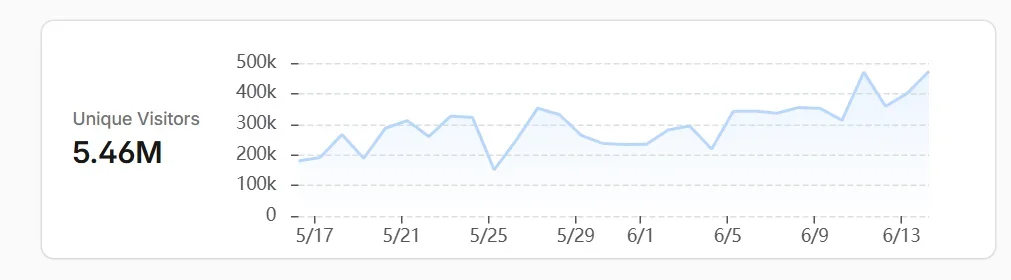
Just had an increase in guests also. 2000 tonight - it's usually no more than 500. Most seem to be from Vietnam. I have various bytespider types blocked in .htaccess which previously got rid of all the ones from singapore - wondering who the vietnam ones are.
 
Screenshot 2026-06-13 181116.webp

This is a stock XF install, loaded it with 10k threads, 100k posts. Its on a 1 cpu 2gb RAM Linode in Texas ($US12 monthly). I'm in Melbourne running these tests, just to put focus on the distance which adds probably 250ms per query.

This is on CentminMod stable.

I used K9 to load 100 virtual users per second onto the server, randomly choosing threads and pages, forums.

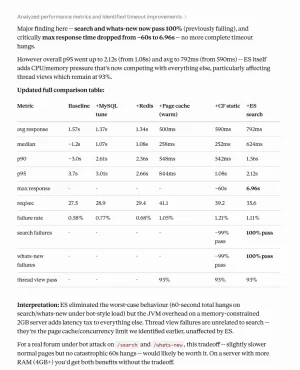
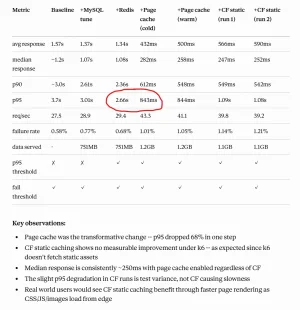
My point in this initial setup test for those dealing with crazy traffic, is that you need to focus on caching. 95th percentile in the image above, the largest single improvement was introducing disk page caching.

Here is the config file I put together for this test:

Code:
<?php
$config['db']['host'] = 'localhost';
$config['db']['port'] = '3306';
$config['db']['username'] = 'dbusername';
$config['db']['password'] = 'dbpassword';
$config['db']['dbname'] = 'dbname';
$config['fullUnicode'] = true;
$config['searchInnoDb'] = true;
$config['enableAddOnArchiveInstaller'] = true;
$config['cache']['enabled'] = true;
$config['cache']['sessions'] = true;
$config['cache']['provider'] = 'SV\RedisCache\Redis';
$config['cache']['config'] = [
    'host' => '127.0.0.1',
    'port' => 6379,
    'database' => 0,
    'compress_threshold' => 2048,
    'compress_library' => 'zstd',
];
$config['cache']['frontendOptions']['automatic_serialization'] = false;
$config['cache']['context']['page']['provider'] = 'Redis';
$config['cache']['context']['page']['config'] = [
    'host' => '127.0.0.1',
    'port' => 6379,
    'database' => 1,
];
$config['pageCache']['enabled'] = true;
$config['pageCache']['cleanThreshold'] = 500;
$config['pageCache']['lifetime'] = 300;

As outlined in image, Redis itself didn't make a whole lot of change, BUT, when you also enable page caching, page loading went from seconds to under a second. Big change.

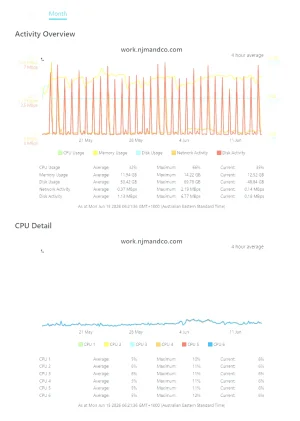
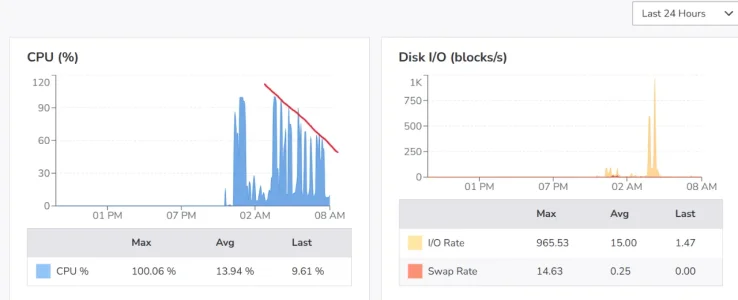
This alone shows what 1 cpu and only 2gb ram can do. No small site, even with all this bot craziness, is being hit with 100 users p/s. Image heavy small forums will benefit greatly from CF edge caching. The CPU went from 95% use to 60% - 80% spikes, once caching was running.

Cache Rule Expression for test forum

Code:
(http.request.full_uri wildcard "https://xfforumtest.com/*.css") or (http.request.full_uri wildcard "https://xfforumtest.com/*.js") or (http.request.full_uri wildcard "https://xfforumtest.com/*.jpg") or (http.request.full_uri wildcard "https://xfforumtest.com/*.png") or (http.request.full_uri wildcard "https://xfforumtest.com/*.woff2") or (http.request.full_uri wildcard "https://xfforumtest.com/*.ico")

Set Edge TTL to 1 day.

Don't get me wrong, /search and /whats-new are still vulnerable using MySQL.

Now if you were using 4gb RAM, then elasticsearch would remove the /search and /whats-new risk near entirely.

For $25 a month, you can have 2 cores and 4gb ram, more than plenty, which would easily run a forum probably up-to around the 500k+ post range.

Pretty much, if there is an optimisation in XF, I have not enabled it. Same with CF, if I can disable anything that would help the site, beyond the testing parameters, then it is disabled. Point is, I am intentionally not being nice to this test site to demonstrate where people should spend time and take seriously, the right caching that will deliver the right results for their website, thus load problems.

This is by no means robust testing, just testing a few things under the worst conditions to outline some important aspects that affect this conversation and global issue, to help those running smaller sites and smaller budgets handle this stuff without suffering, or expensive solutions.

Screenshot 2026-06-13 184300.webp
 
Last edited:
I've actually done some research for small sites on limited resources, and tomorrow I will try a paired down ES install, normally this would require a 4gb ram server, BUT, there is a way to pair it down and limit it, none of which affects how XF use ES, yet it solves the crippling issue bot swarms cause on /search and /whats-new type search, which are never cached. ES isn't vulnerable to table locks like MySQL is... see how this goes tomorrow.
 
Got ES on, working, stable, but it adds cpu and memory pressure which obviously has negative results in load times, yet improves with zero dropped requests.

Screenshot 2026-06-14 224954.webp
 
Hey, you might want to test a 2 core at smallest, since mysql paralellizes a bit, and this really punishes your performance.

I'm building a traffic simulator and our local to local setup, we see an average page for a logged out user happen in a few milliseconds.
 
you might want to test a 2 core at smallest, since mysql paralellizes a bit, and this really punishes your performance.
I'm going to. I wanted to test 1 core 2g ram with 100k posts to demonstrate what can be achieved. Yes, at that level, a person should have upgraded, absolutely. I plan on testing a 2 core with 4g ram to beyond a million posts, to see just where it can go when being smashed by insane traffic.

Basically, anyone buying XF and starting a new forum, this shows that you can do it cheaply, get insane performance from the server, and not worry about the bot craziness going on, which there are many new owners in here driving themselves crazy about bots affecting their daily life.

If someone is paying $10 a month for shared hosting that they can't control, can't fix the bot traffic via performance, and bots are bypassing measures such as CF already... then for $12 monthly, you can control this completely.

I believe a 2 core 4g ram system will scale significantly to a million posts, beyond, with ease. So when someone buys into running a forum, they know they can not be worried about bots for about US$25 monthly, no limitations that shared hosting comes with compared to vps.

One host in Australia is cheaper than that for those specs, AUD$20: https://www.binarylane.com.au/vps-hosting/linux-vps

I'm sure there are other smaller hosts cheaper than Linode and DigitalOcean in the US and other countries.

The ES instance is set at 256M heap and 100k posts is only consuming about 25M.

Bot craziness is slowly coming back on my main site (no restrictions).... they're sneaky little buggers, not rushing the site, just slowly expanding.

Screenshot 2026-06-15 061936.webp
Very minor CPU increase... RAM hasn't changed, as pretty much everything is already in it.
Screenshot 2026-06-15 062204.webp
 
I'm going to. I wanted to test 1 core 2g ram with 100k posts to demonstrate what can be achieved. Yes, at that level, a person should have upgraded, absolutely. I plan on testing a 2 core with 4g ram to beyond a million posts, to see just where it can go when being smashed by insane traffic.

Basically, anyone buying XF and starting a new forum, this shows that you can do it cheaply, get insane performance from the server, and not worry about the bot craziness going on, which there are many new owners in here driving themselves crazy about bots affecting their daily life.
Yeah remember my Centmin Mod LEMP stack you are running auto optimizes server configurations for Nginx, PHP-FPM, MariaDB MySQL at initial installation time based on detected server resources available - so you're already half way there. You just now need to optimise for your traffic :D
Bot craziness is slowly coming back on my main site though.... they're sneaky little buggers, not rushing the site, just slowly expanding.
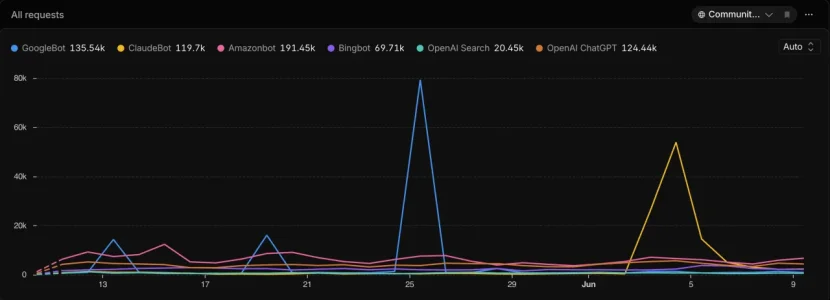
What bots are they, I've totally tamed mine only one that pops up more is Claude bots but I'd rate limited them and mainly from thread scraping bots according to my custom Cloudflare dashboard analytics

1781469036867.webp

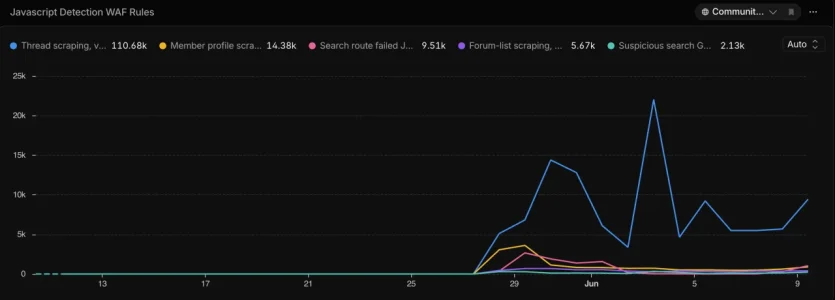
And Cloudflare Javascript detection based WAF rules tracking shows thread scraper bot detection ids as most common. Didn't know member profile scrapers were up there too until I started tracking it via custom dashboards

1781469112149.webp
 
I have Russia and Vietnam blocked
Years ago, CF CAPTCHA (or hard ban if CF is unavailable) for few datacenter ASNs from those countries (+ Singapore, China, Brazil) did the trick. Now, my top bot sources are the US, Netherlands, France and Germany. The latest wave even hit residential IPs from ~50 countries. The catch is that many people now use VPNs to bypass age checks on big platforms, so blanket-blocking entire countries can and will hurt your own users.
idn't know member profile scrapers were up there too until I started tracking it via custom dashboards
They also mass scan reactions pages for post. Basically, I hid all this from guests — profiles, reaction stat.
 
Yeah remember my Centmin Mod LEMP stack you are running auto optimizes server configurations for Nginx, PHP-FPM, MariaDB MySQL at initial installation time based on detected server resources available - so you're already half way there. You just now need to optimise for your traffic
I remember. I did tweak things a little more, some additional DB tuning. The table above shows pre and post my tuning. Baseline is centminmod out of the box. https://xenforo.com/community/threads/crazy-amount-of-guests.233649/page-36#post-1785200 Redis + Page Caching made the biggest difference though. Whilst CF shows its slower introducing it, the testing isn't optimal as its not pulling from CF cache.

I'm not sure what testing is available to hit it with 100 users p/s that also uses CF caching. Just using K6 for basic load testing, to ensure the site is still reachable, doesn't collapse, a user can click through without suffering major loading issues. Baseline was horrible, by the end, with load, I could still browse the site reasonably well.

What bots are they, I've totally tamed mine
Don't know... I have removed all restrictions to see how well the server handles things without any blocks in place, just unrestricted bot craziness. DDOS obviously still covered by default via CF... but I've turned off anything I can that protects from abusive traffic.
 
They also mass scan reactions pages for post.
Yup seen that as well
Whilst CF shows its slower introducing it, the testing isn't optimal as its not pulling from CF cache.
Cache only helps for repeat visitors within the cache TTL period so depends on how long you set cache TTL for

Don't know...
Parse your nginx vhost site's nginx access logs for user agents etc :) Can also enable Nginx JSON logging - older guide at https://community.centminmod.com/threads/how-to-configure-nginx-for-json-based-access-logging.19641/
 
Did someone at Xenforo tighten up security on these forums? Am now getting a LOT of this error:

Code:
Sorry, you have been blocked
  You are unable to access xenforo.com.
 
[snip]
Here is the config file I put together for this test:

Code:
$config['db']['host'] = 'localhost';
$config['db']['port'] = '3306';
$config['db']['username'] = 'dbusername';
$config['db']['password'] = 'dbpassword';
$config['db']['dbname'] = 'dbname';
$config['fullUnicode'] = true;
$config['searchInnoDb'] = true;
$config['enableAddOnArchiveInstaller'] = true;
$config['cache']['enabled'] = true;
$config['cache']['sessions'] = true;
$config['cache']['provider'] = 'SV\RedisCache\Redis';
$config['cache']['config'] = [
    'host' => '127.0.0.1',
    'port' => 6379,
    'database' => 0,
    'compress_threshold' => 2048,
    'compress_library' => 'zstd',
];
$config['cache']['frontendOptions']['automatic_serialization'] = false;
$config['cache']['context']['page']['provider'] = 'Redis';
$config['cache']['context']['page']['config'] = [
    'host' => '127.0.0.1',
    'port' => 6379,
    'database' => 1,
];
$config['pageCache']['enabled'] = true;
$config['pageCache']['cleanThreshold'] = 500;
$config['pageCache']['lifetime'] = 300;

As outlined in image, Redis itself didn't make a whole lot of change, BUT, when you also enable page caching, page loading went from seconds to under a second. Big change.

[snip]

Within your XF config file, I had noticed you've two different declarations for Redis providers, just curious... any reason?

Code:
$config['cache']['provider'] = 'SV\RedisCache\Redis';
$config['cache']['context']['page']['provider'] = 'Redis';
 
Xons Redis adaptor threw an error for the page context: must define a host. It doesn't implement the context lookup the same way XF's native page cache factory expects. XF's built-in Redis provider works correctly for that use case. It was a bit of trial and error to work through.
 
Back
Top Bottom