
XF 2.1 Control over User Info pop up display

WhiskeyMac

Member
Licensed customer
If you click on the name of a User/Member of a Forum you get a pop up box display shown below...
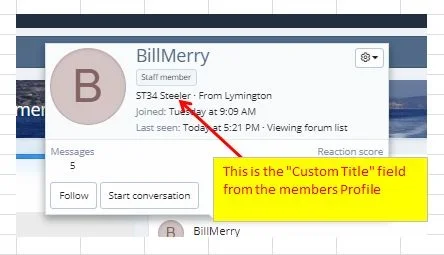
201177


Is it possible to control what displays here by adding one of our own Custom Fields that we have added to each members profile ?

:)
 
You could edit the member_tooltip template. Better still, create a new template modification for this template. I think you'd want to make the edit before the userblurb tag, <xf:userblurb user="$user" tag="div" />.
 
Thanks for replying...I am not a proficient programmer...
Could you give an example of adding a custom field, also how do you refer to the field name of the custom field that has been added...
:-)
 
I think you can use: {$user.Profile.custom_fields.fieldId} (where fieldId is your custom field Id) to show a user's entered value for a particular field.
 
I'm getting users wondering if the pop-up can be disabled, or back to the last versions style with the info in the avatar block. Is that possible?

EDIT: nevermind.
 
Last edited:
Back
Top Bottom