
You are using an out of date browser. It may not display this or other websites correctly.
You should upgrade or use an alternative browser.
You should upgrade or use an alternative browser.

Consent Manager 2.0.2
No permission to download
- Thread starter DEBTech
- Start date

DEBTech updated Consent Manager (IAB TCF 2.2) with a new update entry:
1.0.4
Read the rest of this update entry...
1.0.4
Changelog v1.0.4
New Features — Google Revenue Fix
- Google Additional Consent (AC) Spec:
addtlConsentcookie is now set alongsideeuconsent-v2— 199 Google AC vendors (Google #229, Xandr #80, Index Exchange #126, Criteo #154, Amazon #7, LiveRamp #12 etc.) can now bid in auctions- GVL Import: Now also fetches Google's
commonly-used-providers.jsonand stores...
Read the rest of this update entry...

I have a few questions:
- Is this CMP compatible with TCF 2.3? (https://support.google.com/adsense/answer/9804260?sjid=7473290129075777156-EU)
- Does this CMP therefore integrate Xenforo’s cookie solution (does it accept those cookies as well as third-party cookies and list them correctly?)
- Is this CMP therefore fully compliant with the GDPR in the EU? Has it been verified by a third party?
Hi,
Short answer:
With v1.0 I built my own IAB TCF 2.2/2.3 compatible CMP banner. It worked technically — TC String, Vendor Consents, addtlConsent cookie, Cross-Frame TCF API, Google Consent Mode v2 — everything was implemented and passed validation on external tools like Kukie.io.
The problem in practice:
Despite a technically correct implementation, I and my testers experienced significant problems with Google ad revenue. Ads were served, but often only as non-personalized ads (npa=1 instead of npa=0). Bidding rates were considerably lower than expected.
What I tried:
My finding:
The fundamental problem is: Google's own systems (AdSense, Ad Manager, GPT) trust their own CMP (Google Funding Choices, CMP ID 300) significantly more than any third-party CMP. Even when the TC String is technically identical, fewer bidders participate and revenue stays below expectations with a custom CMP.
This isn't a bug on my end — it's the reality of Google's ecosystem. Other third-party CMPs (Cookiebot, OneTrust) have this problem to varying degrees as well.
What I've built from that (v2.0.0):
I've completely restructured the addon. Instead of delivering my own banner, I now use Google Funding Choices as the banner provider and focus on what Google doesn't offer:
v2.0.0 Patch 1 is being released today and will be available shortly.
Short answer:
With v1.0 I built my own IAB TCF 2.2/2.3 compatible CMP banner. It worked technically — TC String, Vendor Consents, addtlConsent cookie, Cross-Frame TCF API, Google Consent Mode v2 — everything was implemented and passed validation on external tools like Kukie.io.
The problem in practice:
Despite a technically correct implementation, I and my testers experienced significant problems with Google ad revenue. Ads were served, but often only as non-personalized ads (npa=1 instead of npa=0). Bidding rates were considerably lower than expected.
What I tried:
- Expanded TC String to 831 characters with full vendor consent bitfield (1567 vendors)
- Added Disclosed Vendors segment (TCF v2.3 mandatory since Feb 2026)
- Fixed Google Consent Mode v2 timing — consent default BEFORE gtag.js
- Corrected purpose mapping (ad_storage = Purpose 7, not P3+P4)
- addEventListener instead of polling for faster consent signals
- addtlConsent cookie with 381 Google AC vendors
- __tcfapiLocator iframe + postMessage cross-frame handler
- External validation with Kukie.io, Consentik, IAB TCF Decoder, UniConsent
- Comparison with sites using InMobi Choice and other CMPs
My finding:
The fundamental problem is: Google's own systems (AdSense, Ad Manager, GPT) trust their own CMP (Google Funding Choices, CMP ID 300) significantly more than any third-party CMP. Even when the TC String is technically identical, fewer bidders participate and revenue stays below expectations with a custom CMP.
This isn't a bug on my end — it's the reality of Google's ecosystem. Other third-party CMPs (Cookiebot, OneTrust) have this problem to varying degrees as well.
What I've built from that (v2.0.0):
I've completely restructured the addon. Instead of delivering my own banner, I now use Google Funding Choices as the banner provider and focus on what Google doesn't offer:
- Consent Analytics Dashboard — accept rates, device breakdown, referrer stats, trend alerts
- Google AdSense API Integration — revenue directly in the XenForo admin dashboard (today/7d/30d)
- Revenue Forecast — estimated monthly revenue based on current accept rate
- Ad Blocker Detection — detects and counts ad blocker users
- Cookie Scanner — hybrid scan (HTTP + browser JS) with automatic known cookie detection
- Consent Rate Email Alerts — automatic notification when accept rate drops below threshold
- GDPR Compliance Report — CSV export of all consent data for audits
- Google Publisher Tag (GPT) Loader — automatic head injection for Ad Manager users
- Scheduled Re-Consent — automatic renewal every X months (GDPR recommends 12 months)
- User/Page Criteria — controls who sees the banner
v2.0.0 Patch 1 is being released today and will be available shortly.
DEBTech updated Consent Manager with a new update entry:
2.0.0 Patch 1
Read the rest of this update entry...
2.0.0 Patch 1
Why this major update?
Version 1.x included a custom-built IAB TCF 2.2 consent banner with full TC String encoding, cross-frame TCF API, Google Consent Mode v2 integration and vendor management. While technically compliant and validated by external tools (Kukie.io, Consentik, IAB TCF Decoder), real-world testing revealed a significant problem: Google's ad systems (AdSense, Ad Manager, GPT) consistently delivered lower bidding rates and served more non-personalized ads (npa=1) when...
Read the rest of this update entry...
I updated to the new version. I selected the option to overwrite all files. After accessing the dashboard, I receive the following error message:
Edit: Perhaps you should address the topic of Google OAuth 2.0. What needs to be set up beforehand to use the Google API? How do you create the ID? I think not everyone using Adsende in conjunction with XenForo has dealt with this topic yet.
Thank you for your support.
Code:
XF\Db\Exception: MySQL statement prepare error [1054]: Unknown column 'device_type' in 'SELECT' in src/XF/Db/AbstractStatement.php at line 225
XF\Db\AbstractStatement->getException() in src/XF/Db/Mysqli/Statement.php at line 207
XF\Db\Mysqli\Statement->getException() in src/XF/Db/Mysqli/Statement.php at line 43
XF\Db\Mysqli\Statement->prepare() in src/XF/Db/Mysqli/Statement.php at line 61
XF\Db\Mysqli\Statement->execute() in src/XF/Db/AbstractAdapter.php at line 96
XF\Db\AbstractAdapter->query() in src/XF/Db/AbstractAdapter.php at line 157
XF\Db\AbstractAdapter->fetchAll() in src/addons/DEB/ConsentManager/Admin/Controller/ConsentDashboard.php at line 62
DEB\ConsentManager\Admin\Controller\ConsentDashboard->actionIndex() in src/XF/Mvc/Dispatcher.php at line 362
XF\Mvc\Dispatcher->dispatchClass() in src/XF/Mvc/Dispatcher.php at line 264
XF\Mvc\Dispatcher->dispatchFromMatch() in src/XF/Mvc/Dispatcher.php at line 121
XF\Mvc\Dispatcher->dispatchLoop() in src/XF/Mvc/Dispatcher.php at line 63
XF\Mvc\Dispatcher->run() in src/XF/App.php at line 2824
XF\App->run() in src/XF.php at line 814
XF::runApp() in admin.php at line 15
Edit: Perhaps you should address the topic of Google OAuth 2.0. What needs to be set up beforehand to use the Google API? How do you create the ID? I think not everyone using Adsende in conjunction with XenForo has dealt with this topic yet.
Thank you for your support.
Last edited:
DEBTech updated Consent Manager with a new update entry:
2.0.0 Patch 2
Read the rest of this update entry...
2.0.0 Patch 2
- Fixed: Database migration now ensures all required columns exist regardless of which version you upgrade from (device_type, country_code, referrer, adblock_detected)
- Fixed: Fresh installations now include all columns in the initial table creation
Read the rest of this update entry...
Hi,
Short answer:
With v1.0 I built my own IAB TCF 2.2/2.3 compatible CMP banner. It worked technically — TC String, Vendor Consents, addtlConsent cookie, Cross-Frame TCF API, Google Consent Mode v2 — everything was implemented and passed validation on external tools like Kukie.io.
The problem in practice:
Despite a technically correct implementation, I and my testers experienced significant problems with Google ad revenue. Ads were served, but often only as non-personalized ads (npa=1 instead of npa=0). Bidding rates were considerably lower than expected.
What I tried:
- Expanded TC String to 831 characters with full vendor consent bitfield (1567 vendors)
- Added Disclosed Vendors segment (TCF v2.3 mandatory since Feb 2026)
- Fixed Google Consent Mode v2 timing — consent default BEFORE gtag.js
- Corrected purpose mapping (ad_storage = Purpose 7, not P3+P4)
- addEventListener instead of polling for faster consent signals
- addtlConsent cookie with 381 Google AC vendors
- __tcfapiLocator iframe + postMessage cross-frame handler
- External validation with Kukie.io, Consentik, IAB TCF Decoder, UniConsent
- Comparison with sites using InMobi Choice and other CMPs
My finding:
The fundamental problem is: Google's own systems (AdSense, Ad Manager, GPT) trust their own CMP (Google Funding Choices, CMP ID 300) significantly more than any third-party CMP. Even when the TC String is technically identical, fewer bidders participate and revenue stays below expectations with a custom CMP.
This isn't a bug on my end — it's the reality of Google's ecosystem. Other third-party CMPs (Cookiebot, OneTrust) have this problem to varying degrees as well.
What I've built from that (v2.0.0):
I've completely restructured the addon. Instead of delivering my own banner, I now use Google Funding Choices as the banner provider and focus on what Google doesn't offer:
- Consent Analytics Dashboard — accept rates, device breakdown, referrer stats, trend alerts
- Google AdSense API Integration — revenue directly in the XenForo admin dashboard (today/7d/30d)
- Revenue Forecast — estimated monthly revenue based on current accept rate
- Ad Blocker Detection — detects and counts ad blocker users
- Cookie Scanner — hybrid scan (HTTP + browser JS) with automatic known cookie detection
- Consent Rate Email Alerts — automatic notification when accept rate drops below threshold
- GDPR Compliance Report — CSV export of all consent data for audits
- Google Publisher Tag (GPT) Loader — automatic head injection for Ad Manager users
- Scheduled Re-Consent — automatic renewal every X months (GDPR recommends 12 months)
- User/Page Criteria — controls who sees the banner
v2.0.0 Patch 1 is being released today and will be available shortly.
Okay, thanks for the reply, but how does this cookie solution handle Xenforo cookies? What about third-party cookies? Are they automatically detected and included?
Is it therefore fully GDPR-compliant? It can obviously be useful for very large sites, but the point is that we can’t risk cookies not complying with the privacy policy.
For example, if we used Matomo Analytics, how would it work? Would it automatically add the appropriate cookies and toggles?
The Cookie Scanner automatically detects all cookies on your site, both server side via HTTP headers and browser side via JavaScript cookies. It recognizes your XenForo cookie prefix and matches all XenForo cookies automatically. For third party cookies from Google, ad networks, analytics tools and so on, it uses an integrated database with over 2200 known cookies. If something unknown shows up, it gets flagged so you can check it.
Regarding GDPR: The consent banner comes from Google Funding Choices (CMP ID 300), Google's own IAB registered CMP. It handles everything on the consent side, so TCF 2.2/2.3 strings, purpose based consent and Google Consent Mode v2. My addon doesn't touch the banner at all. It sits behind it and tracks what happens: who accepted, who rejected, on which device, from which referrer and so on. For audits you can export everything as CSV and there's a validator that checks your setup for common issues.
Now the important part about Matomo: This addon does not block or load scripts. It doesn't manage individual cookie toggles. Google Funding Choices collects consent for IAB TCF purposes, and Google Consent Mode v2 controls whether Google's own tags fire, that works automatically. For non Google tools like Matomo, you need to check the consent status yourself. Matomo supports this, you can configure it to respect the analytics_storage signal from Google Consent Mode, or use the __tcfapi that Google FC provides to check if your visitor gave consent before tracking. But that's something you set up on the Matomo side, not in this addon.
To summarize: The addon monitors and reports on consent. Google FC handles the banner and consent collection. Script blocking for third party tools like Matomo needs to be handled by those tools themselves, based on the consent signals that Google FC provides.
Regarding GDPR: The consent banner comes from Google Funding Choices (CMP ID 300), Google's own IAB registered CMP. It handles everything on the consent side, so TCF 2.2/2.3 strings, purpose based consent and Google Consent Mode v2. My addon doesn't touch the banner at all. It sits behind it and tracks what happens: who accepted, who rejected, on which device, from which referrer and so on. For audits you can export everything as CSV and there's a validator that checks your setup for common issues.
Now the important part about Matomo: This addon does not block or load scripts. It doesn't manage individual cookie toggles. Google Funding Choices collects consent for IAB TCF purposes, and Google Consent Mode v2 controls whether Google's own tags fire, that works automatically. For non Google tools like Matomo, you need to check the consent status yourself. Matomo supports this, you can configure it to respect the analytics_storage signal from Google Consent Mode, or use the __tcfapi that Google FC provides to check if your visitor gave consent before tracking. But that's something you set up on the Matomo side, not in this addon.
To summarize: The addon monitors and reports on consent. Google FC handles the banner and consent collection. Script blocking for third party tools like Matomo needs to be handled by those tools themselves, based on the consent signals that Google FC provides.
When I install and activate patch version 2 on a freshly installed XenForo system, I get the following error message. Note: Based on the previous error message, I was using XenForo on a server in my home lab.
Code:
LogicException: Could not find repository 'DEB\ConsentManager\Repository\VendorRepository' for 'DEB\ConsentManager:Vendor' in src/XF/Mvc/Entity/Manager.php at line 296
[LIST=1]
[*]XF\Mvc\Entity\Manager->getRepository() in src/XF/Mvc/Controller.php at line 1068
[*]XF\Mvc\Controller->repository() in src/addons/DEB/ConsentManager/Pub/Controller/Consent.php at line 35
[*]DEB\ConsentManager\Pub\Controller\Consent->actionIndex() in src/XF/Mvc/Dispatcher.php at line 362
[*]XF\Mvc\Dispatcher->dispatchClass() in src/XF/Mvc/Dispatcher.php at line 264
[*]XF\Mvc\Dispatcher->dispatchFromMatch() in src/XF/Mvc/Dispatcher.php at line 121
[*]XF\Mvc\Dispatcher->dispatchLoop() in src/XF/Mvc/Dispatcher.php at line 63
[*]XF\Mvc\Dispatcher->run() in src/XF/App.php at line 2824
[*]XF\App->run() in src/XF.php at line 814
[*]XF::runApp() in index.php at line 23
[/LIST]
DEBTech updated Consent Manager with a new update entry:
2.0.0 Patch 3
Read the rest of this update entry...
2.0.0 Patch 3
- Fixed: Cookie declaration page (/consent) crashed on fresh installations due to a reference to the removed Vendor repository
Read the rest of this update entry...
The error I previously reported no longer occurs with patch version 3. However, it now appears that further prerequisites must be met before the add-on can be successfully deployed. At least, that's how I understand it.
When I access the dialog to change the cookie settings in my locally hosted forum, nothing is displayed. Since Google Funding Choices is used as the consent provider, the consent notice must be created and published in any case, correct? An AdSense account is not strictly necessary for the consent notice itself. My question is therefore: what minimum requirements must the add-on meet to use the Google consent notice?
What criteria does the Google consent notice use to determine this?
My second question concerns setting up OAuth 2. Is https://developers.google.com/identity/protocols/oauth2 the correct place to configure this?
I am aware that I am asking many questions, but I think the topic is too sensitive for me (and others) to make unnecessary mistakes here.
When I access the dialog to change the cookie settings in my locally hosted forum, nothing is displayed. Since Google Funding Choices is used as the consent provider, the consent notice must be created and published in any case, correct? An AdSense account is not strictly necessary for the consent notice itself. My question is therefore: what minimum requirements must the add-on meet to use the Google consent notice?
What criteria does the Google consent notice use to determine this?
My second question concerns setting up OAuth 2. Is https://developers.google.com/identity/protocols/oauth2 the correct place to configure this?
I am aware that I am asking many questions, but I think the topic is too sensitive for me (and others) to make unnecessary mistakes here.
Minimum requirements for the Google consent banner:
Google Funding Choices is part of Google's Privacy & Messaging platform. You need at least one of these:
1. A Google AdSense account, or
2. A Google Ad Manager account
The consent banner (GDPR message) is created and published directly in your Google account. In AdSense you go to Privacy & Messaging > GDPR, in Ad Manager under Privacy & Messaging. There you create your GDPR message, customize the look and text, select your ad technology partners (vendors) and publish it. Once published, Google automatically serves the banner on your site and manages the entire vendor list, consent collection, TC String generation and Google Consent Mode signals.
The addon itself does not display the banner and does not manage vendors. It only tracks and reports on the consent decisions your visitors make after Google FC shows the banner. So if no GDPR message is created and published in your Google account, nothing will appear on your site. That's expected behavior.
An AdSense account alone is enough. You don't necessarily need Ad Manager. Most XenForo site owners use AdSense and that works perfectly fine.
What Google uses to determine when to show the banner:
Google checks the visitor's location by IP. The GDPR message is shown to visitors from the EEA (European Economic Area) and UK by default. You can adjust the regions in your Privacy & Messaging settings. Returning visitors who already gave consent won't see the banner again until the consent expires or is revoked.
OAuth 2 setup for the Revenue Dashboard:
The OAuth 2 credentials are created in the Google Cloud Console, not directly on the OAuth protocol page you linked. Here are the steps:
1. Go to https://console.cloud.google.com
2. Create a new project (or use an existing one)
3. Enable the "AdSense Management API" (and/or "Ad Manager API" if you use Ad Manager)
4. Go to APIs & Services > Credentials
5. Click "Create Credentials" > "OAuth 2.0 Client ID"
6. Application type: Web application
7. Add your authorized redirect URI (this is shown in the addon settings page)
8. Copy the Client ID and Client Secret into the addon settings
9. Click the Authorize button in the addon settings to complete the OAuth flow
The Revenue Dashboard is entirely optional. Consent monitoring, cookie scanner, validator and all other features work without it. You only need OAuth 2 if you want to see your ad revenue data directly in the XenForo admin panel.
Google Funding Choices is part of Google's Privacy & Messaging platform. You need at least one of these:
1. A Google AdSense account, or
2. A Google Ad Manager account
The consent banner (GDPR message) is created and published directly in your Google account. In AdSense you go to Privacy & Messaging > GDPR, in Ad Manager under Privacy & Messaging. There you create your GDPR message, customize the look and text, select your ad technology partners (vendors) and publish it. Once published, Google automatically serves the banner on your site and manages the entire vendor list, consent collection, TC String generation and Google Consent Mode signals.
The addon itself does not display the banner and does not manage vendors. It only tracks and reports on the consent decisions your visitors make after Google FC shows the banner. So if no GDPR message is created and published in your Google account, nothing will appear on your site. That's expected behavior.
An AdSense account alone is enough. You don't necessarily need Ad Manager. Most XenForo site owners use AdSense and that works perfectly fine.
What Google uses to determine when to show the banner:
Google checks the visitor's location by IP. The GDPR message is shown to visitors from the EEA (European Economic Area) and UK by default. You can adjust the regions in your Privacy & Messaging settings. Returning visitors who already gave consent won't see the banner again until the consent expires or is revoked.
OAuth 2 setup for the Revenue Dashboard:
The OAuth 2 credentials are created in the Google Cloud Console, not directly on the OAuth protocol page you linked. Here are the steps:
1. Go to https://console.cloud.google.com
2. Create a new project (or use an existing one)
3. Enable the "AdSense Management API" (and/or "Ad Manager API" if you use Ad Manager)
4. Go to APIs & Services > Credentials
5. Click "Create Credentials" > "OAuth 2.0 Client ID"
6. Application type: Web application
7. Add your authorized redirect URI (this is shown in the addon settings page)
8. Copy the Client ID and Client Secret into the addon settings
9. Click the Authorize button in the addon settings to complete the OAuth flow
The Revenue Dashboard is entirely optional. Consent monitoring, cookie scanner, validator and all other features work without it. You only need OAuth 2 if you want to see your ad revenue data directly in the XenForo admin panel.
Thank you very much for the very quick response and explanation. I will implement and set up the suggested steps as soon as possible. Feedback will follow, of course.
Could you elaborate a bit more on point 7? Where is this URL displayed? When I select 'Authorize with Google' in the Admin Panel, I get the following Google error message: redirect_uri_mismatch
For the information in the Google Console, you need two URLs:
Authorized JavaScript sources & Authorized redirect URIs.
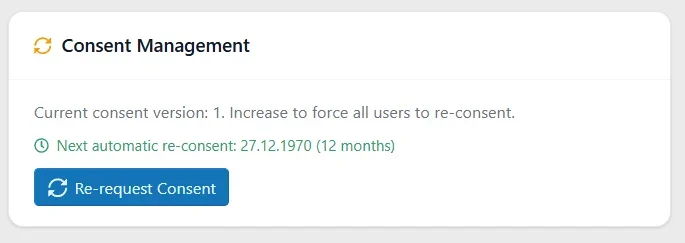
Update: A small cosmetic / calculation problem if I set consent rescheduling to 12 month:
Thank you.
For the information in the Google Console, you need two URLs:
Authorized JavaScript sources & Authorized redirect URIs.
Update: A small cosmetic / calculation problem if I set consent rescheduling to 12 month:
Thank you.
Last edited:
When you click "Authorize with Google", the addon redirects to Google OAuth with a callback URL. Google checks if this URL is whitelisted in your Cloud Console credentials. The error means it's not listed there yet.
To fix this:
Go to Google Cloud Console → APIs & Services → Credentials
Date display "27.12.1970"
Will be fixed in the next version.
To fix this:
Go to Google Cloud Console → APIs & Services → Credentials
- Click on your OAuth 2.0 Client ID
- Under Authorized redirect URIs, add:
(Replace yourdomain.com with your actual domain) - Under Authorized JavaScript origins, add:
- Save
Date display "27.12.1970"
Will be fixed in the next version.
Now I get the error 400 invalid_scope.
I enabled Ad Manager API too; but it still throws the error 400 invalid_scope.
Code:
Some requested scopes were invalid. {valid=[https://www.googleapis.com/auth/adsense.readonly], invalid=[https://www.googleapis.com/auth/admanager.report]}
Last edited:
I was probably a bit too quick when reporting the error, and a cron job or something similar hadn't been processed yet. Anyway, it's gone now, and the correct date is displayed. Sorry for the confusion.Date display "27.12.1970"
Will be fixed in the next version.
The add-on looks promising as a wrapper for Google Consent Manager; I’m looking forward to hearing feedback from other admins.
As I’ve already mentioned, on a large website, privacy policy is a serious matter—you risk fines from AGCOM in Italy.
As I’ve already mentioned, on a large website, privacy policy is a serious matter—you risk fines from AGCOM in Italy.
I can't say for sure whether the add-on fully complies with all regulations in all countries. I'm not an expert. However, after a very short period of use, I can already say this: It's the first (free!) add-on for XenForo that seems to implement consent correctly. I deduce this, among other things, from the fact that the IAB TCF strings can be decoded correctly. Tests I conducted myself with various consent settings also produced the expected results. The values and data are understandable to me so far.I’m looking forward to hearing feedback from other admins.
Similar threads
- Replies
- 1
- Views
- 53


- Replies
- 0
- Views
- 20
- Replies
- 2
- Views
- 59

