
XF 2.3 Can't figure out the database info for an import

PaulyWalnuts

Member
Licensed customer
Getting ready to setup another forum. (That I can't afford) but it's for the wife and she insists. Happy wife is a happy life, right?

I'm trying to configure the database to import a phpBB forum. but it keeps telling me my credential and the paths to avatars and attachments is wrong.

What's sad is that I've done it before and it worked the first time! 'Ware the CRS!import.webp
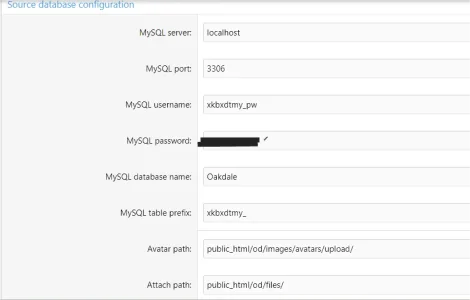
 
I'm trying to configure the database to import a phpBB forum. but it keeps telling me my credential and the paths to avatars and attachments is wrong.
By credentials do you mean the database details? If that is the case, have you entered the correct database info? You can see them at whatever file phpbb stores it. Have you installed XenForo at the very same database that you have used to install the phpbb forum or have you installed it at a different database? If the letter you must make sure that the database users of both databases have full permissions/privileges at each other databases
 
By credentials do you mean the database details? If that is the case, have you entered the correct database info? You can see them at whatever file phpbb stores it. Have you installed XenForo at the very same database that you have used to install the phpbb forum or have you installed it at a different database? If the letter you must make sure that the database users of both databases have full permissions/privileges at each other databases
Each have their own database, each has its own user and they are granted all rights to their respective databases. I've changes the passwords to the db users so that I KNOW the credentials are right.

I'll call bluehost, I'm sure they'll get it right, but I also have errors for the paths to avatars and attachments.
 
Who needs blue host to help when I figured it out myself.

In the past, when I installed phpBB I installed it manually myself. This time I let their software installation app install it for me. I was using the credentials, database name, prefix...etc. the way I always did when I installed it manually.

And then I called myself a dumb-ass and looked in the config.php to get the correct info.

I can now access the database, but the importer still doesn't see the avatars and file folders.

I enter public_html/od/images/avatars/upload with and without the leading / before public_html and public_html/od/files/ and am told the location is incorrect.

What should the path be?
 
Back
Top Bottom