Advanced Traffic Statistics: Live Radar, WAF & AI Security

Advanced Traffic Statistics: Live Radar, WAF & AI Security 1.8.3

No permission to download
We are running php 8.2.30 and MySQL 8.0.45. All of the tables in the database are innodb_utf8mb4_unicode_ci except three addon tables that are utf8mb3_general_ci for au lait LAU (119 rows), xfa fss transaction (0 rows), xfa Who Read Content (1847974 rows).

Who Read Content is important to us but it was set up with no limit on how long to hold data. There is a problem with the addon that is not allowing me to change the value to save the maximum events count. I will try to sort that out with XFA.

I do not know if this information will help in resolving what is going on with our system and your package.
 
We are running php 8.2.30 and MySQL 8.0.45. All of the tables in the database are innodb_utf8mb4_unicode_ci except three addon tables that are utf8mb3_general_ci for au lait LAU (119 rows), xfa fss transaction (0 rows), xfa Who Read Content (1847974 rows).

Who Read Content is important to us but it was set up with no limit on how long to hold data. There is a problem with the addon that is not allowing me to change the value to save the maximum events count. I will try to sort that out with XFA.

I do not know if this information will help in resolving what is going on with our system and your package.

Thank you for this detailed report. This information is extremely helpful and explains exactly why you are seeing the MySQL 3988 error.

Your server environment (PHP 8.2.30 and MySQL 8.0.45) is actually excellent and very modern. The problem is not the software version, but a "collation conflict" caused by those three specific tables, especially xfa_Who_Read_Content.

Why this causes the error:When XenForo tries to install or upgrade an add-on, it opens a "transaction." If the process touches or even just "sees" tables with different collations (mixing the old utf8mb3 with the modern utf8mb4), MySQL 8.0 blocks the operation for safety. The fact that the "Who Read Content" table has 1.8 million rows makes this conflict much more likely to trigger a timeout or a transaction lock.

The Solution:Since you have a system consultant, you can ask them to perform these two steps. It will not only fix the installation of my add-on but also make your entire forum more stable and faster:

  1. Convert the three tables: Ask your consultant to convert au_lait_lau, xfa_fss_transaction, and especially xfa_Who_Read_Content to utf8mb4_unicode_ci. This will align them with the rest of your database.
  2. XenForo Built-in Tool: XenForo actually has a built-in tool for this. Your consultant can run this command via CLI:php cmd.php xf:convert-utf8mb4(Note: Since the "Who Read Content" table is very large, they should run this via CLI to avoid web-server timeouts).
Regarding the XFA add-on issue:The reason you can't save the "maximum events count" might be related to this same database mismatch or the massive size of the table. Standardizing the collation often fixes these "unresponsive" settings as well.

Once those 3 tables are aligned to utf8mb4_unicode_ci, our add-on (and any other future updates) will install instantly without any errors.

Important: Full Backup before proceeding
 
Just a heads up on the misc/style-variation bot that keep hammering our sites.

I use the free version of cloudflare and they are also my registrar.
So, since I had already used up my free security rules, I deleted the least activated rule.

Then I created a new security rule.

Gave it a name,
Selected "URI Path" in the Field dropdown,
Selected "contains" in the Operator dropdown,
Entered the phrase style-variation into the Value Box,
Selected "Block" in Choose Action,
And whatever order you want it to be at in your list of rules (doesn't matter)
Click or tap the save button.

It will be active within a minute.

So far in my first 10 minutes cloudflare has blocked 350+ of these string requests.
Yes my site was being hit that hard.

So, so far so good.
 
Just a heads up on the misc/style-variation bot that keep hammering our sites.

I use the free version of cloudflare and they are also my registrar.
So, since I had already used up my free security rules, I deleted the least activated rule.

Then I created a new security rule.

Gave it a name,
Selected "URI Path" in the Field dropdown,
Selected "contains" in the Operator dropdown,
Entered the phrase style-variation into the Value Box,
Selected "Block" in Choose Action,
And whatever order you want it to be at in your list of rules (doesn't matter)
Click or tap the save button.

It will be active within a minute.

So far in my first 10 minutes cloudflare has blocked 350+ of these string requests.
Yes my site was being hit that hard.

So, so far so good.
Hi!

While your rule is definitely effective at stopping the bot attack, I would like to issue a small "heads-up" for everyone using XenForo 2.3.

The string style-variation is actually a core part of XenForo 2.3's native functionality. It is used by the system to handle Style Variations (switching between Light and Dark modes).

If you block all URIs containing that string:

  • Legitimate users will be unable to switch between Light and Dark modes (the request will be blocked by Cloudflare).
  • Some browsers might fail to load the correct CSS variation automatically, potentially causing display issues.
A better approach:Instead of a flat "Block" on the URI, you might want to combine the rule with a User-Agent check or use a JS Challenge (Managed Challenge) instead of a hard Block. This way, real users with a browser will pass the challenge and be able to switch styles, while the "dumb" bots hammering your site will still be stopped.

Thanks for sharing your results, but be careful if you notice your users complaining about the dark/light mode toggle not working!
 
Thanks for sharing your results, but be careful if you notice your users complaining about the dark/light mode toggle not working!
Thank you for the advice.

My site is exclusively dark mode only and I do not allow any style changes. Light or Dark. So no worries there.

But I did note that when I enter https ://websitename.com/misc/style-variation into my browser, the page it led to was a simple forum page with the style selector visable. (which i have hidden on my site)

Since I added the cloudflare rule, when I enter that url into the browser, I get the standard cloudflare Blocked page. So that part is identifiable as working.

I will have to do some study and testing to see if I need to add a user agent check, or a js challenge. (I hate using the challenge as I prefer to go straightaway to just blocking. That uri string isn't used by real human visitors on my site.)


Thank you for all your help, and I hope others that experience this type of problem consider a free cloudflare account, at minimum, along with adding a security rule. I know I am not alone in this. ;)

(I can breath now, my traffic went down from over 15,000 of these hits since 24 hours and now I am down to my normal hundreds per day of actual traffic.)
 
Last edited:
After considering everything I decided I do not need (yet) to add to my flat block at cloudflare. I have verified at cloudflare every misc/style-variation has been captured at the zone level. Tens of thousands lol. But the effect on my forum traffic has been cleansed and now reflects a more realistic traffic level. Much appreciate your work in this as it helped to identify this issue.

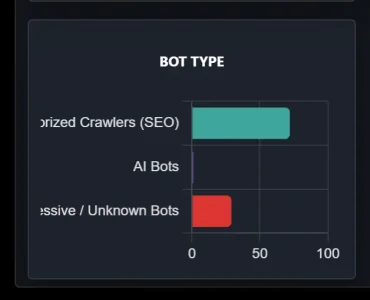
Something fyi from my reports page on my desktop. Words cutoff on left edge.
Screenshot 2026-03-15 135910.webp
 
2. TOR "T1" Flag Issue:This is a brilliant catch! Cloudflare natively assigns the pseudo-country code "T1" to all traffic originating from the TOR network. Since "T1" isn't a real country, XenForo doesn't have a matching flag sprite for it, resulting in the broken image. We will add a rule in the next patch to intercept "T1" and convert it to the default "Unknown" globe icon.
Just a reminder in case it got missed. No hurry though as it isn't critical.
 
After considering everything I decided I do not need (yet) to add to my flat block at cloudflare. I have verified at cloudflare every misc/style-variation has been captured at the zone level. Tens of thousands lol. But the effect on my forum traffic has been cleansed and now reflects a more realistic traffic level. Much appreciate your work in this as it helped to identify this issue.

Something fyi from my reports page on my desktop. Words cutoff on left edge.
View attachment 335143
From the xenforo admin panel, rename the phrase with a shorter one. We will fix it in the next release
Just a reminder in case it got missed. No hurry though as it isn't critical.
We already included the fix in the previous release. If it didn't work, please attach a screenshot of the bot connecting again, as it's difficult to replicate if it doesn't connect to our forum.
 
  • Like
Reactions: CTS
We already included the fix in the previous release. If it didn't work, please attach a screenshot of the bot connecting again, as it's difficult to replicate if it doesn't connect to our forum.
I only notice when the flag placeholder shows up on my country flag list with no image in either the reports page or widget.

I presume you mean a screen shot of the Live Traffic Radar showing that hit?
If so I will keep an eye out and grab a screen shot when it shows up again.
 
Thank you for this detailed report. This information is extremely helpful and explains exactly why you are seeing the MySQL 3988 error.

Your server environment (PHP 8.2.30 and MySQL 8.0.45) is actually excellent and very modern. The problem is not the software version, but a "collation conflict" caused by those three specific tables, especially xfa_Who_Read_Content.

Why this causes the error:When XenForo tries to install or upgrade an add-on, it opens a "transaction." If the process touches or even just "sees" tables with different collations (mixing the old utf8mb3 with the modern utf8mb4), MySQL 8.0 blocks the operation for safety. The fact that the "Who Read Content" table has 1.8 million rows makes this conflict much more likely to trigger a timeout or a transaction lock.

The Solution:Since you have a system consultant, you can ask them to perform these two steps. It will not only fix the installation of my add-on but also make your entire forum more stable and faster:

  1. Convert the three tables: Ask your consultant to convert au_lait_lau, xfa_fss_transaction, and especially xfa_Who_Read_Content to utf8mb4_unicode_ci. This will align them with the rest of your database.
  2. XenForo Built-in Tool: XenForo actually has a built-in tool for this. Your consultant can run this command via CLI:php cmd.php xf:convert-utf8mb4(Note: Since the "Who Read Content" table is very large, they should run this via CLI to avoid web-server timeouts).
Regarding the XFA add-on issue:The reason you can't save the "maximum events count" might be related to this same database mismatch or the massive size of the table. Standardizing the collation often fixes these "unresponsive" settings as well.

Once those 3 tables are aligned to utf8mb4_unicode_ci, our add-on (and any other future updates) will install instantly without any errors.

Important: Full Backup before proceeding
The table collations have been fixed but some jobs related to the prior installation seem to be causing problems. Is your offer to install this addon still good?
 
Temporarily disabled until I can figure out the cron stalls. I noted this morning the crons stalled yesterday evening, so this morning I disabled the addon to release the cron executions.
 
The problem with XFA-WRC is that it does not handle user_id = 0 for any user associated content. I have a report in to the author.
Currently I have it disabled and I have hacked the offensive user_id entries by substituting a new user id created for the purpose. It appears that some process sets user_id to 0 when content is deemed to be spam or some similar reason.

I presume you are not looking at the table while the WRC addon is disabled.

You may have noticed the payment for the pro version of your addon. :)
 
The problem with XFA-WRC is that it does not handle user_id = 0 for any user associated content. I have a report in to the author.
Currently I have it disabled and I have hacked the offensive user_id entries by substituting a new user id created for the purpose. It appears that some process sets user_id to 0 when content is deemed to be spam or some similar reason.

I presume you are not looking at the table while the WRC addon is disabled.

You may have noticed the payment for the pro version of your addon. :)
Hi Tom,

First of all, thank you very much for your purchase! Your support is greatly appreciated.

Regarding the issue you mentioned with XFA-WRC and the user_id = 0 logic:
  • XF Guest Logic: You are correct; XenForo natively assigns user_id = 0 to Guests or when content is associated with a deleted/spam-cleaned account. Many add-ons fail because they expect a valid User Entity and don't handle the "Guest" state properly.
  • Our Add-on Compatibility: You can rest easy with Advanced Traffic Statistics. Our system is built to be "Guest-first". We log traffic based on IP addresses and User Agents, so the user_id = 0 state is a standard part of our tracking logic and won't cause any crashes or database integrity issues.
  • AI Analyst Safety: Even the AI Daily Report uses a specific "Bot User ID" that you define in the options, ensuring that the generated threads are always associated with a valid account of your choice, completely avoiding the "User ID 0" trap.
I strongly recommend installing the latest Version 1.8.3 I just released. It includes critical fixes for MySQL compatibility and better handling of TOR network traffic.

Let me know if you need any help setting up the new Pro features!
 
How do I receive the pro code. I actually installed the new version before you had released. I did not receive anything after paying.
The system automatically sends the activation code. Check your email and spam folders in the email address you used for PayPal. If you haven't received it, send me a PM specifying the email address you used and I'll resend it. Once you get the code go to the addon settings and enter it.
 
I do not see any instructions on configuring the report page. I created the page in the addon and it appeared in the node list. I located it in our moderator/admin forum. but it is empty.

Is the a document somewhere on setting up the report page?
 
1774435455632.webp
1774435594129.webp

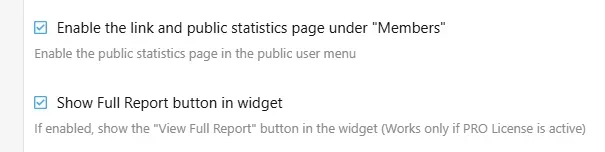
The page is automatically created by the addon. Make sure you've enabled the correct display in your settings and groups.
 
Last edited:
Apologies for being so dense but I am not sure what location in the admin area you mean. Are both of the checkboxes in the Usergroup permissions listing? We do not have a group called Members. We have "Registered Users" and "NAWCC Members" who are dues paying members of the association.

I am not sure what you mean by widget since Advanced Statistics did not create a widget in the Appearance area of Admin.

I looked in the templates for any templates associated with Advanced Traffic Statistics but there are none there.

There are none in my widgets list either.

Does your addon make changes in the setup Public Navigation area? That has been heavily modified on our system for compatibility with our parent organization web site so if you changed some content it may not be visible in the Admin controls for the Public Menu.

I am hoping to substantially improve our performance by getting control of bad bots. We have 5,901 "guests" on the system at this moment with 70 registered users. We have had 520 new users register in the last 30 days with 359 NAWCC members and another 1447 who are registered but do not pay dues. If you subtract the newly registered from the total non members we have about a 2:1 ratio of registered only to paid members.
 
We do not have a group called Members.

Does your addon make changes in the setup Public Navigation area? That has been heavily modified on our system for compatibility with our parent organization web site so if you changed some content it may not be visible in the Admin controls for the Public Menu.
Look in Setup -> Public Navigation in ACP. Possibly the can be found there under the "members" menu point but is not visible in the front end if you don't use that menu in the front end. You can simple put it to another area of your choice.
 
Back
Top Bottom

