
You are using an out of date browser. It may not display this or other websites correctly.
You should upgrade or use an alternative browser.
You should upgrade or use an alternative browser.
XF 1.4 Add post count in bottom right avatar corner
- Thread starter dethfire
- Start date

What things you can't figure out? Have you figured out how to add the post count?

I add this under the marker span in the avatar div.What things you can't figure out? Have you figured out how to add the post count?
<xen:if is="{$user.isOnline}"><span class="Tooltip avpc" title="Post Count" data-offsetX="-22" data-offsetY="-8">10,321</span></xen:if>
avpc css is
#avpc {
position: absolute;
top: 30px;
left: 9px;
width:50px;
height:20px;
color:#000;
background-color:#fff;
border:1px solid #ccc;
}
The coordinates aren't right but I just want to test to see what happens. The text ends up under the avatar, seemingly outside the div container. Not sure what to do about the data-offsets.
owh... what is wrong with the css is that you've added 'avpc' as a class, but you used it as a id selector... change the css selector from '#avpc' to '.avpc'
and for fetching the message count, use {$user.message_count}
and for fetching the message count, use {$user.message_count}

Here you go. I don't have your style on our dev board anymore so you may need to adjust the "top" and "right" css to make it look right.
Revert your current changes you have done.
In the message_user_info template
Find:
<!-- slot: message_user_info_avatar -->
Above it add
Add this CSS to EXTRA.css template
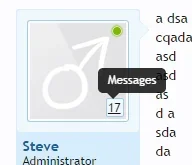
Revert your current changes you have done.
In the message_user_info template
Find:
<!-- slot: message_user_info_avatar -->
Above it add
Code:
            <xen:if is="@messageShowMessageCount AND {$user.user_id}">
                <span class="avatarMessageCount"><a href="{xen:link search/member, '', 'user_id={$user.user_id}'}" class="concealed Tooltip" title="{xen:phrase messages}" data-offsetX="-10" data-offsetY="-8" rel="nofollow">{xen:number $user.message_count}</a></span>
            </xen:if>
Add this CSS to EXTRA.css template
Code:
span.avatarMessageCount
{
    background: @primaryLightest;
    border: 1px solid @primaryLighter;
    position: absolute;
    bottom: 15px;
    right: 15px;
    padding: 2px 2px 0 1px;
    border-radius: 2px;
}

<xen:if is="@enableResponsive">
@media (max-width:@maxResponsiveNarrowWidth)
{
    span.avatarMessageCount
    {
        bottom: 10px;
        right: 10px;
    }
}
</xen:if>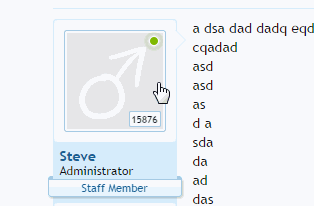

InterestedIf you are interested in hiding it unless the user block is hovered I can give that CSS as well


Hello @Steve F would be nice share that nice cssIf you are interested in hiding it unless the user block is hovered I can give that CSS as well
View attachment 85676
 Thank you.
Hello @Steve F would be nice share that nice css
I've changed it so the default message count isn't displayed.
In the message_user_info template
Find:
<!-- slot: message_user_info_avatar -->
Code:
<xen:if is="!{$isQuickReply} AND {$user.user_id}">
                        <span class="avatarMessageCount"><a href="{xen:link search/member, '', 'user_id={$user.user_id}'}" class="concealed Tooltip" title="{xen:phrase messages}" data-offsetX="-10" data-offsetY="-8" rel="nofollow">{xen:number $user.message_count}</a></span>
                    </xen:if>
Add to EXTRA.css
Code:
/* Hover messageUserBlock to display */
.messageUserBlock:hover span.avatarMessageCount
{
    opacity: 1;
}

span.avatarMessageCount
{
    background: @primaryLightest;
    border: 1px solid @primaryLighter;
    font-size: 11px;
    padding: 0px 2px;
    position: absolute;
    bottom: 15px;
    right: 15px;
    opacity: 0;
    transition: all ease-in-out 0.5s;
    border-radius: 2px;
}

<xen:if is="@enableResponsive">
@media (max-width:@maxResponsiveNarrowWidth)
{
    span.avatarMessageCount
    {
        bottom: 10px;
        right: 10px;
        opacity: 1;
    }
}
</xen:if>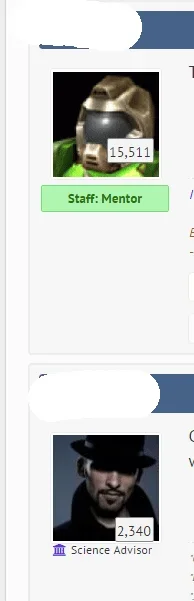
Similar threads

- Question
- Replies
- 0
- Views
- 344