
You are using an out of date browser. It may not display this or other websites correctly.
You should upgrade or use an alternative browser.
You should upgrade or use an alternative browser.
![[XTR] AI Assistant](/community/data/resource_icons/10/10205.jpg?1766866402)
[XTR] AI Assistant 1.0.35
No permission to buy ($45.00)
- Author Osman
- Creation date
This update brings essential logic fixes and performance improvements to ensure flawless bot operation. We resolved a critical restriction conflict where bots configured for "Auto-Reply" were silently blocked if their target forum was not explicitly included in the general "Access -> Reply Forums" list. The system now correctly prioritizes Auto-Reply directives, allowing bots to respond seamlessly in their designated nodes.
Furthermore, we have highly optimized backend queries during thread creation by routing bot availability checks directly through XenForo's native caching system, which significantly reduces database load and processing time. Upgrading to this version is highly recommended for all users to ensure optimal stability and performance.
- Fix: Addressed a logical conflict where the strict "Access > Reply Forums" and "Posted in Forums" restrictions inadvertently blocked the Thread Auto-Reply functionality. Auto-Reply nodes are now properly exempted from these global limitations, ensuring bots respond exactly as configured.
- Optimization: The
hasAutoReplyBotForNodecheck has been fundamentally rewritten. It now evaluates node conditions strictly using the DataRegistryxentrAiaBotCache, drastically reducing unnecessary database queries during entity save cycles and significantly improving thread creation performance.- Maintenance: Implemented an automated database rebuild step in the installer to seamlessly migrate and sync cache data upon upgrade.
Performance and Stability Update In this release, we've implemented significant architectural improvements to maximize the background performance of the add-on. We have completely eliminated the unnecessary database (SQL) overhead that occurred with every new post, which is especially crucial for high-traffic forums. Auto-reply checks are now processed in milliseconds through XenForo's built-inDataRegistry(Cache) system.
- Improvement: Refactored the Auto-Reply trigger checks to run entirely through the DataRegistry (Cache) instead of executing database queries on every post save.
- Enhancement: Expanded the
BotCachestructure to allow instant reading of bot activation settings directly from memory.
In this version, we have rolled out a critical infrastructure update specifically for our Azure OpenAI users, ensuring full compatibility with Azure's next-generation image models.
1. Seamless Azure GPT Image Compatibility We have permanently resolved the "The requested operation is unsupported" error that occurred when trying to generate images usinggpt-image-1orgpt-image-2deployments on Azure OpenAI. The add-on now automatically routes traffic through the correct Azure API version based on your selected model. It uses the stable release (2024-02-01) for DALL-E models and automatically switches to the latest preview version (2025-04-01-preview) for GPT Image models.
2. Native GPT Image 2 Support The highly requested GPT Image 2 model, known for generating incredibly realistic and high-quality images, has been officially added to the Image Model dropdown list in the Bot Capabilities settings.
Changelog (v1.0.23)
- [Feature] Officially added the "GPT Image 2 (OpenAI / Azure)" option directly into the Image Model selector under Bot Capabilities.
- [Feature] Introduced a fault-tolerance mechanism for Azure OpenAI image requests: if an "unsupported" error occurs, the system automatically forces the newest API version and retries the generation.
- [Core] Registered gpt-image-2 into the official recognized models list within both
OpenAIImageandAzureImageclasses.Changed / Improved
- [Core] Rewrote the Azure OpenAI URL builder (buildAzureUrl). Instead of forcing all requests through a single legacy API version, the system now intelligently selects the dynamic API version (stable vs. preview) based on the exact model family being used.
Fixed
- [Bug] Permanently fixed the "
API Error (400): The requested operation is unsupported" error caused by outdated API versions when deployinggpt-imageseries models via Azure.
In this release, we have taken two massive steps forward in the core architecture of the add-on: We introduced Granular Admin Permissions to ensure complete security and team management, while completely rebuilding the Image Generation infrastructure to be compatible with OpenAI's newest models and third-party proxy services.
1.
Highlighted Features
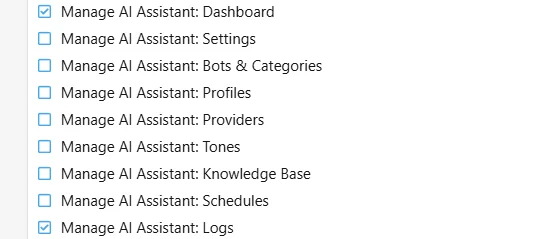
Comprehensive Admin Panel Permission System Allowing all administrators to modify API keys or bot settings in large forums is a major security risk. With this update, we have introduced 9 different sub-admin permissions for the AI Assistant. Now you can allow one admin to only read logs, while another can solely manage the Knowledge Base! The added permissions include:
2.
- General AI Assistant Access
- Manage Bots
- Manage Behavior Profiles
- Manage Providers (API Keys)
- Manage Knowledge Base
- Manage Schedules
- Manage Tones
- View Logs
- Manage General Options
Next-Generation Model Support (GPT-Image Series) Full support has been added for OpenAI's newest image generation models:
gpt-image-1,gpt-image-2,gpt-image-1-mini, andgpt-image-1.5. The system now automatically adjusts the API parameters based on the selected model type.
3.Custom Model & Proxy Support Unofficial API providers (proxies) often use non-standard model names. Thanks to the "Custom model" option added to the Bot Capabilities page, you can now manually enter any specific model name requested by your API provider (e.g.,
gpt-4-dalle-proxy). The system no longer strictly filters model names and will pass whatever you type directly to the API.
4.Smart Error Handling and Auto-Retry Mechanism Some intermediary APIs were returning errors because they didn't support the
response_format=b64_jsonparameter. Our newly developed smart algorithm handles this gracefully: If the API rejects this parameter, instead of canceling the process, the system clears the parameter and instantly resends the request. If the API returns a temporary URL instead, the server automatically downloads the image in the background and safely uploads it to the forum.
Added
- [Security] Added 9 new specific administrator permissions for the AI Assistant to the XenForo Admin Control Panel (admin_permission.xml structure implemented).
- [Feature] Added OpenAI's next-generation image models:
gpt-image-1,gpt-image-2.- [Feature] Added a "Custom model" option and a dedicated text input field to the Bot Capabilities page for proxy users.
- [Feature] Introduced a "Smart Auto-Retry" mechanism that automatically clears incompatible parameters and retries the request if an image generation API call fails due to formatting parameters.
- [Feature] Added a fallback download system that uses the Guzzle HTTP Client to securely download the image to the server if the API returns a temporary
urlinstead ofb64_jsondata.- [Language] Added new phrases required for the custom model system (e.g.,
xentr_aia_custom_model).
- [Core] Updated
admin_navigation.xml(Menu structure) to link all sub-menus to the newly added admin permissions. Administrators will now only see the menus they are authorized to access.- [Core] Completely rewrote the
OpenAIImageandAzureImageprovider classes with a much more modern, flexible, and modular architecture.- [Core] Relaxed the model validation system; the system now directly passes undefined external proxy models to the API instead of rejecting them.
- [Core] Updated the
api-versionvalue for Azure OpenAI to2024-02-01to support the newest image models.- [Template] Reorganized the "Image model" selection list in the
xentr_aia_bot_edittemplate to include proxy support and highlight modern models.
- [Bug] Permanently resolved the "Unknown parameter: 'response_format'" error encountered when using proxy services.
- [Bug] Improved the handling and user warning messages for the "model does not exist" error, which occurred when text models were mistakenly selected for image generation requests.
- [Bug] Fixed an issue in the
MentionReplyCreatorclass where custom model (custom_model) values were not being properly passed to the image generator classes.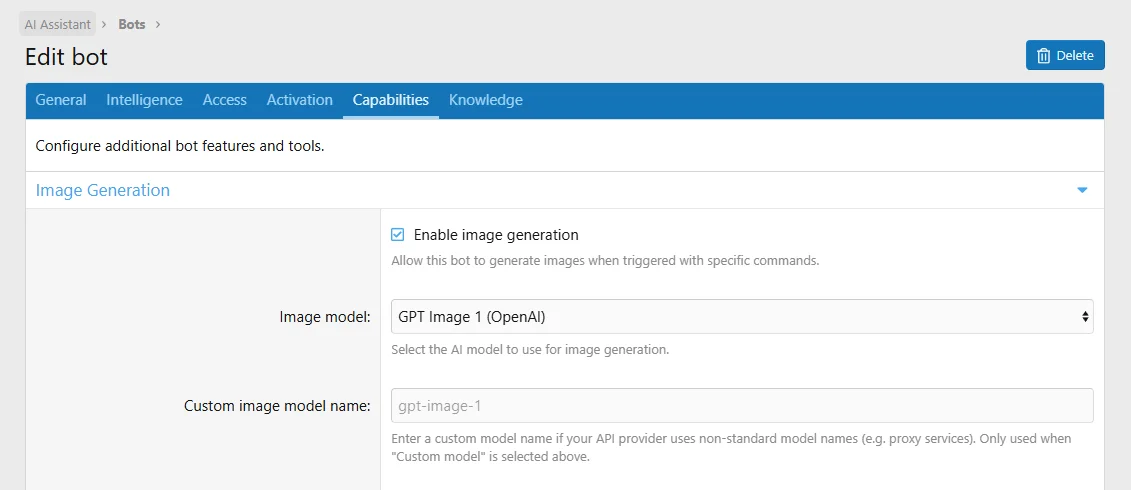
Admin Permissions
We continue to keep pace with the rapid advancements in the AI ecosystem! With version 1.0.21 of XENTR AI Assistant, we are proud to introduce the highly anticipated native Azure OpenAI support for our enterprise users. You can now use your Azure infrastructure directly through our add-on without the need for any intermediary proxies.
Furthermore, this release integrates all the next-generation AI models released as of June 2026 into the core of our add-on. Your assistant now natively recognizes and supports OpenAI's latest GPT-5.5 series, Google's Gemini Omni, and the latest models released by giants like Anthropic, DeepSeek, Mistral, Moonshot, and xAI.
Changelog
- [New Feature] Added native support for Azure OpenAI. Azure's custom API endpoint structure and authentication are now fully supported out-of-the-box (eliminating the need for Custom Proxies).
- [Update] Updated the OpenAI model list to include GPT-5.5, GPT-5.5-Pro, the GPT-5.4 series, and GPT-5.3-Instant.
- [Update] Added the new Gemini Omni, 3.5 Flash, and 3.1 Flash-Lite to the Google Gemini model list.
- [Update] Updated the Anthropic Claude model list to include Claude Opus 4.8, Opus 4.7, and Sonnet 4.6.
- [Update] Added DeepSeek V4 Pro, DeepSeek V4 Flash, Mistral Medium 3.5, Mistral Small 4, Grok 4.3 Beta, and Moonshot (Kimi) K2.7 Code to the models list.
- [Update] Integrated Meta's Muse Spark model into intermediary providers (OpenRouter / Hugging Face).
Changelog:
- Fixed critical error during AI mention replies — Resolved LogicException: Attempted to set 'status' while a save was pending without forceSet that occurred when the AI mention handler encountered a database or API error. The ActionLog entity now uses forceSet when marking status as failed during error handling, preventing cascading exceptions.
- Fixed custom tone/prompt not being applied to AI suggestions — The "Suggest Reply" feature always defaulted to the "Friendly" tone regardless of user selection. This was caused by a parameter name mismatch between the frontend (tone) and the backend controller (ai_tone). The controller now accepts both parameter names with proper fallback logic.
- Fixed AI suggestion not inserting into BBCode editor mode — When the editor was in "Toggle BB Code" mode, clicking "AI Suggestion" would show a success message but fail to insert the text into the editor. The code was using Froala's codeView API which does not exist in XenForo 2.3. Updated to use XenForo 2.3's native editorHandler.isBbCodeView() and editor.bbCode.getTextArea() API, matching XenForo's own core implementation.
- Improved HTML content sanitization — Replaced regex-based HTML stripping (/<[^>]*>/g) with DOM-based textContent extraction for cleaner and more accurate text parsing when sending content to the AI API. This also properly handles HTML entities like &amp;, &nbsp; etc.
Release Notes
AI Mention Reply Error Fix Fixed a critical error that could occur when the AI bot failed to generate a mention reply (e.g., due to API timeout or database errors). Previously, this would cause an unhandled LogicException and leave the action log in an inconsistent state. The error is now handled gracefully with proper logging.Important: This update includes critical bug fixes. All users are recommended to update.
Custom Tone Support Fix Your custom tones (Pirate, Professional, Casual, etc.) are now correctly applied when using the "Suggest Reply" feature. A bug was preventing the selected tone from being sent to the AI, causing all suggestions to default to "Friendly" regardless of selection.
BBCode Editor Mode Fix The "AI Suggestion" button now works correctly when the editor is in BBCode mode (Toggle BB Code). Previously, the suggestion would be generated successfully but not inserted into the editor text area. This has been fixed by aligning with XenForo 2.3's native editor API.
In this release, we focused heavily on User Privacy and Data Security. We know that running a private community means keeping your members' data safe and giving them control over how their content is used. With v1.0.19, we are introducing a powerful multi-layered privacy infrastructure.
What's New in this Release?
We highly recommend all administrators to update to this version to provide a safer and more privacy-compliant experience for their communities.
- Global User Opt-Out: We believe in user autonomy. Your members can now go to their standard XenForo Account -> Privacy settings and check a single box to prevent the AI Assistant from processing their messages. If a user opts out, their content is completely masked and ignored by the AI across the entire forum.
- Automated PII Data Masking: Administrators now have the option to enable a Personally Identifiable Information (PII) filter. When active, the system will automatically scan and hide sensitive data like email addresses and phone numbers before securely sending the context to AI providers.
- Thread-Level Privacy Consistency: When a thread starter disables AI bots for their topic, the AI Assistant is now completely disabled for that thread. We have also updated the user interface so that AI action buttons (like "Summarize Thread" or "Suggest Reply") are strictly hidden in these topics.
Changelog v1.0.19
New Features:
Enhancements & Fixes:
- Feature: Added a "Do not allow AI to process my messages" option to the native XenForo Account Privacy settings.
- Feature: Added an automated PII (Personally Identifiable Information) masking system to censor emails and phone numbers before AI processing.
- Feature: Added a new admin option to easily toggle the PII data filter on or off globally.
- Change: "Summarize Thread" and "Suggest Reply" buttons are now completely hidden if AI bots are disabled by the thread starter.
- Fix: Resolved an issue where AI bots could still process context from threads that were marked as "AI Disabled".
- Change: Opted-out users will no longer trigger Auto-Replies or Bot Mentions.
- Vision Capability Detection Fixed: Updated the strict regex filtering mechanism that caused the add-on to fail to recognize next-generation AI models (such as
gpt-4.1,gpt-5.x,o1,o3, etc.) as vision-capable, which previously resulted in image attachments being incorrectly stripped from the API payload.- Silent Bot Failure Resolved: Fixed the underlying logic issue where using custom or proxy-based Vision model names caused API requests to fail with a 400 Bad Request error, leading to the bot remaining completely silent and failing to reply to users.
- Expanded Model Support: The AI Assistant now provides full native support for the upcoming
gpt-5series,o1/o3reasoning models, and flexible custom model names (e.g.,gpt-4.1-mini) provided by third-party API proxies. Regardless of the model name, image attachments will now be successfully processed and delivered to the API.
- Fix: Added a specialized filtering method to automatically remove Perplexity/Sonar style footnote markers from AI output.
- Fix: Implemented a sanitization step to purge unclosed or broken BBCode tags generated by AI models.
- Fix: Improved the quoting logic to completely remove media tags from the shortened quote content, preventing broken embeds in the front end.
- Enhancement: Added an "IDENTITY REMINDER" reinforcement block to the system prompt to prevent context loss for models.
- Feature: Added a new global option to manage the default checked/unchecked state of the AI trigger on the thread creation page.
- Update: Updated the thread creation template modifications to reflect the new dynamic checkbox option.
With this update, we have focused on improving the robustness of AI outputs, fixing quote rendering issues, and expanding customization options for administrators based on your feedback.
Key Highlights in this Release:
- Smart Citation Filtering: We have added a smart filter for research-augmented models like Perplexity and Sonar. Ugly, unclickable reference markers (like [1] or [1, 2]) that these models sometimes inject are now automatically stripped before rendering on the forum.
- Media Rendering in Quotes: Fixed a critical issue where the AI would sometimes break MEDIA, IMG, or ATTACH BBCode tags when trying to quote a user. Orphaned or half-written tags generated by the AI are now properly cleaned up and sanitized.
- Enhanced AI Persona Retention: Some AI models with shorter context windows tend to "forget" their assigned persona (e.g., "You are a friendly support assistant") as the conversation gets longer. We've added a strict reinforcement block to the end of the system prompt to guarantee your bot stays in character at all times.
- New Admin Option for Thread Creation: You can now control the default behavior of the "Enable AI Bots" checkbox when users create new threads. By using the new "Enable AI Bots by default" option in the admin panel, you can choose to have it unchecked natively.

This release is a stability and architectural update that brings the AI core up to date with the latest flagship generations (such as Claude 4.6, Gemini 3.1, Grok 3) and completely automates expansive networks like OpenRouter and Hugging Face.
- Updated AI Models: The predefined model lists in the system for Claude (claude-sonnet-4-6, claude-opus-4-6, etc.), Google Gemini (gemini-3.1-pro-preview, gemini-3.1-pro-preview-customtools, etc.), and xAI Grok (grok-3, grok-3-mini, grok-code-fast-1, etc.) have been completely refreshed with their latest flagship versions.
- Dynamic Model Fetching (OpenRouter & Hugging Face): The admin CP model lists for OpenRouter and Hugging Face have transitioned from static configurations to a dynamic API fetching system. To heavily optimize server performance and API limits, this vast list is cached securely via the XenForo Data Registry with a 12-hour lifespan.
- Fix - Editor Quote Block Merging Issue: Resolved a crucial JavaScript bug in the reply editor. Previously, when users quoted a post and utilized the "AI Suggestion (Rewrite/Refine)" feature for their draft, the system would destroy the existing BBCode quote blocks and merge all contents into a single paragraph. Structured quote blocks are now flawlessly preserved, isolated before sending, and safely prepended back to the AI's rewritten response.
Additionally, prioritizing community feedback, this patch rectifies a critical user-experience flaw in the frontend editor where the AI Rewrite feature would corrupt and consume existing BBCode Quote structures.