

- Compatible XF 2.x versions
- 2.3
- Additional requirements
- XenForo 2.3.13 or later
- License
- CC0 1.0 Universal
- Visible branding
- No
Customize XenForo’s WYSIWYG editor font sizes
XQ Editor Font Sizes lets you configure the seven text sizes available in XenForo’s rich-text editor. The dropdown displays your configured pixel values, and the corresponding numbered SIZE BB code uses the same settings when messages are displayed.
Features
Default sizes
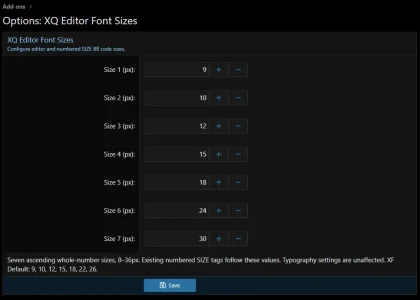
Add-on defaults: 9, 10, 12, 15, 18, 24, 30px.
XF Default: 9, 10, 12, 15, 18, 22, 26px.
The first five choices retain XenForo’s default sizes. Size 6 increases from 22px to 24px, and size 7 increases from 26px to 30px. All seven values can be customized.
Important: existing messages are affected
The configured values apply to existing and new content containing numbered tags such as [SIZE=6]text[/SIZE], whether the formatting was applied through the WYSIWYG editor or entered manually.
For example, installing with the add-on defaults makes existing SIZE=6 content display at 24px and SIZE=7 content display at 30px. Changing these settings later also changes how existing numbered SIZE tags are displayed.
Stored messages are not rewritten. These changes happen when content is rendered. Normal unformatted text and the forum’s Typography style properties are unaffected.
Configuration
Go to Admin CP → Setup → Options → XQ Editor Font Sizes.
Enter seven distinct whole-number sizes from 8 through 36, in ascending order. Reload open editor pages after changing the settings.
To retain XenForo’s original size mapping while keeping the add-on enabled, use 9, 10, 12, 15, 18, 22, 26.
Disabling or uninstalling
Disabling or uninstalling restores XenForo’s default editor choices and numbered SIZE rendering. Existing posts and messages will return to default XF size values.
Explicit pixel tags, such as [SIZE=24px]text[/SIZE], continue to use their specified size within XenForo’s native limits.
Development note: This add-on was made with AI assistance, then manually reviewed, tested and refined on a live XenForo installation. Code reviews, bug reports, and suggestions are welcome.
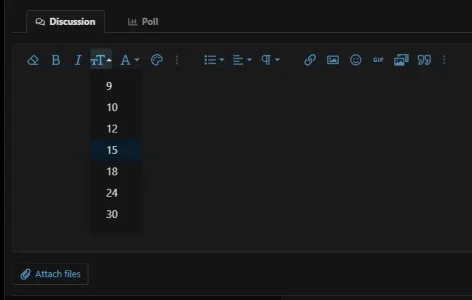
XQ Editor Font Sizes lets you configure the seven text sizes available in XenForo’s rich-text editor. The dropdown displays your configured pixel values, and the corresponding numbered SIZE BB code uses the same settings when messages are displayed.
Features
- Individually configure all seven font-size choices.
- Choose whole-number sizes from 8px through 36px.
- Keep editor choices and numbered SIZE BB code synchronized.
- Apply your settings to both existing and new messages.
- Retain XenForo’s support for explicit pixel-size BB code.
- Restore XenForo’s default numbered sizes by disabling or uninstalling the add-on.
- Lightweight implementation with no core-file modifications, new database tables, scheduled tasks, or external requests.
Default sizes
Add-on defaults: 9, 10, 12, 15, 18, 24, 30px.
XF Default: 9, 10, 12, 15, 18, 22, 26px.
The first five choices retain XenForo’s default sizes. Size 6 increases from 22px to 24px, and size 7 increases from 26px to 30px. All seven values can be customized.
Important: existing messages are affected
The configured values apply to existing and new content containing numbered tags such as [SIZE=6]text[/SIZE], whether the formatting was applied through the WYSIWYG editor or entered manually.
For example, installing with the add-on defaults makes existing SIZE=6 content display at 24px and SIZE=7 content display at 30px. Changing these settings later also changes how existing numbered SIZE tags are displayed.
Stored messages are not rewritten. These changes happen when content is rendered. Normal unformatted text and the forum’s Typography style properties are unaffected.
Configuration
Go to Admin CP → Setup → Options → XQ Editor Font Sizes.
Enter seven distinct whole-number sizes from 8 through 36, in ascending order. Reload open editor pages after changing the settings.
To retain XenForo’s original size mapping while keeping the add-on enabled, use 9, 10, 12, 15, 18, 22, 26.
Disabling or uninstalling
Disabling or uninstalling restores XenForo’s default editor choices and numbered SIZE rendering. Existing posts and messages will return to default XF size values.
Explicit pixel tags, such as [SIZE=24px]text[/SIZE], continue to use their specified size within XenForo’s native limits.
Development note: This add-on was made with AI assistance, then manually reviewed, tested and refined on a live XenForo installation. Code reviews, bug reports, and suggestions are welcome.


