
![[XFA] RM Marketplace/Shop - XF2 - Affiliate system plugin](/community/data/resource_icons/9/9866.jpg?1743350593)
- Compatible XF 2.x versions
- 2.2
- 2.3
- Additional requirements
- RM Marketplace > 5.7.0
- Updates duration
- 1 year - 10€ renew
RM Marketplace Affiliate lets your sellers grow their sales through their own affiliates. A seller hands out a coupon, assigns it to a member and sets the commission. Every sale made with that coupon is tracked, reported to both sides and settled with a clear payout breakdown.
Sellers always know what they owe, and affiliates always know what they earned, including when an order is refunded. Payouts stay in your sellers' hands: nothing is paid automatically.
Perfect for marketplaces whose sellers want word-of-mouth promotion, influencer deals and partner programs.
 What's new in 1.1.0
 Payouts with full breakdown: sellers and affiliates each get a payouts history, and one click opens an overlay listing every sale, rate and commission behind a payout or a current balance.
 Refund handling: when an order is refunded, the commission is cancelled, or deducted from the next payout if it was already paid, and sellers can mark a negative balance as settled.
 Alerts for every step: affiliates are alerted when they are assigned a coupon, earn a commission, see a sale refunded, get paid or have a balance settled.
 Email notifications: the same events can reach affiliates by email, with the sale details included.
 Your choice of notifications: affiliates can switch off alerts per event and opt out of affiliate emails from their account preferences.
 Features
For sellers
 Affiliate coupons: add an affiliate to any coupon with a percentage of the sale to give back as commission.
 Easy assignment: pick the affiliate by username with autocomplete, right in the coupon form.
 Commission per coupon: set a different percentage for each coupon, to match your margins and each affiliate's performance.
 Affiliates tab: a tab in your seller dashboard lists every affiliate with their total earnings and what is still unpaid.
 Sort and filter: sort by earnings or unpaid earnings, and filter by affiliate or payment status.
 Mark as paid: once you have paid an affiliate yourself, mark them paid in one click after a confirmation.
 Affiliate shown on coupons: see at a glance which coupons belong to which affiliate in your coupon list.
For affiliates
 Personal dashboard: a dedicated affiliate area with a welcome page, reachable from the marketplace menu.
 Your coupons: see every coupon assigned to you, the products it applies to, and its details, with filters.
 Coupon usage: review each sale made with your coupons and your earning on it, filtered by seller, coupon or paid and unpaid status.
 Earnings statistics: sales, earnings and unpaid amounts with charts, by day, week or month, over the period you choose.
 Payouts history: see every payment you received, with the details of what it covered.
Payouts and refunds
 Balance details: before paying, a seller sees the earnings to pay, the refunds to deduct and the net amount, sale by sale.
- Payout breakdown: every recorded payout keeps its detail, so both sides can check it at any time.
 Refunded orders: the commission on a refunded sale is cancelled automatically, so nobody is paid for a sale that was returned.
 Refunds after payout: the amount already paid is deducted from the affiliate's next payout.
 Settle a balance: if an affiliate owes money back, the seller can mark the balance as settled once it is paid back or waived.
 Contact the affiliate: reach an affiliate by private message from the seller's list.
Alerts and emails
 Coupon assignment: an affiliate is notified as soon as a seller assigns a coupon to them, with a link to view it.
 Sale alerts: affiliates are told when they earn a commission from a sale.
 Payout alerts: affiliates are told when a seller records a payment to them.
 Email notifications: the same events can be sent by email, with a summary of the sale or payout.
 Opt-out: each affiliate chooses which alerts they receive and whether to get affiliate emails.
Control for admins
 Seller permission: choose which usergroups can create affiliate coupons.
 Affiliate permission: choose which usergroups can be affiliates and access the affiliate dashboard.
 No self-referral: an affiliate cannot use their own coupon.
 Built into your marketplace: the affiliate fields and tab appear inside the existing RM Marketplace dashboard, with nothing to rebuild.
 Quick facts
 Requires: the RM Marketplace add-on.
 Install: install RM Marketplace first, then RM Marketplace Affiliate. Step by step instructions are in the readme.
- Good to know: the add-on tracks and reports affiliate sales. It does not process payments, so sellers pay their affiliates themselves and then mark them as paid.
 Support: visit the support forum.
 Ready to grow your marketplace through affiliates?
Install the add-on, give your sellers the permission, and let their coupons bring in new buyers.-
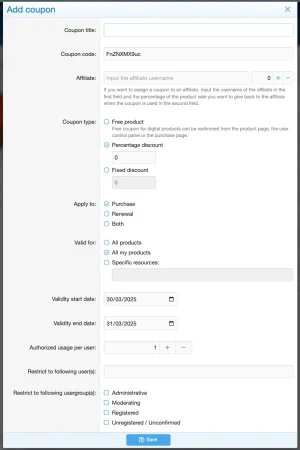 01 - Dashboard - Coupon add.webp
 -
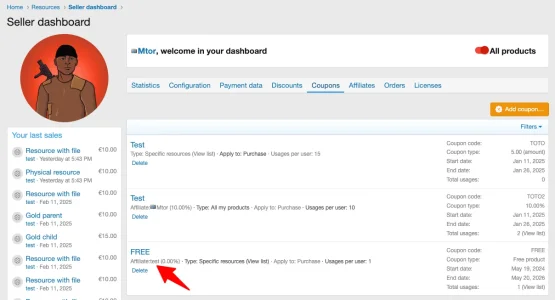 02 - Dashboard - Coupons.webp
 -
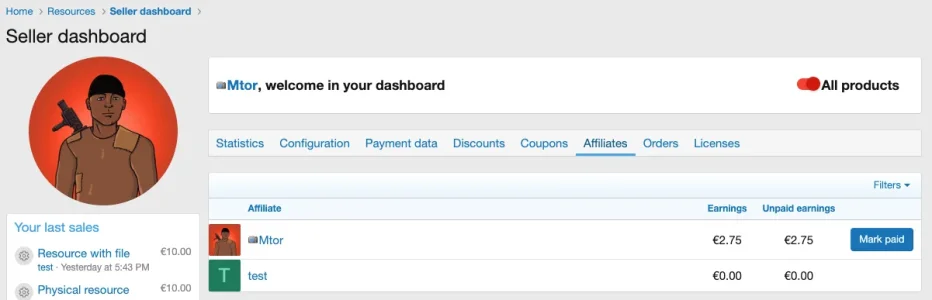 03 - Dashboard - Affiliates.webp
 -
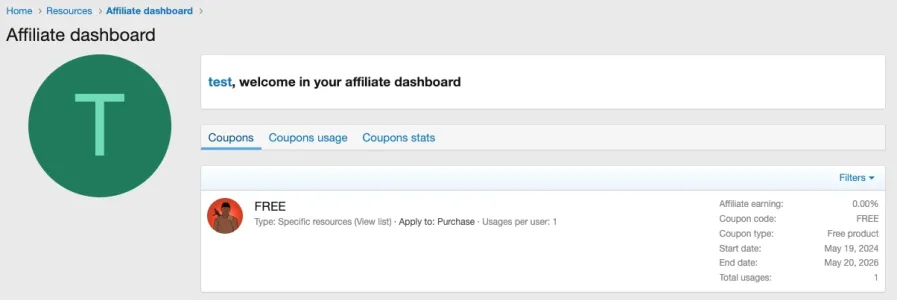 04 - Affiliate dashboard - Coupons list.webp
 -
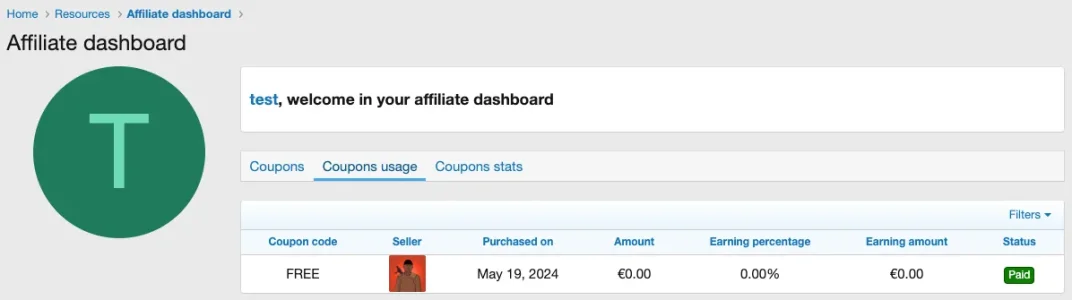 05 - Affiliate dashboard - Coupons usage.webp
 -
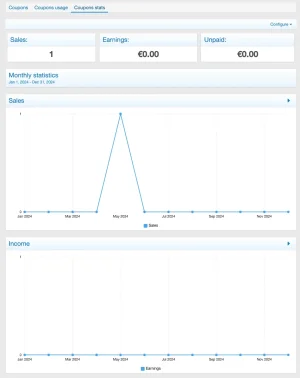 06 - Affiliate dashboard - Stats.webp
 -
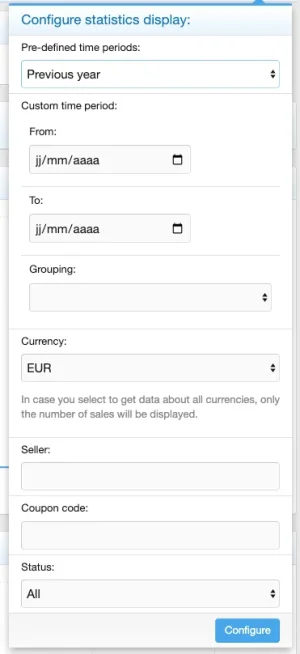 07 - Affiliate dashboard - Stats filters.webp
 -
 08 - Permissions.webp
 -
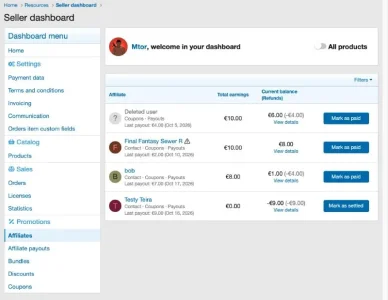 09 - Dashboard - Affiliates balance and payouts.webp
 -
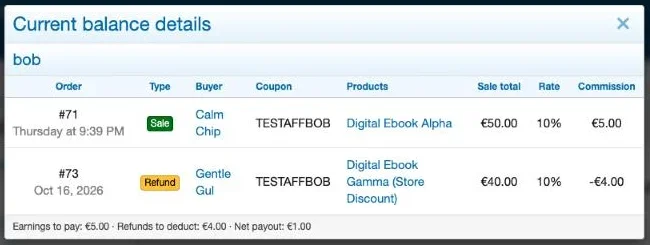 10 - Dashboard - Affiliates balance details.webp
 -
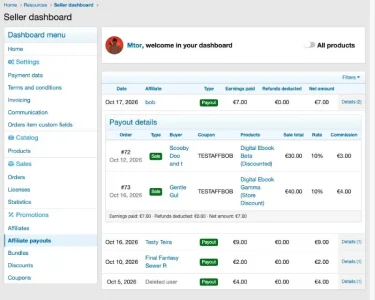 11 - Dashboard - Affiliate payouts details.webp
 -
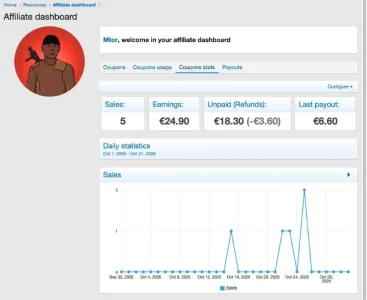 12 - Affiliate dashboard - Stats.webp
 -
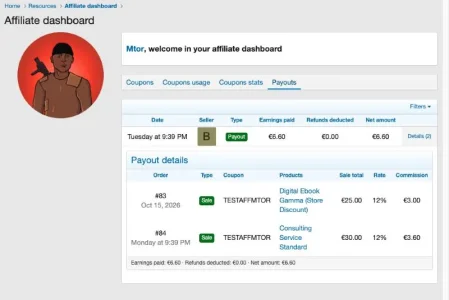 13 - Affiliate dashboard - Payouts details.webp
![[XFA] RM Marketplace/Shop - XF2](/community/data/resource_icons/6/6064.jpg?1791757902)
![[XFA] RM Marketplace/Shop - XF2 - Cart plugin](/community/data/resource_icons/9/9784.jpg?1745174668)
![[XFA] RM Donations - XF2](/community/data/resource_icons/7/7072.jpg?1792622301)
![[XFA] RM Multiple Categories Resources - XF2](/community/data/resource_icons/7/7863.jpg?1792619019)
![[XFA] RM Nodes Layout - XF2](/community/data/resource_icons/9/9509.jpg?1792615803)