
You are using an out of date browser. It may not display this or other websites correctly.
You should upgrade or use an alternative browser.
You should upgrade or use an alternative browser.
![[XenCustomize] Testimonials: Client Feedback & Reviews Manager](/community/data/resource_icons/9/9599.jpg?1762176204)
[XenCustomize] Testimonials: Client Feedback & Reviews Manager 2.3.7
No permission to buy ($45.00)
- Author Veer
- Creation date
This update introduces several new display options based on customer feedback, especially suggestions from @stromb0li. You can now toggle job titles, company names, author stats, banners, and the information sidebar block to keep your testimonial pages clean and customizable.
XenCustomize Testimonials v2.3.7 released!
We’ve also improved the comment system with better notification handling and fixed permission checks for editing and deleting comments.
A few template issues were resolved as well — attachment previews and guest captcha now use the correct keys, making everything work smoothly.
Update now to enjoy cleaner layouts and more control over your testimonial pages!
If you're enjoying the add-on, please consider leaving a rating and review here
New Features & Enhancements
- Added new admin option: Display Job Title
- Shows the reviewer’s job title, with automatic linking when a job website is provided
- Added new admin option: Display Company Name
- Shows the reviewer’s company name, with automatic linking when a company website is provided
- Added new admin option: Show Author Statistics
- Displays author stats (messages, reactions, trophies) on testimonial pages
- Added new admin option: Show Author Banners
- Displays author banners within the testimonial view
- Added new admin option: Show Information Sidebar
- Controls the visibility of the testimonial information sidebar block
Bug Fixes
- Improved testimonial watch notifications by correcting the alert action used (Reported)
- Fixed the comment edit permission check to use the correct time-limit phrase and added the missing phrase (Reported)
- Corrected the comment delete permission check to use the proper time-limit phrase and added the missing phrase (Reported)
- Fixed a wrong attachment context key in comment preview to ensure attachments load correctly (Reported)
- Fixed an incorrect captcha context key in the testimonial quick reply form (Reported)
Screenshots
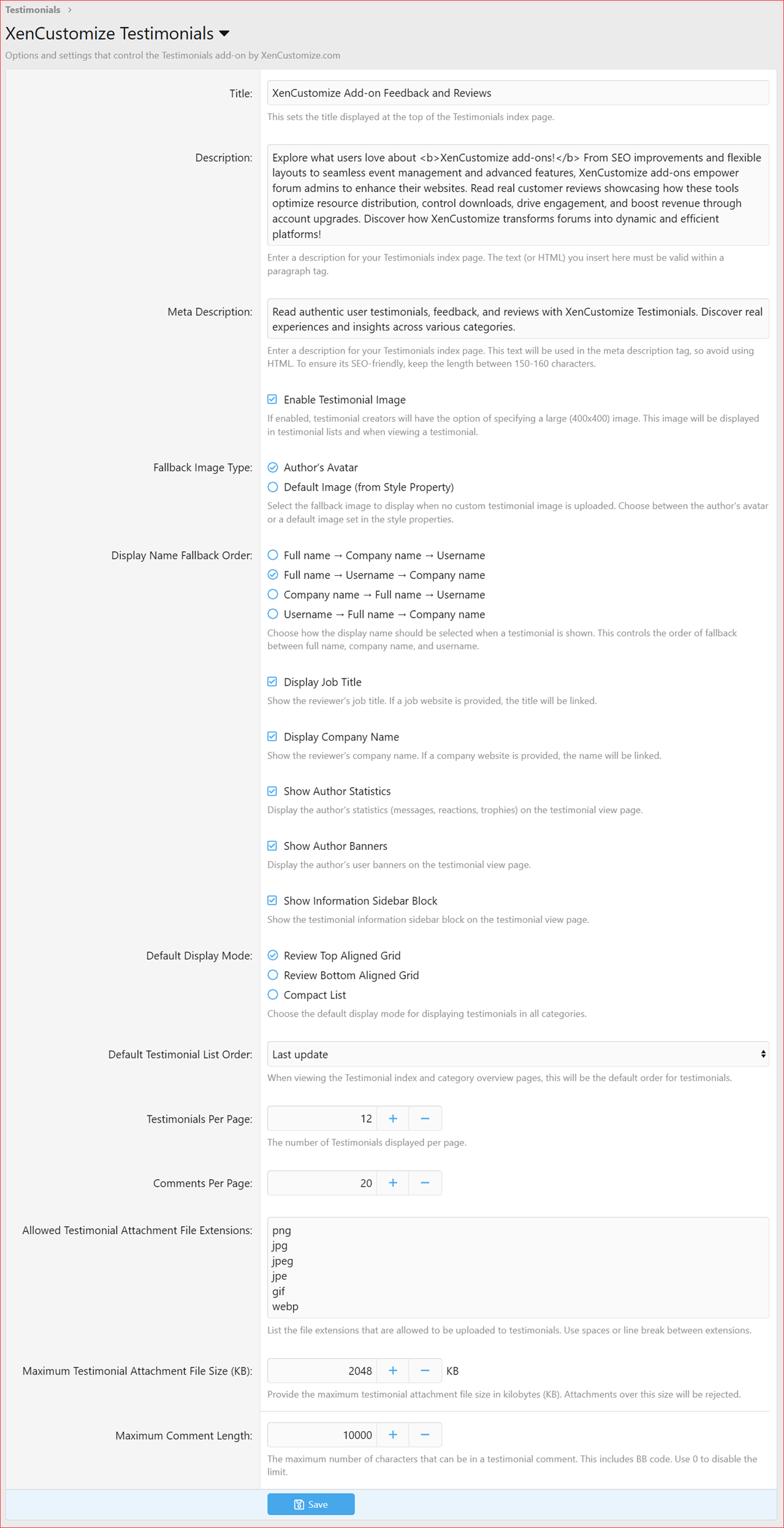
Screenshot from Testimonials v2.3.7


Version 2.3.6 is one of our biggest updates yet for the Testimonials system. This release fully upgrades testimonial replies into a rich, modern comment system similar to what we use in News Publisher. Comments now support attachments, videos, reactions, moderation tools, inline moderation, alerts, and detailed permission controls for both users and moderators.
We've also added testimonial watching, so users automatically follow testimonials they interact with and get alerts on new comments. Visitors can now mark testimonials as read, and creators get notified when someone comments on their testimonial.
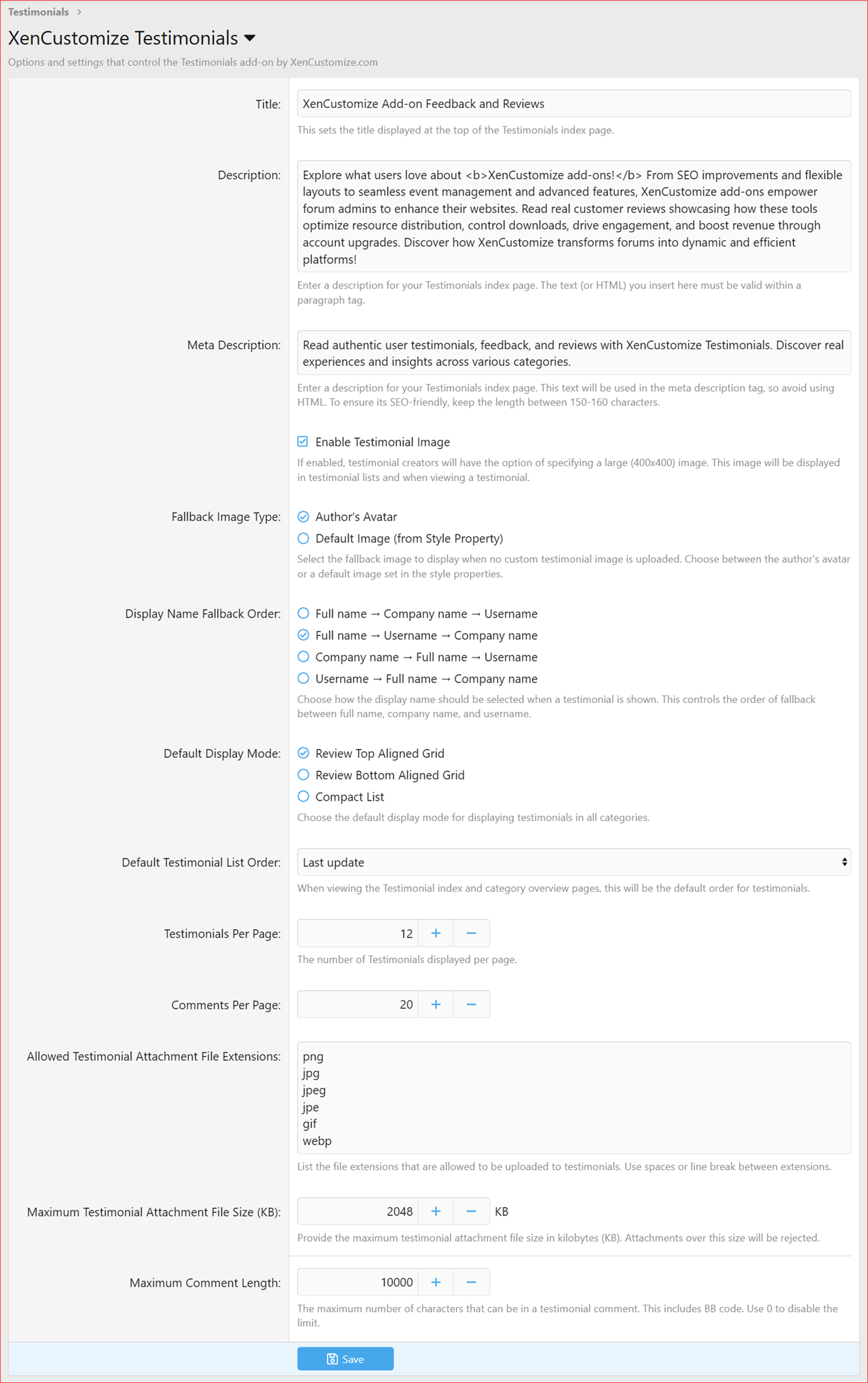
Admins get several new options, including comments per page, maximum comment length, and a flexible name fallback order. Behind the scenes, we updated all core tables to match the new (comment) content type and added new rebuild tools, templates, phrases, and routes to support the upgraded system.
This update also fixes missing alert handling, improves post-to-testimonial conversion, and adds missing ACP phrases. Version 2.3.6 brings major improvements to usability, performance, and consistency across the entire addon. Enjoy the upgrade!
If you're enjoying the add-on, please consider leaving a rating and review here

- Added support for marking testimonials as read for visitors
- Added testimonial watch functionality:
- Testimonials are auto-watched when a user posts a comment
- Users watching a testimonial receive alerts when new comments are posted
- Testimonial creators receive alerts when users comment on their testimonials
- Fully rewritten, and redesigned the testimonial replies into a full comment system similar to News Publisher
- Added comment count display on the testimonial view
- Added new user group permissions for testimonial comments:
- View comments
- View comment attachments
- React to comments
- Post comments
- Submit comments without approval
- Upload attachments to comments
- Upload videos to comments
- Edit own comment
- Delete own comment
- Time limit on editing/deleting own comments (minutes)
- Added new moderator permissions for testimonial comments:
- Use inline moderation on comments
- View unapproved comments
- View deleted comments
- Approve / unapprove comments
- Edit any comment
- Delete any comment
- Undelete comments
- Hard delete any comment
- Give warnings on comments
- Added new comment permissions to installer setup to automatically apply default permissions
- Added inline moderation support for testimonial comments:
- Delete comments
- Undelete comments
- Approve comments
- Unapprove comments
- Merge comments
- Added attachment support for testimonial comments
- Added new admin option: Comments Per Page
- Added new admin option: Maximum Comment Length
- Added new admin option: Name Fallback Order for testimonials (Suggested by @stromb0li)
- Allows choosing the order in which the testimonial author’s name is displayed (Full Name, Company, Username)
- Works across all display modes and widget templates
- Added a new rebuild tool: Rebuild testimonial comment embed metadata: Attachments
- Updated all core tables to replace the old content type with the new type to ensure full compatibility with the new comment system.
- Added several new templates, phrases, routes, and jobs
- Added the missing alert message used when a post is converted to a testimonial (Reported)
- Fixed an issue that caused alerts to break when converting a post into a testimonial (Reported)
- Added missing phrases for default testimonial list order options in the Admin CP (Reported by @stromb0li)
- Fixed Facebook icon not shown when a full name isn't specified (Reported by @stromb0li)
XenCustomize Testimonials v2.3.5 is a maintenance update delivering small fixes and visual improvements.
This release refines several internal areas for smoother performance, improves testimonial readability with a slightly larger message font, and introduces a refreshed product icon for a cleaner, modern appearance.
A light but valuable update — keeping your Testimonials add-on polished and consistent.
- Resolved a template warning related to testimonial reply search results.
- Corrected several minor typos in controller logic for improved stability.
- Fixed variable reference issues in internal image-handling routines.
- Cleaned up code references in public controller for better consistency.
- Slightly increased testimonial message font size for better readability.
- Refreshed the official Testimonials product icon with a modern, updated design.
If you're enjoying the add-on, please consider leaving a rating and review here.
XenCustomize Testimonials v2.3.4 is here!
This is a major update that brings a highly-requested feature: a full-fledged Testimonial Reply System. This new system transforms static testimonials (or feedback, reviews, experiences, or recommendations, depending on your chosen Testimonial Type) into dynamic conversations by allowing users to engage directly with content.
Testimonial Replies are a new, fully integrated content type, which means they work seamlessly with core XenForo features. You can now use reactions on replies, and users will be notified through a comprehensive set of alerts and news feed updates. Additionally, we have added a full suite of moderation tools, giving you complete control over replies and ensuring a safe, organized environment.
This update also includes various code optimizations for improved performance and a number of bug fixes to enhance stability. We've published new documentation threads with detailed explanations and screenshots showcasing every new feature, so be sure to check them out. Upgrade now to enable this new level of community engagement!
Testimonial Reply System:
- Introduced a new, fully integrated content type for testimonial replies, allowing users to engage directly with testimonials.
- Core Integrations:
- Replies are seamlessly integrated with core XenForo systems, including Approval Queue, Alerts, Edit History, Moderator Log, News Feed, Latest Activity, Reactions, Reports, Search, and Warnings.
- New Admin Options:
- Maximum testimonial reply length: Sets the maximum character limit for testimonial replies (use 0 for no limit).
- New User Group Permissions:
- Reply to testimonials: Post replies to any testimonial.
- Reply to own testimonials: Post replies only to their own testimonials.
Reactions:
- Added standard XenForo reactions for testimonial replies.
- Controlled by the existing React to testimonials permission (no new permission required).
Alerts:
- Added a comprehensive set of alerts for replies and reactions, ensuring users are notified of new activity on their content.
- Reply Alerts:
- When someone replies to your testimonial.
- When someone replies to a testimonial you also replied to.
- Reaction Alerts:
- When someone reacts to your reply to a testimonial.
- Edit Alert:
- When your reply is edited.
News Feed:
- Key actions are automatically added to the news feed, including new replies and reactions.
Moderation Tools:
- Added full moderator controls for testimonial replies, including dedicated approval and deletion queues, and the ability to approve/unapprove, edit, delete, undelete, hard delete, and issue warnings on any testimonial reply.
Code & Performance Improvements:
- Minor code optimizations and refactoring for improved performance, maintainability, and structure.
- Fixed an issue where submitted reports for testimonials were not appearing in the report list.
- Fixed an issue where the “Members who reacted to testimonial” overlay did not display any users.



If you're enjoying the add-on, please consider leaving a rating and review here or at XenCustomize.com.
XenCustomize Testimonials 2.3.3 is here!
This update adds more customization and better visibility! You can now rename the index title, add a visible description, and set a custom meta description for better SEO. We’ve also improved activity tracking - users will now see proper “Who’s Online” activity when browsing testimonials.

- Introduced a new setting to easily rename the Testimonials index title.
- Introduced a setting to display a visible description below the index title. Supports plain text or valid HTML within a paragraph tag.
- Added support for a custom meta description for the Testimonials index page to improve SEO.
- Enhanced activity tracking:
- Users now see accurate activity details such as “Viewing a testimonial” or “Viewing testimonial category” on the Who’s Online page and user profiles (previously displayed as “Viewing unknown page”).
If you're enjoying the add-on, please consider leaving a rating and review here or at XenCustomize.com.
XenCustomize Testimonials 2.3.2 is here!
We've improved the date-changing functionality, updated related templates and phrases, and ensured the native time picker is used for a smoother experience. Additionally, a missing phrase has been added to keep everything polished. Enjoy a more refined and user-friendly testimonials system!
- Improvements to the date-changing functionality, updated related phrases, and ensured the native time picker is used.
- Added a missing phrase.
XenCustomize Testimonials 2.3.1 is here!
This update brings a fantastic new feature that allows you to Convert Posts to Testimonials directly from thread posts. Admins and moderators can now easily repurpose user content into testimonials, complete with customizable options like destination category, title, rating, and testimonial state. Additionally, when a post is converted, a new post message template is applied, giving the thread a cohesive look with a snippet of the testimonial, a link to the full review, and a category link for related testimonials.
We’ve also introduced the[testimonial_view]BB Code, which automatically formats testimonials for a consistent and professional display, ensuring the converted posts visually match the actual testimonials in your Testimonials section. Plus, we’ve improved the responsive design of the Review Top Aligned Grid layout for a smoother experience across all devices.
New Features
- Convert Post to Testimonial
- Introduced a powerful feature that allows you to convert thread posts into testimonial entries!
- Streamlined process accessible directly via posts.
- Excludes the first post of a thread to maintain thread integrity.
- Enables admins and moderators to easily repurpose user content as testimonials for better visibility.
- Customizable options during conversion, including destination category, title, rating, and testimonial state.
- Added a new post message template for threads when a post is converted into a testimonial:
- Includes a snippet of the testimonial, a link to the full review, and a category link for more related testimonials.
- Transfers key post data (attachments, post date, user) to the testimonial while ensuring engagement continuity.
- Fully permission-controlled with the new user group permission "Testimonials: Convert post to testimonial".
- Complete documentation is available on our support site to help you get started!
- New BB Code: [testimonial_view]
- Introduced a custom BB Code for displaying testimonials in a consistent layout across your site!
- Ensures converted posts visually match testimonials in the dedicated Testimonials section.
- Fully customizable via the less template for seamless theme integration.
- Improved responsive design for the Review Top Aligned Grid layout, ensuring a better experience on all devices.
- Resolved an issue with the missing alert template "
alert_user_tsm_testimonial_move".If you're enjoying the add-on, and have not rated yet, please consider leaving a rating here or at XenCustomize.com.

XenCustomize Testimonials 2.3.0 is here! This update brings full compatibility with XenForo 2.3.x!
This version takes advantage of XenForo 2.3's new features, including image optimization. Testimonial images now benefit from native image optimization, improving performance and user experience. Plus, you can rebuild existing testimonial images for optimization via Tools > Rebuild caches > Optimize testimonial images.
Additionally, we've added support for the webp file format, expanding the options for testimonial images and ensuring modern compatibility.
Note: This version requires XenForo 2.3.0 or higher. Update today and enjoy these improvements!
XenForo 2.3 Compatibility
- Now fully compatible with XenForo 2.3.x.
- XenForo 2.3.0 is now the minimum requirement for this (2.3.x) add-on branch.
- XenForo 2.2.x remains supported through the 2.2.x branch, which we actively use on our official (XF 2.2) support site.
- Added XenForo 2.3-specific "
Image Optimization" support for "Testimonial Image".- Added the ability to rebuild existing Testimonial Images using the "
Optimize testimonial images" option inTools>Rebuild caches.- Added support for the
webpfile extension in the allowed file extensions for testimonial images.- Added support for XenForo 2.3-specific style variations via style properties.
XenCustomize Testimonials 2.2.4 is here! This update brings enhanced category customization options, allowing you to define Open Graph titles, meta titles, and meta descriptions for better SEO and social media sharing.
You can also now choose from five distinct testimonial types—Testimonial, Feedback, Review, Experience, and Recommendation—for each category, offering more flexibility in how testimonials are displayed.
Additionally, a new permission has been introduced to control how long users can edit or delete their own testimonials.
Coming soon: Version 2.3.0, fully compatible with XenForo 2.3, is our next release!
Complete change log
- Customizing SEO and Social Sharing for Categories
- Open Graph Title
- Define a custom title for social media sharing. Defaults to the category title if left blank.
- Meta Title
- Customize the meta title for browser tabs and search engines. Defaults to the category title if not provided.
- Meta Description
- Specify a meta description for better search engine optimization. Uses the category description if left blank.
- Testimonial Type
Choose the type or style of testimonials displayed in each category. Options include:
- Testimonial (default)
- Feedback
- Review
- Experience
- Recommendation
- User Group Permission: Time Limit on Editing/Deleting Testimonials
- Added a new permission:
Time limit on editing/deleting own testimonials (minutes)to control how long users can modify or delete their submissions.
Documentation available for above implemented features:
XenCustomize Testimonials 2.2.3 is here! This update brings improved styling across all display modes, making testimonials look more polished and responsive. We’ve also enhanced the carousel widget for better alignment and consistency. A new admin option lets you choose a fallback image (either the author’s avatar or a default image) when no custom testimonial image is available.
We’ve also added some new style properties for more customization and fixed a couple of bugs to ensure everything runs smoothly.
Coming soon: In our next quick update, we’ll be adding several SEO & quality of life improvements before shifting focus to the XenForo 2.3 branch.
Complete Change Log
New Features and Enhancements:
- Styling Improvements Across All Three Display Modes:
- Enhanced overall consistency and appearance for a polished look.
- Prevented testimonial titles and messages from wrapping unexpectedly, ensuring layouts remain intact.
- Improved responsiveness for seamless adaptation across various screen sizes.
- Updated testimonial message area styling on the testimonial view, adding elegant quote icons before and after the message for visual emphasis.
- Carousel Widget Enhancements:
- Improved simple and full carousel styles for a clean, consistent display.
- Ensured testimonial titles and content are well-aligned and responsive.
- Admin option "Fallback Image Type"
- Select the fallback image to display when no custom testimonial image is uploaded. Choose between:
- Author's avatar
- Default image (from the style property).
- The "Fallback Image Type" setting applied to all three display modes and widget.
- Added more style properties:
- Testimonial list - Testimonial category section background color
- Review top aligned grid box - Background color
- Testimonial message - Background color
- Testimonial message - Border left color
Bug Fixes
- Added missing template "
alert_tsm_testimonial_mention".- Added missing phrase "
xcu_tsm_testimonial_x".