
You are using an out of date browser. It may not display this or other websites correctly.
You should upgrade or use an alternative browser.
You should upgrade or use an alternative browser.
![[XenCustomize] Survey Manager](/community/data/resource_icons/10/10555.jpg?1791829425)
[XenCustomize] Survey Manager 2.3.4
No permission to buy ($55.00)
- Author Veer
- Creation date
A new update is available for Survey Manager by XenCustomize.
This update adds Copy survey, clearer email report tracking, and practical Admin CP improvements based on customer feedback.
XenCustomize Survey Manager v2.3.4 Released
Release Highlights
Copy an existing survey into a new Draft, ready to review and update
View original email report handoff status for each recipient
Retry eligible failed or unattempted recipients without intentionally resending to successful recipients
Quicker access to surveys, responses and analytics from the Admin CP
Safer CSV exports with protection against spreadsheet formula interpretation
Download the latest version or purchase here!
Full Changelog:
Creating next year's survey is now easier. Use Copy from the Surveys list or Copy survey from the Builder, enter the new title, and continue directly to the new survey's Builder.
The copy includes the survey's settings, pages, questions, answer options and logic. It always starts as a Draft, with responses and other activity remaining with the original survey.
The individual Admin CP response view now shows the original email report handoff result for each recipient. Retry failed email delivery attempts only eligible failed or unattempted original recipients, while the existing Resend email report action continues sending a fresh copy to the survey's currently configured recipients.
Queued by XenForo means the email was accepted into XenForo's mail system; it does not confirm inbox delivery. Uncertain outcomes are clearly shown and are excluded from selective retry to avoid risking duplicate emails.
Survey Manager 2.3.4 requires XenCustomize Core Library 1.0.4 or newer. Please update Core Library before upgrading Survey Manager.
Requirement
For screenshots and more detailed documentation and examples of the new features, please see:
Documentation & Follow-up Threads
- Copy/duplicate/clone an existing survey
- Email report delivery tracking and failed recipient retry
- CSV export spreadsheet formula protection
If you're using Survey Manager, we'd really appreciate it if you could take a moment to leave a rating/review.
Enjoying Survey Manager?
Your feedback helps support its continued development. Thank you for your support!
Download the latest version or purchase here!

A new update is available for Survey Manager by XenCustomize.
This update brings a collection of practical improvements to response management, survey navigation, reporting, and the respondent experience.
Admins can now browse and jump between responses more efficiently, resend a completed response email report when needed, and associate an existing XenForo discussion thread with a survey. The release also improves active response-time tracking, long multi-page survey navigation, and the presentation of response emails.
Previous, Next, and direct-jump response navigation in the Admin CP
Associate, change, or disconnect an existing discussion thread
More accurate active survey time across multiple sessions
Improved long multi-page survey navigation on desktop and mobile
Clearer, more professional survey response email reports
Full Changelog:
- Added Previous and Next controls for browsing responses within the current survey from the Admin CP.
- Added a Response X of Y indicator with a compact jump menu for moving directly to a response position.
- Added a Resend email report action for completed responses when email report recipients are configured.
- Email resends use the survey's currently configured recipients and only resend the email report; they do not repeat discussion notices, report threads, conversations, or alerts.
- Improved response action icons and added clear status guidance when email resend is unavailable for an in-progress response.
- Fixed Rich text box answers showing raw BBCode in the individual Admin CP response view.
- Added a More options menu for survey managers on the public survey page.
- Admins and staff with the existing survey management permission can associate an existing XenForo thread with a survey, replace the association, or disconnect it.
- Associated threads use Survey Manager's existing discussion integration.
- Improved response time tracking to count active survey time instead of long inactive gaps between visits.
- Added a configurable maximum active interval per page, defaulting to 30 minutes.
- Standardized human-friendly time-spent display across survey summaries, response views, reports, and analytics.
- Improved long multi-page survey navigation so the current page stays visible.
- Added compact desktop scroll controls for longer page lists while preserving native mobile swipe scrolling.
- Improved survey response emails with clear page sections, highlighted question rows, and comfortable answer areas that work across all question types.
- Added a Start Survey button to the Before you start card, with refined desktop and mobile alignment.
- When a question has both Description and Help text, the Description remains inline and Help text is available through a native tooltip.
- Improved the completion summary layout for clearer first-completed and time-spent information.
Survey Manager 2.3.3 requires XenCustomize Core Library 1.0.3 or newer.
For screenshots and more detailed examples of the new and improved features, please see:
- Improve Response Time Tracking
- Improve Multi-Page Survey Progress Navigation
- Allow Manually Associating a Discussion Thread with a Survey
- Improve question Help text when Description is also provided
- Add Resend Submission Delivery Option
- Add Start Survey button under this box
- Previous / Next navigation on the ACP individual response view
- Move "First completed" onto a new line in the survey completion summary
- Improve the survey submission email styling.
Thank you to everyone who continues to share feedback and real-world workflow ideas for Survey Manager. This release focuses on the everyday details that make creating, completing, reviewing, and delivering surveys smoother.
Thank You for Your Feedback
Have an idea or something you'd like to see improved? You're always welcome to share it in our suggestions area.
If you're enjoying Survey Manager, we'd really appreciate it if you could take a moment to leave a rating/review on the XenForo resource page. Your feedback helps other XenForo admins discover the add-on and supports its continued development.
Thank you for your support!
Download the latest version or purchase here!
A new update is available for Survey Manager by XenCustomize.
This is a small hotfix release for Survey Manager 2.3.2.
It fixes a response report delivery issue that could occur when a completed survey response included answers from the new Likert Scale / Rating Matrix question type.
Full Changelog:
- Fixed response report delivery for surveys containing Likert Scale / Rating Matrix answers.
- Corrected the Likert row relation used when formatting completed response reports for email, thread, conversation, and alert delivery.
- Response delivery is now only marked as sent after the configured delivery actions complete successfully, allowing failed delivery attempts to remain retry-safe.
We recommend all Survey Manager 2.3.2 customers upgrade to v2.3.2.1, especially if using the Likert Scale / Rating Matrix question type together with email, thread, conversation, or alert response delivery.
Recommended
Download the latest version or purchase here!
A new update is available for Survey Manager by XenCustomize.
This update introduces the new Likert Scale / Rating Matrix question type, bringing a powerful new way to collect structured ratings and opinions across multiple statements using a shared scale.
Likert questions are fully integrated throughout Survey Manager, including the survey builder, responsive public forms, response handling, reports, analytics, public results, and CSV exports.
Per-row analytics and public result distributions
Likert-aware CSV exports
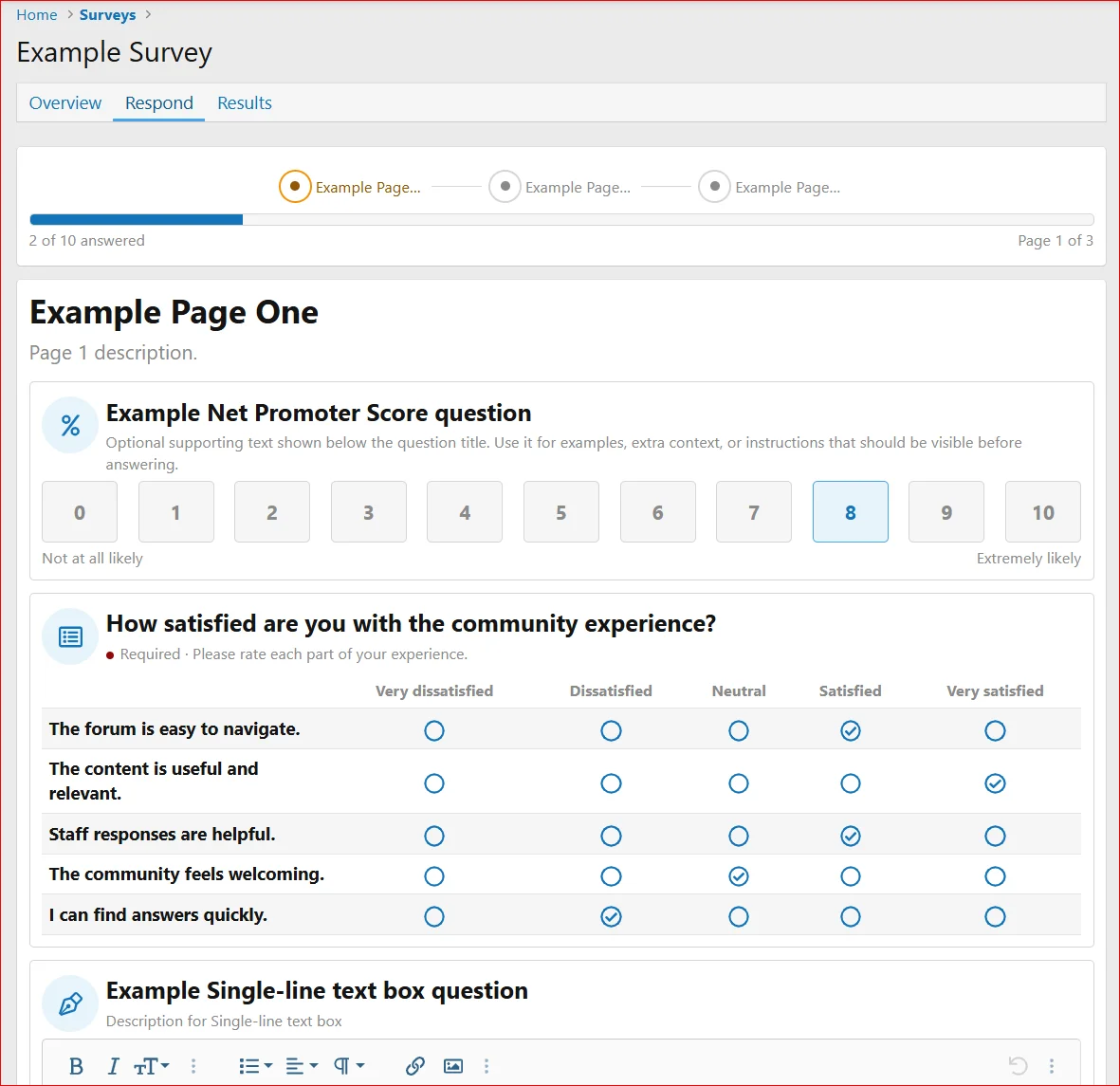
For detailed documentation, screenshots or questions please visit this thread.
This update was directly inspired by customer feedback and helps make Survey Manager an even more complete survey solution for XenForo.
If you're enjoying Survey Manager, we'd really appreciate it if you could take a moment to leave a rating/review on the resource page. Your feedback helps other admins discover the add-on and supports its continued development.
Thank you for your support!
Full Changelog:
Download the latest version or purchase here!
- Added a new Likert Scale / Rating Matrix question type.
- Added Admin CP setup for matrix scale choices and row statements directly in the question form.
- Reused the existing answer option system for scale choices so admins can control labels, values, and display order consistently.
- Added dedicated Likert row storage for the statements/items respondents rate.
- Required Likert questions now require every matrix row to be answered.
- Optional Likert questions allow respondents to leave rows unanswered.
- Public survey forms render Likert questions as a responsive rating matrix on desktop and a stacked row-by-row choice layout on smaller screens.
- Likert matrix questions count as one question in survey progress, regardless of how many rows they contain.
- Admin CP response views and delivery reports now show Likert answers as row label plus selected scale choice.
- CSV exports expand each Likert matrix row into its own column.
- Admin analytics and public results show per-row Likert distribution summaries.
- Protected historical Likert results by preventing deletion of matrix rows or scale choices once they have existing survey responses, while still allowing rename and reorder edits.
A new update is available for Survey Manager by XenCustomize.
This update brings more control to both survey creation and submission delivery, with default answer selections and powerful new email customization options. Admins can now customize delivery email From names, Reply-To addresses, and subjects using survey response data and flexible tokens.
The release also includes an important survey progress fix and general cleanup for a more polished and reliable experience.
Default selections for Drop down and Radio button questions
Response-based Reply-To email
Custom email subjects with built-in and survey answer tokens
Easy-to-use email token support
General codebase/phrase cleanup
If you're enjoying Survey Manager, we'd really appreciate it if you could take a moment to leave a review. Your feedback helps others discover the add-on and supports its continued development. Thank you for your support!
Full Changelog:
- Added optional default selection support for Drop down selection questions.
- Added optional default selection support for Radio button questions.
- Added a compact Admin CP workflow that lets admins mark a choice as the default directly from the existing possible choices row.
- Existing surveys and existing questions continue to use no default selection unless an admin explicitly configures one.
- Default selections now count as answered in the public survey progress display when the respondent first views the question.
- Returning to an already-submitted page does not force the default selection back over a respondent's cleared or changed answer.
- Added optional email From name customization for survey response delivery emails.
- Added optional Reply-To support using an email-validated single-line text answer from the submitted survey response.
- Added optional email subject customization with survey answer tokens.
- Added built-in email tokens for From name and Subject fields:
{survey_title},{response_id},{respondent}, and{completed_date}.- Added survey question tokens for From name and Subject fields using
{question:ID}for single-line text, drop-down selection, and radio button answers.- Reply-To customization uses a dedicated email field selector and only supports email-validated single-line text questions.
- New surveys now prefill the email subject field with a token-based version of the default response report subject.
- Kept the actual sender email address controlled by XenForo's configured mail sender for better deliverability and header safety.
Download the latest version or purchase here!
- Fixed public survey progress totals when current-page visibility rules hide questions that the server has already excluded from the visible question total.
- Deleted 60+ unused phrases.
