- Compatible XF 2.x versions
- 2.2
- 2.3
- Additional requirements
- XenForo 2.2.14+
- License
- Single Use License (may be used on one website)
- Updates duration
- 6 months ($10 renewal) / $25 - 1 year ($15 yearly renewal)
Track member activity across individual XenForo forums with detailed post counts, thread statistics, participation percentages, and contributor rankings.
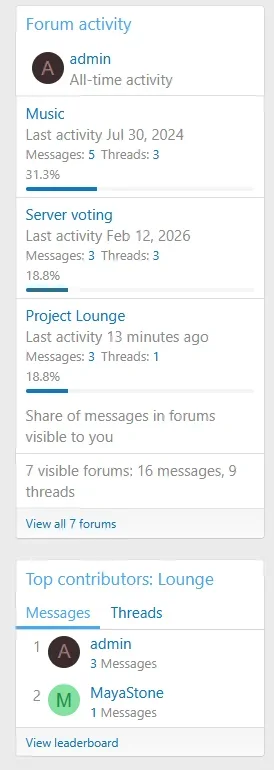
User Forum Stats shows how many threads and messages each member has contributed to specific forums. Members can explore their own posting activity, view forum-by-forum statistics on profiles, compare participation levels, and discover top contributors through leaderboards and widgets.
Administrators can use forum activity statistics as criteria for trophies, notices, and user group promotions, with configurable privacy controls and statistics rebuilding tools.
Features:
Member Profile Statistics
 Per-Forum Activity Statistics: Display the number of threads started, messages posted, and total contributions for each forum.
 Member Profile Integration: Show forum statistics in a dedicated Forum stats tab or within the standard About and Postings tabs.
 Clickable Activity Counts: Open matching threads or messages directly from statistics when the visitor has the required search permission.
 Last Forum Activity: Display the date of each member's latest visible message in individual forums.
 Time Zone Support: Show activity dates using the visitor's selected time zone.
 Forum Activity Filters: Filter statistics by forum name, category, or whether the member has created threads.
 Category Grouping: Organize forum statistics into collapsible categories with individual subtotals.
 Flat & Grouped Views: Switch between a flat forum list and category-grouped statistics.
 Statistics Sorting: Sort forums by name, thread count, message count, or activity share in ascending or descending order.
 Activity Share: Optionally show the percentage of a member's visible forum activity contributed to each individual forum.
 Forum Participation Percentage: Show what percentage of a forum's total messages were written by the selected member.
 Participation Details: Hover over or focus a participation percentage to view the member's message count and the forum's total.
 Member Activity Summary: Highlight the member's most active forum, top three forums by message count, and total number of forums where they have participated.
 Remembered Display Preferences: Preserve expanded filter panels and category collapse states.
 Configurable Display: Independently enable or disable category grouping, sorting, activity shares, participation percentages, and profile summaries.
Widgets & Member Rankings
 User Forum Activity Widget: Display per-forum posting statistics in standard XenForo widget positions.
- Flexible Member Selection: Show statistics for the current profile owner, signed-in visitor, or a specifically selected member.
 Widget Layouts: Choose between a statistics table and a compact activity list.
 Configurable Entry Limit: Set how many forums appear initially and allow visitors to expand the remaining entries.
- Widget Sorting: Order forums by name, message count, thread count, or newest or oldest activity.
- Optional Activity Dates: Include each member's last activity date in the widget.
- Optional Totals & Percentages: Show activity shares and total contributions when needed.
- Forum Contributor Leaderboards: Rank members by messages posted or threads created in individual forums.
 Paginated Rankings: Browse forum leaderboards across multiple pages.
 Forum Leaders Widget: Display top contributors in a compact list with aligned positions, avatars, names, and activity counts.
 Context-Aware Rankings: Automatically use the current forum, select a fixed forum, or configure a fallback for pages without forum context.
 Leaderboard Privacy: Respect member profile privacy and optionally exclude selected user groups from rankings.
Activity Criteria & Permissions
- Forum Activity Criteria: Configure minimum or maximum message and thread counts for selected forums.
- Trophy Criteria: Award XenForo trophies based on participation in specific forums.
 Notice Criteria: Display notices according to member posting activity.
 User Group Promotions: Promote members based on their forum-specific message or thread counts.
- Multiple Forum Selection: Match activity requirements when a member meets the configured threshold in any selected forum.
- Forum Visibility Protection: Hide statistics for forums the current visitor cannot access.
 Thread Visibility Protection: Optionally hide another member's forum statistics when the visitor cannot view threads created by other members in that forum.
 Permission-Aware Widgets: Apply existing profile and statistics permissions to displayed activity data.
Statistics Management
- Statistics Rebuild Tool: Recalculate forum activity statistics when existing data needs to be refreshed.
 Full Forum Rebuild: Rebuild statistics for all members across the entire community.
- Member Statistics Rebuild: Recalculate one member's contributions across all forums.
- Single Forum Rebuild: Rebuild statistics for all members in a selected forum without including its subforums.
 Visible Content Counting: Count visible posts and threads while excluding deleted, moderated, and redirect threads.
 Activity Corrections: Update activity dates and counts when content is hidden, deleted, restored, moved, or reassigned.
- Background Processing: Populate existing last-activity dates through background processing.
Requirements:
 XenForo 2.2.14+
Useful for:
- Member Contribution Profiles: Give members a detailed overview of where they participate most throughout the community.
- Contributor Recognition: Highlight members who contribute consistently to particular forums or discussion areas.
- Community Incentives: Encourage participation in selected forums through trophies, notices, and promotions.
 Specialized Communities: Identify active contributors in technical support, knowledge-sharing, or topic-specific forums.
- Participation Analysis: Compare how individual members distribute their activity across different community sections.
- Forum-Specific Recognition: Recognize local contributors without relying exclusively on board-wide message totals.
FAQ:
 Can members see how many posts they have made in each forum?
Yes. User Forum Stats displays per-forum message counts, threads started, and total contributions on member profiles.- Can visitors view another member's forum statistics?
Yes, when their permissions allow it. Statistics respect forum visibility and the configured privacy restrictions. - Can I display the most active members of a specific forum?
Yes. Forum leaderboards rank contributors by message or thread count, and a dedicated widget can display the results. - Can I see what percentage of a forum's posts belong to a member?
Yes. The optional participation percentage shows the member's share of the forum's messages, with a tooltip displaying both counts. - Does the add-on show when a member was last active in a forum?
Yes. The latest visible message date can be displayed beneath each forum name. - Can forum activity be used for trophies and user group promotions?
Yes. Administrators can configure minimum or maximum thread and message count criteria for selected forums. - Can statistics be grouped by forum category?
Yes. Members can switch between a flat list and collapsible category groups with subtotals. - Can existing forum activity statistics be rebuilt?
Yes. Administrators can rebuild statistics for the entire board, one member, or all members in a selected forum.
Screenshots:
Member Profiles
The Forum stats tab shows activity by forum, with message and thread counts, filters, and search links. |
Admin Options
Configure where statistics appear and which features are available. |
User Criteria
Choose forums and set minimum or maximum activity thresholds in XenForo user criteria. |