
- Compatible XF 2.x versions
- 2.3
Overview:
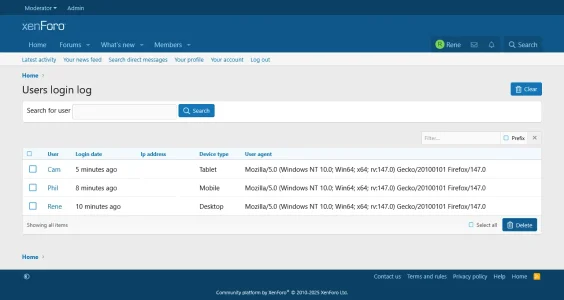
- This add-on will capture and log users data when they log in and it will display them.
- Login date.
- Ip address.
- Device type.
- Browser type.
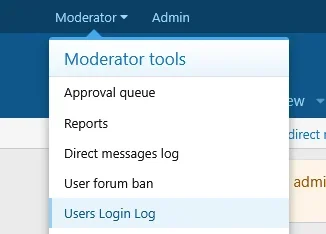
- Users login log will be displayed under the Moderator tools->Users login log.
- Only moderators with permissions General moderator permissions->View users login logs will be able to view Users login log.
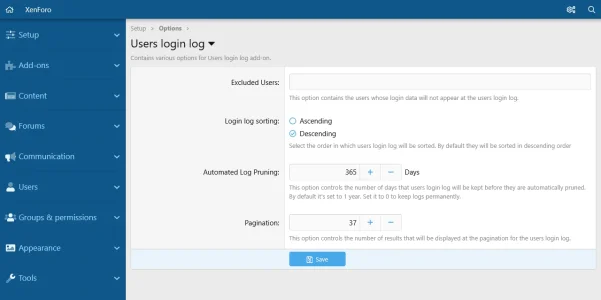
- Users can be excluded from being displayed in the users login log.
- Logs can be searched for users login data.
- Logs can be sorted from the add-on' s Setting page to be displayed wither in ascending or descending order. By default they will be sorted in Descending order.
- Only admins will be able to bulk delete logs or clear them all.
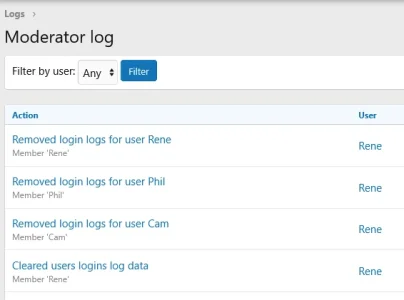
- Deleting or clearing of logs will be logged in the Moderator logs in the Admin panel.
- A cron task will run daily and it will delete expired users login log. By default the cutoff time frame to keep logs is set to 1 year. You can select to keep them permanently if you so wish.
- Users login data will be logged from the moment that the add-on is installed. Previous logins will not be logged.
-
 1_permissions.webp
 -
 2_settings.webp
 -
 3_moderator_tools_link.webp
 -
 4_users_login_log.webp
 -
 5_moderator_log_actions.webp