
![[TylerAustin] adminCP Firewall - XF2](/community/data/resource_icons/10/10971.jpg?1793380311)
- Compatible XF 2.x versions
- 2.3
- Additional requirements
- XenForo 2.3.0+.
PHP 8.3.0+.
MySQL 8.0+.
Recently Used Devices 2.5.3 or newer (nick97/recentlyuseddevices) (optional).
XenConcept Admin Login Log 2.0.1 or newer (XenConcept/AdminLoginLog) (optional).
- License
- You may not redistribute the files in whole or in part. You may not rent, lease, loan, custom changes and/or development that’s including private development, sub-license, sell, assign, pledge, transfer or otherwise dispose of the files in any form w
- Updates duration
- 6 Months - $15.00 Renewal / 12 Months - $35.00 Renewal / Lifetime license $350.00 + PayPal Fees
adminCP Firewall protects the XenForo AdminCP with an IP allowlist and sends security notifications for administrator login activity.
Key Features
- Filter individual batch results to matches, valid nonmatches or invalid entries. Totals still cover the whole submitted list and original line numbers remain visible. Select a category and check again to reevaluate the list against the currently saved policy; the filter is not saved as a setting.
- Review batch-check totals for saved-policy matches, nonmatches and invalid entries before reading individual results. Counts are per nonblank line, not unique IP, and do not imply that IP denial is active or authentication will succeed.
- Check up to 20 IP-address lines together in Access check, with individual invalid-input feedback, saved-policy matches and native standard-format addresses. This permission-protected, read-only check makes no external requests, sends no notifications and does not save the submitted list. Limits are 20 lines (including blank lines) and 2,048 bytes.
- Open each setting's retained native change history directly from its option row. Links open in a new tab so unsaved form values remain on the settings page; history shows saved changes only and still requires Manage AdminCP Firewall.
- Receive a Protection-tab warning when no IP rules are saved, explaining whether IP denial is active and linking to Access check before enabling it. Localhost remains allowed; the warning uses XenForo's reported request IP and does not change settings.
- See a Protection-tab warning when a saved rule allows every IPv4 or IPv6 address, including equivalent IPv4-mapped ranges. This read-only warning does not change rules, assess combined rule coverage, or replace administrator authentication.
- Review saved notification channels and event switches in the Notifications tab, with warnings when the Firewall, both channels, or all events are off. Save and reload to refresh this read-only summary; it does not verify delivery or send test notifications.
- View the checked address in XenForo's standard format, with IPv4, IPv6, or IPv4-mapped IPv6 identification and an explanation of mapped-address policy matching. This remains a read-only local check, not DNS or geolocation lookup.
- Read settings history grouped by editor and recorded second, with each setting's old and new values kept together. Grouping is for readability, not proof of one save; pagination still counts individual changes.
- See a read-only Protection overview with the current XenForo-reported IP, saved-policy match, effective IP-denial status, and latest retained settings change with its editor and date. Open Access check or full history directly from the overview.
- Control email and alert delivery separately in the Notifications tab. Both channels default to on and use the existing event switches; disabling both stops Firewall notifications without disabling IP protection. Alert-associated push follows XenForo's normal preferences.
- Filter settings change history by setting, an editor's current username, and the last 24 hours, 7 days, 30 days, or 90 days. Combine filters or reset them to view all retained history. Filtered pagination keeps the same selection; time windows are reevaluated when each page loads and do not change XenForo's retention policy.
- Organizes Firewall settings into Protection, Notifications, Integrations, and Access check tabs. Save changes before switching tabs; each tab saves only its displayed settings.
- Provides a read-only access checker for complete IPv4 and IPv6 addresses, showing the saved-policy match, your current XenForo-reported IP, and whether IP denial is active. Checks do not modify settings, test credentials, send notifications, or contact an external lookup service.
- Restricts AdminCP access to allowed IPv4 and IPv6 addresses.
- Accepts exact addresses, CIDR ranges, and legacy IPv4 partial rules ending with a dot.
- Can deny a valid administrator login when the request IP is not allowed.
- Checks existing administrator sessions against the allowlist on each AdminCP request when IP denial is enabled.
- Sends XenForo alerts and email notifications for invalid-IP login attempts.
- Sends XenForo alerts and email notifications after successful AdminCP logins.
- Sends XenForo alerts and email notifications after failed AdminCP logins.
- Includes a dedicated Manage AdminCP Firewall administrator permission.
- Supports localhost development through 127.0.0.0/8, ::1, and IPv4-mapped loopback addresses.
- Includes a config.php emergency override for recovering AdminCP access after an IP or location change.
- Optionally integrates with Recently Used Devices 2.5.3+ to add device, browser, operating-system, authorization, authentication, location, recorded-IP, and login-time context to firewall notifications.
- Optionally integrates with XenConcept Admin Login Log 2.0.1+ to correlate firewall events with its native success/failed login records.
- Uses XenForo's native AdminCP option layout, authentication flow, alerts, mail queue, phrases, and permissions.
Supported XF Versions
- XenForo 2.3.0+.
- Future XenForo 2.x releases are supported unless XenForo introduces a breaking platform change.
Security Notes
- Keep at least one verified recovery path before enabling IP denial.
- Use CIDR ranges only when the entire network range is trusted.
- Review successful, failed, and invalid-IP notifications promptly.
- Treat approximate device location as supporting context rather than proof of identity.
- The add-on supplements normal XenForo authentication; it does not replace passwords, passkeys, two-step verification, or XenForo session security.
Distribution Terms
- Do not redistribute, resell, publish, share, provide, or make available modified copies, including private modifications, without permission from the copyright holder.
Copyright ©2026 TylerAustin. This item is not authorized for posting on xenforo.com and others web sites except under the XenForo account named TylerAustin, GameNet.
-
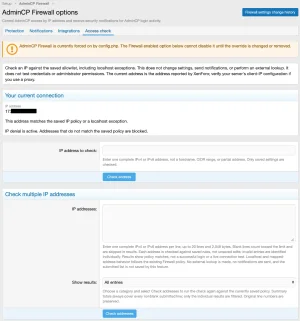 adminCP Firewall Options - Access check.webp
 -
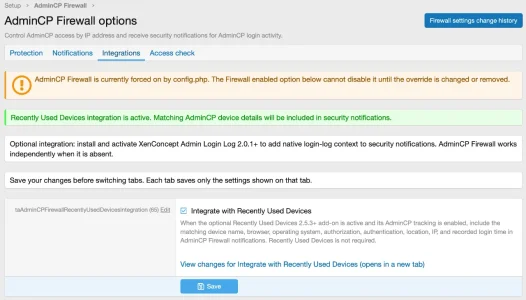 adminCP Firewall Options - Integration.webp
 -
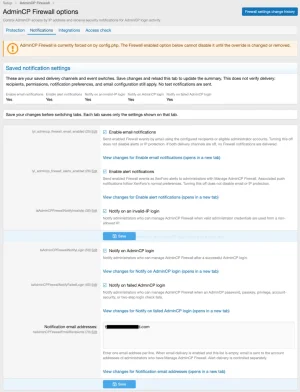 adminCP Firewall Options - Notifications.webp
 -
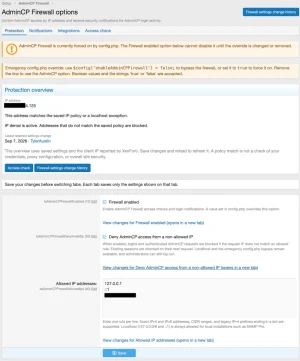 adminCP Firewall Options - Protections.webp
 -
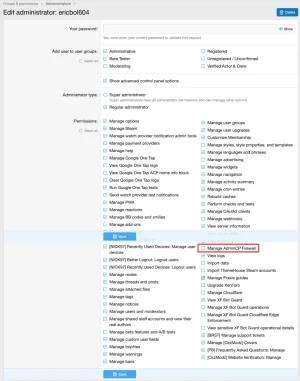 Edit administrator.webp
 -
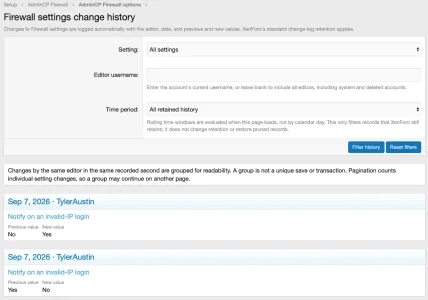 Firewall settings change history.webp
![[TylerAustin] XFRM Resource Grid - XF2](/community/data/resource_icons/10/10972.jpg?1793380801)
![[TylerAustin] RM Marketplace Product Price With Variables Option - XF2](/community/data/resource_icons/10/10719.jpg?1788125991)
![[TylerAustin] Drag n drop - XF2](/community/data/resource_icons/10/10753.jpg?1788999724)
![[NICK97] TV & Movie: Watchlist - XF2](/community/data/resource_icons/9/9306.jpg?1787876841)