

- Compatible XF 2.x versions
- 2.3
- Updates duration
- Beta Free
- Visible branding
- No
Be sure to backup before installing. I did install and uninstall this on a live forum running 2.3.10 Patch 2 without any issues. Did the same on my test setup that is running 2.3.13.
The whole idea for this beta is of course testing. But I would like suggestions as well. I will be making things look better too.
## Install and configure
1. In the Admin CP, go to Add-ons → Install/upgrade from archive and upload the release ZIP. If the archive installer is disabled, copy the contents of the ZIP's
2. In Groups & permissions → User group permissions → Booking Manager, grant View availability and own tickets and Reserve and reschedule resources to the member groups you choose. Grant View availability and own tickets and Manage all booking tickets to staff who handle approvals. Permissions are opt-in. Guests cannot access bookings.
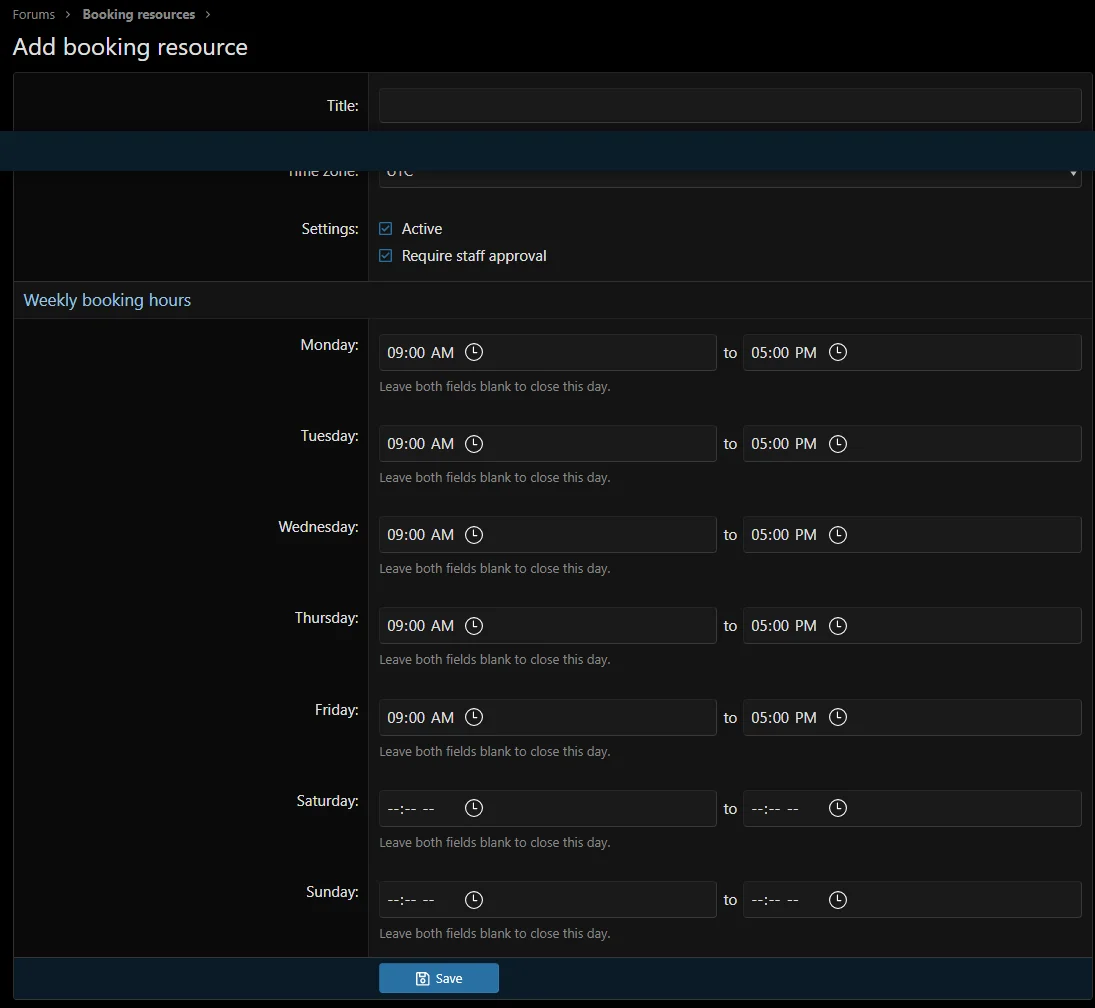
3. In Forums → Booking resources, add a resource, choose its time zone, and set its hours for each day. Leave both fields blank to close that day. Choose whether new reservations require approval. Delegated ACP administrators need Manage booking resources.
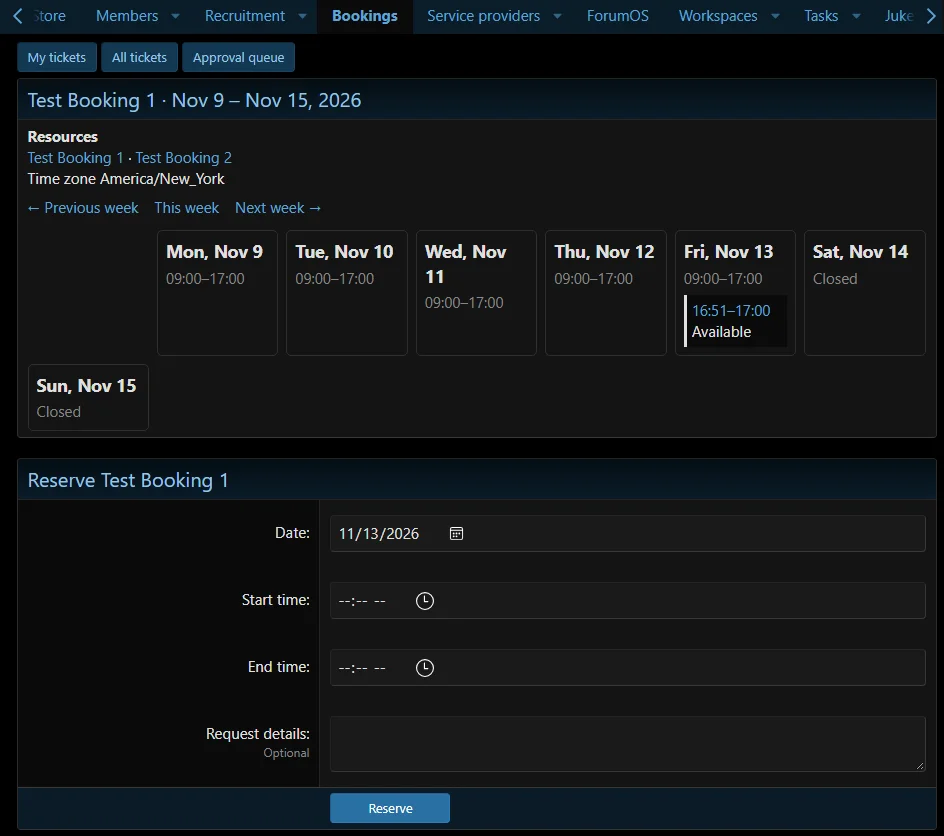
4. Open Bookings in public navigation. Choose a resource and week. Pick a date and time within published hours, optionally add request details, and submit. The submission opens the associated ticket. Staff work from Approval queue or All tickets.
## Reservation rules

Please report whatever you find. Asl give your ideas as well.
The whole idea for this beta is of course testing. But I would like suggestions as well. I will be making things look better too.
## Install and configure
1. In the Admin CP, go to Add-ons → Install/upgrade from archive and upload the release ZIP. If the archive installer is disabled, copy the contents of the ZIP's
upload directory into the XenForo root, then install Talmyric Booking Manager from the Add-ons page. The CLI equivalent after copying files is php cmd.php xf:addon-install Talmyric/BookingManager.2. In Groups & permissions → User group permissions → Booking Manager, grant View availability and own tickets and Reserve and reschedule resources to the member groups you choose. Grant View availability and own tickets and Manage all booking tickets to staff who handle approvals. Permissions are opt-in. Guests cannot access bookings.
3. In Forums → Booking resources, add a resource, choose its time zone, and set its hours for each day. Leave both fields blank to close that day. Choose whether new reservations require approval. Delegated ACP administrators need Manage booking resources.
4. Open Bookings in public navigation. Choose a resource and week. Pick a date and time within published hours, optionally add request details, and submit. The submission opens the associated ticket. Staff work from Approval queue or All tickets.
## Reservation rules
- Each resource is exclusive. Pending and approved reservations occupy time. Adjacent reservations may share a boundary. Declining or cancelling frees the time immediately.
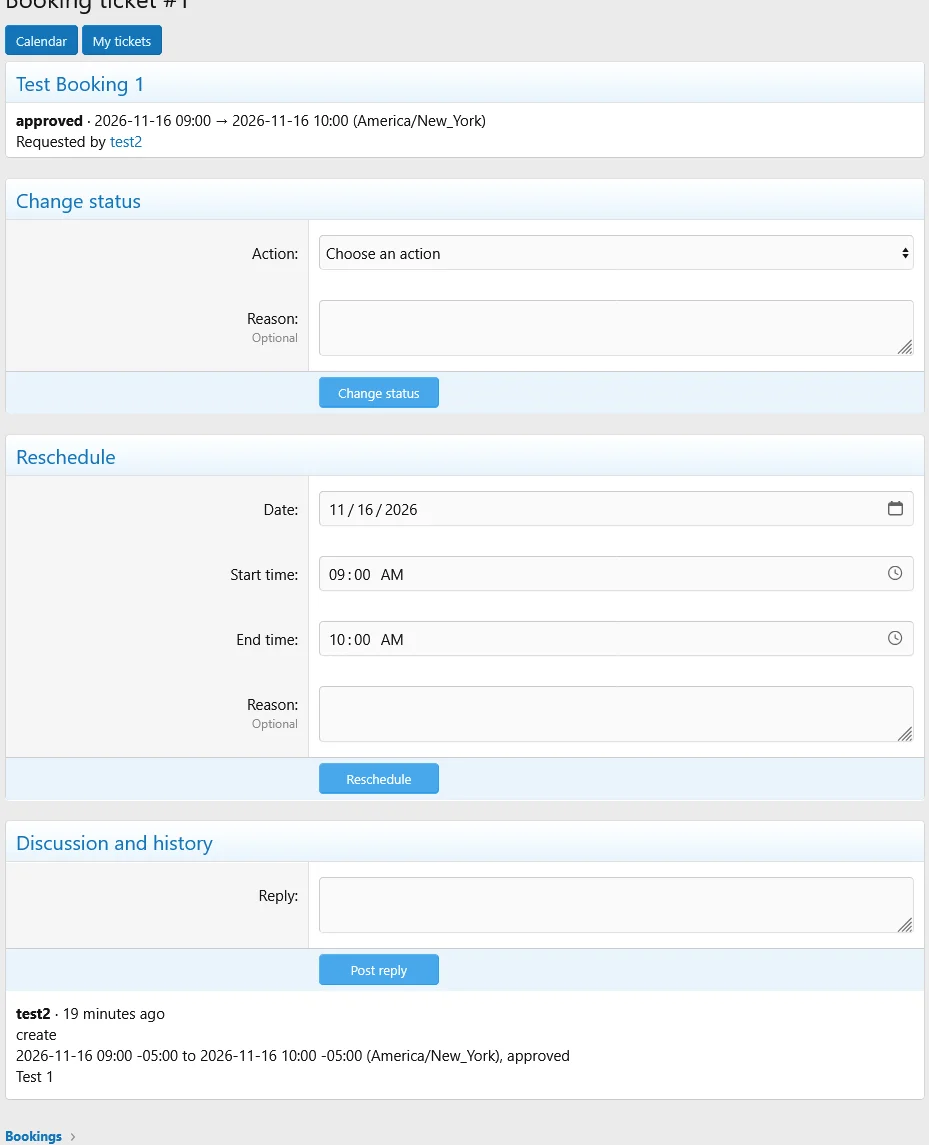
- A reservation always has a numbered private ticket. The requester and authorized staff can view and reply. The ticket captures the actor, date, status changes, and previous and new times. Calendar readers see occupied periods and status without seeing the requester or discussion.
- Members may cancel their own future reservations. Members with booking permission and authorized staff can reschedule future reservations on active resources. Rescheduling applies the resource's current approval policy, so an approved reservation may return to pending. A failed reschedule preserves the original booking. Staff can decline pending bookings and cancel pending or approved bookings.
- Staff changes and replies attempt to send the requester a standard XenForo alert, subject to XenForo alert rules. The approval queue is the staff intake channel.
- Weekly hours are one same-day interval per day. Local times must exist and be unambiguous, including on daylight-saving transition days. Reservations are stored as UTC timestamps and displayed in the resource's time zone.
- A resource's time zone is fixed after creation to keep prior reservations and history intelligible. Deactivating a resource hides it from the calendar and blocks new bookings and rescheduling. Existing tickets remain accessible. Editing hours affects new bookings and reschedules. Existing reservations retain their times.
Please report whatever you find. Asl give your ideas as well.


