
You are using an out of date browser. It may not display this or other websites correctly.
You should upgrade or use an alternative browser.
You should upgrade or use an alternative browser.

Sedir - Calm, Fast Theme for XenForo 2.3 (Light & Dark) 1.0.3
No permission to buy (€49.00)
- Author SelamT
- Creation date
Requires re-importing the style XML and upgrading Sedir Core to 1.0.3 (template modifications changed, new widget positions, one new table). The Turkish language pack is included in the package: re-import it if you use it, it now contains the layout studio texts.
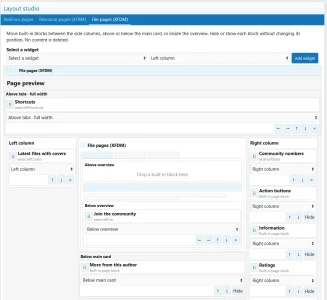
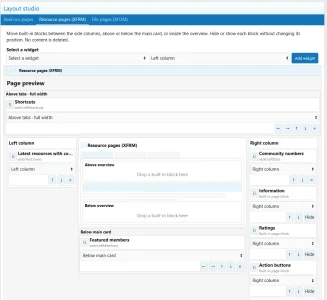
New: visual layout studio
Sedir Core gets an admin screen that arranges the page instead of listing position names, with separate, linkable tabs for XenForo, XenForo Resource Manager and Digital Download Manager. Each module keeps its own layout.
- Six placement areas per module. Left column, right column, full width above the tabs, below the complete main card, and above or below the overview inside that card. The preview draws those real nesting boundaries, so a block placed inside the card looks like it is inside the card.
- Built-in resource and file blocks are editable too. Information, ratings, action buttons, team, "more from this author" and sharing appear as six cards you can move between those areas. They are native XFRM and XFDM page sections: Sedir places them, it does not copy them, and it does not touch those add-ons' tables. Remove Sedir Core and every block returns to where XenForo puts it.
- Hide and show without losing placement. A hidden block keeps its area and its order and comes back exactly where it was. No content is deleted.
- Widgets can use the main areas too. The four main areas are no longer reserved for built-in blocks: any existing XenForo widget can sit above the tabs, above or below the overview, or below the main card. Existing widget assignments are preserved.
- The XenForo tab places widgets above and below the forum list. Other XenForo pages keep their own widget positions.
- Drag a card, use its arrow buttons, or pick the area from a selector. The selector is there for narrow admin screens and touch devices, where dragging is awkward.
- Nothing changes on the public side until you save. The studio uses XenForo's own sticky Save bar at the bottom of the admin screen.
- No inline code and no visible jump. Placement is applied while XenForo renders the page, not by moving elements with JavaScript afterwards.
New: featured image for resources and files
- A cover field on the edit form and on the add form. JPEG, PNG, GIF or WebP; larger images are scaled down to 1600x1000.
- Chosen per item. A band of fixed height, so pages keep the same length whatever the image size; the full image; a small image in the right column; or hidden.
- Hidden still means shared. "Do not show on the page" only hides it; the image is still sent as og:image and as the Twitter card, so Google and social networks keep using it.
- Three sizes, no upscaling. Every cover is stored once and two smaller versions are derived from it (960px for card strips, 480px for list rows and the sidebar). A version is written only when the original is larger, so a card never has to stretch a list-sized thumbnail.
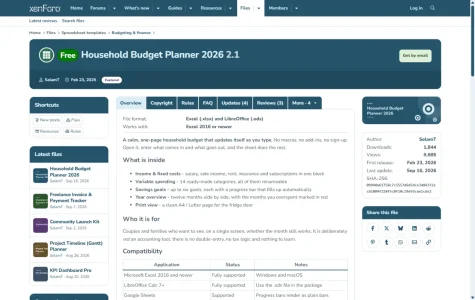
- Covers in list rows and on the home page. A cover replaces the item icon in the resource and file lists, and the "Latest resources" and "Latest downloads" cards on the Sedir home page carry it across the top. Items without a cover keep the same card shape with their own icon.
- Nothing is added to the other add-ons. The image lives in Sedir Core's own table and its own folder; XFRM and XFDM keep their tables untouched and nothing is left behind if you remove Sedir Core.
New: a left column on any page
- Built from XenForo's own sidenav column. Its width, its spacing and the button that opens it as a panel on a phone all come from the platform, so it looks right in any style. Leave the positions empty and no column is created.
- It joins an existing left navigation instead of adding a second one. On your account, help and resource category pages your widgets appear above and below the page's own navigation.
- A widget can tell which page it is on. Use $context.template in a widget's display condition, for example to keep the home page full width. XenForo passes no page context to its own site-wide positions; these ones do.
New: five widgets
All five read existing data only: no new tables, nothing written to the other add-ons, and each one renders nothing at all when it has nothing to show.
- Content with covers. Resources or files with their cover image, as rows for a narrow column or as a grid of large covers for a wide area. Source, order (last updated, newest, highest rated, most downloaded, most viewed), count, categories and featured-only are options.
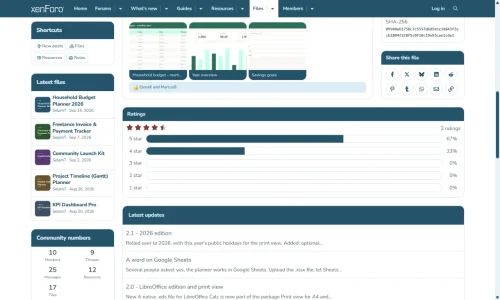
- Numbers. Members, threads, messages, resources and files as one compact card, with the newest member below. Counts that belong to an add-on you do not have are simply absent.
- Featured members. Ordered by message count, reaction score, trophy points or join date, with the number beside the name.
- Shortcuts. Your own links as compact chips or as a list with icons and short descriptions.
- Call to action card. A short message with a single button, shown to everyone, to guests only or to members only.
Layout behaviour
- Relocated block headers keep their seam. A native block moved out of the sidebar does not arrive with a leftover title strip.
- Sticky side columns respect the new order. The whole right column stays sticky after its cards are reordered, and a widget placed below the main card keeps the same sticky boundary.
- A block below the main card spans the detail row. A long "more from this author" section no longer stretches the sidebar and leaves the page lopsided.
- A block below the overview sits before the reactions. The like controls and the reaction list stay the last part of the article.
- One spacing value. Every gap follows Sedir's single card-spacing setting: 24px, measured on the live demo between the left column, the content and the sidebar, and above and below every relocated block.
- Mobile detail drawer. On narrow resource and file pages the right column becomes its own drawer: Navigation on the left, Details on the right, both on one row.
Fixed
- Unequal gaps once a left column was present. XenForo adds its own side padding to the content column on top of the theme's grid gap, so the gap on the left measured 34px while every other gap was the theme's 24px. Both of the core's paddings are now cleared and the grid gap is the only spacing.
- The left column ended short of the content. The right sidebar already filled the row with a short sticky inner box, so its last card settled level with the bottom of the content; the left column kept the older behaviour and carried a trailing card margin, ending 24px higher. It now uses the same two rules.
- A sidebar cover slid under the sticky navigation bar. The cover is lifted to the height of the tab strip, but the lift was applied to the image, so once the sticky column locked to the top of the window the image kept the lift and ended up behind the navigation bar. The lift now belongs to the column, which the sticky offset already accounts for.
- Unequal space above and below the previous/next strip. XenForo always puts a strip after the message list and gives it 6px of top padding, even when the only thing inside it is a hidden "show ignored content" link. That invisible 6px was added to the gap above the strip: 30px above, 24px below. The padding is now zero unless the strip actually carries something visible.
- Square top-right corner on the section cards under a content page. When the tab strip is wide enough to show its scroll arrow, the card the strip sits on squares its right corner so the arrow stays flush. That rule reached every card below the strip and only the left corner had an undo, so "Latest updates", "Latest reviews", "Latest comments" and "Latest questions" were rounded on the left and sharp on the right.
- Corner artefacts across the theme. The light tooth at the corner of the last tab, the outer corner of the tab strip when all tabs fit, the dark slivers beside the strip's scroll arrows, the dark notch at the top right of the card under a tab strip, the white crescent on a sidebar card's title strip, the dark caption bar on attachment and gallery boxes, and the blue nubs on a post's white sheet on a phone.
- Section headers at the bottom of resource and file pages were invisible. The restored headers now carry the theme's header colours and padding, with no notch above the first card.
- The tab strip's scroll arrows did not look clickable, and sort buttons ran over the tabs. The arrows now read as controls, and the "Sort by date / Sort by votes" group no longer overlaps the tab row on a file page.
- Solution preview on a question page had its colours the wrong way round. The card's text area is white and the button that jumps to the solution carries the tint, not the other way round.
- Download countdown swallowed its own label. While the wait runs, the button keeps a dark background with light text and the progress fill is a translucent tint, so the label stays readable.
- Buttons without an icon on the home page. "New posts", "Register" and "Browse the forums" have icons again.
- Upgrading from 1.0.2 tried to add the image column twice. A fresh upgrade creates the cover-image table once; an existing table receives the display column only when it is missing.
Requirements
XenForo 2.3.6 or newer. XFRM and XFDM integration appears only when those add-ons are installed; Sedir requires neither of them, and Digital Download Manager is a separate product.
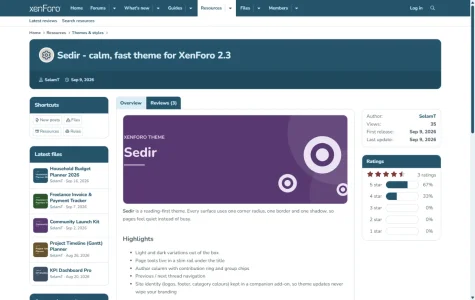
Live demo: forumino.com. The screenshots below are from it and from the 1.0.3 admin screen.
Attachments
Requires re-importing the style XML and upgrading Sedir Core to 1.0.2. The Turkish language pack is included in the package: re-import it if you use it, it now contains the home page texts.
New: a complete home page
Sedir Core 1.0.2 adds a home page for your forum. You switch it on with one option (Admin control panel > Sedir Core > Home page > "Use the Sedir home page"). Your site address then opens the home page instead of the forum list; switching it off restores the previous index page. Every section can be switched off on its own.
The title, the highlighted words and the text are options; every other text is a phrase, in English and Turkish. The page works in any style and follows the Sedir palette, in both the light and the dark variation.
- Welcome band. A large title with a highlighted phrase, a short text and two buttons: guests get Register and Browse the forums, members get New posts and Post thread. On the right, a fan of your featured sections, each leaf in its own palette colour and linking to its section.
- Statistics strip. Threads, messages, members and who is online, plus resources and downloads when XenForo Resource Manager or Digital Download Manager is installed.
- Featured sections. Coloured cards with icon, description and counts; the first card is large and lists its latest threads. Pick the sections yourself or leave it empty to show the first forums of your forum list. The grid adapts to how many sections you show: the number of columns, the large card and the width of the last cards are chosen so that every row is filled and no empty space is left on the right.
- Latest threads, latest resources, latest downloads. Card lists, filtered by the viewer's permissions. The resource and download lists appear only when the add-on is installed.
- Join band. Membership benefits and a three-step "How to get started", shown to guests only.
Fixed
- Navigation bar: the divider jumped while scrolling. When the page scrolled and the navigation became sticky, XenForo's sticky rule cut the space between the label and the dropdown divider from 10px to 3.8px on every item except the selected one, so the divider jumped 6px left and back as you scrolled. The spacing now stays 10px in both states.
- Mobile menu now follows XenForo's structure, in Sedir colours. The off-canvas menu was white and the only lines left were the dividers next to the dropdown arrows, computed for XenForo's dark menu and therefore dark and heavy on white. The menu now uses the navigation bar colour pair like XenForo does: faint row separators and arrow dividers, the selected item on the light "selected tab" tone, and the opened sub-menu set one step apart. Light and dark variations both follow it.
- Footer logo took the header logo's size. When a separate footer logo was set without its own width and height, it was drawn at the header logo's size; with a short mark logo in the header, the long footer logo shrank to a few pixels. A separate footer logo without a size now keeps its own proportions at 36px height; the header logo's size is used only when the footer falls back to the header logo.
Requires re-importing the style XML and upgrading the bundled Sedir Core add-on (template modifications changed). No new style properties or phrases: the Turkish language pack from 1.0.0 still applies.
Sedir Core 1.0.1
- Adds the author name under the avatar on review and comment cards (hidden by default, shown by the Sedir style).
- Adds theme classes to the "More information" and "Get support" sidebar buttons on resource and download pages, so the style can give them icons and colours.
- Moves the Previous / Next navigation on download pages directly under the main content block.
Fixed
- Dark mode: rating stars and rating bars were invisible. Filled stars and the 5-star breakdown bars used a palette tone that matches the dark surface. They now switch to a light tone in the dark variation. Affects XenForo Resource Manager and any add-on using the core rating stars.
- Review / comment cards did not follow the post card design. The author and vote columns stayed white, so the white sheet was framed only at the top and bottom. The whole card now carries the page tint and the sheet is framed evenly on all four sides (XFRM reviews, download reviews and other "simple" message cards with an author column).
- Review cards: empty tinted band under short reviews. When the vote column was taller than the text, a blank band appeared below the sheet. The sheet now stretches to the column height.
- Review cards for guests looked cut open at the bottom. The sheet left its bottom edge to the action row even when there was no action row (guests). It now has a full frame unless an action row follows.
- Review card header now sits above the sheet, like posts. The rating, date and version line was inside the white sheet; it now sits on the tinted area above it in the same small uppercase style as the post date row. The tinted band above the sheet (header included) and the tinted band below it are now the same height, measured to the pixel in Chrome and Firefox, for guests and members (an empty, invisible replies container added an extra 6px for logged-in members).
- Author name was missing on review / comment cards. The name is now shown under the avatar (added by Sedir Core, hidden in other styles so nothing changes there) and the duplicate name in the header line is removed.
- Reply box on review cards was narrower than the review above it. The inline reply editor (and the author's reply) now spans the full width of the white sheet, uses the same frame and rounded corner, sits one message-padding step below the review and has the same padding on all four sides (it touched the review and had 0/7/0/7px inside).
- Text fields: thick focus ring overlapped nearby buttons. Focusing an input, textarea or editor drew a 3px ring outside the field (it covered the Post reply button). Text fields now show a 1px ring in the same colour, on the field's own edge. Buttons and links keep the thicker ring for keyboard navigation.
- Tabbed review lists (Latest / Most helpful / Rating): notch and double edge. The list body drew its own frame and white background 1px outside the cards, and the first card kept its rounded top-left corner next to the tab, leaving a white notch. The body is now frameless and the first card meets the tab with a square corner (resource and download review pages).
- Navigation bar: divider before the dropdown arrow. Items with a dropdown now show XenForo's thin divider between the label and the arrow (1px, 35% of the text colour, vertically centred), on selected, hovered and normal items alike. Sedir previously hid it. The label has the same space on both sides (10px before the word, 10px between the word and the divider).
- Update cards: the reactions row after a Like overlapped the action links. The action links float inside their row and the row did not contain them, so the reactions summary slid up beside them and covered "Unapprove". The action row now contains its links and the reactions summary sits below it, full width, separated by a thin line.
- Download question pages follow the post card language. Question and answer posts (Digital Download Manager) put their date row and action row inside the message box, so the date sat inside the white sheet and the action row stuck out 10px on both sides. The date row now sits on the tint above the sheet and the action row closes it. In the reply form, "Attach files" and "Post reply" share one row under the editor. Question actions shown in the post header (lock, privacy, delete) have icons.
- Question header actions match the action row. Lock / privacy / delete in the first post's header use the same colour, size and weight as Quote, Report and the post number.
- Question pages with answers: corners under the sort tabs. The "Sort by date / Sort by votes" tabs are lifted to the right end of the tab row, above the first card, but the corners still followed their original place: the first card kept a rounded top-right corner under the tabs and the first answer lost its own. Corners now follow where the tabs actually sit (square under the tabs, rounded elsewhere; a question with no answers keeps its rounded corner).
- "Quote" action had no icon. Quote links in action rows now show a quote icon, sized and spaced like XenForo's own Reply and Like icons.
- Update lists: header strip from the second card on. The first update card still meets the tab with a plain title row (the tab is its header); from the second card on, the title row is a dark header strip across the top of the card, in the same colours as the page's block headers (resource and download update pages).
- Buttons without an icon. A site-wide scan (guest and admin views, 17 page types) found six buttons with no icon; they now have one: "Read more..." under update and review lists, "Post comment" on download comments, "Back to file" on the download limits page (its icon class had no icon in XenForo), and "Edit profile banner" / "Send direct message" on member profiles.
- Navigation bar: selected and hovered tab looked 1px off (for staff). The staff bar above the navigation had a fractional height (38.44px), so the navigation started on a half pixel and the white tab rounded differently from the bar: a 1px blue line under the tab and a grey line above it. The staff bar now has a whole-pixel height.
- "No permission to download / buy" button had no icon. It now shows a lock icon, centred with its label (resource and download title panel, and the sidebar copy).
- Status strip (deleted / awaiting approval) on resource and download pages. It was printed between the tabs and the content card, cutting the tab off from its card. It now sits directly under the title panel, above the tabs, with the card gap on both sides and the surface corner - the same place and spacing as on thread pages.
- Undelete and Approve buttons in the title panel had no icon. They now show an icon next to their label like the other page tools.
- Title row optical centring. The title glyphs sat 2-3px high in their line box: above the icon's centre and closer to the top edge than to the band. Cap height and baseline are now centred in the title row (measured on thread, forum, resource and download pages; the icon and the title share the same centre), and the resource title uses the same line height as the others.
- "Filters" next to review tabs was plain text. On resource and download review pages the Filters menu now reads as a tab on the right: same height, padding, type and baseline as the selected tab on the left, sitting on the card with square bottom corners, aligned to the card's right edge; the card's top-right corner is square under it. A site-wide check of menu triggers found no other plain-text ones.
- Author replies added without reloading. A reply posted with the inline editor was inserted flush against the review, without the gap and rounded frame it gets after a reload. Both cases now look the same.
- "Read more" row under review / update cards. It drew a divider line stuck to the bottom edge of the last card and kept the button 10px in from the right. The row is now frameless and the button lines up with the card's right edge.
- Rating breakdown bars: thin light strip under the fill. The coloured fill was 20px tall inside a 22.8px track, leaving a pale line along the bottom of every filled bar. The fill now stretches to the full track height.
- Sidebar "More information" and "Get support" buttons: text sat at the top. The add-on sidebar CSS switched them to block layout, so the label hugged the top of the 40px button. Icon and label now share the same optical centre (the font sits high in its line box, so the label is nudged onto the button's centre line).
- Sidebar link buttons now have icons and their own colours. "More information" gets an info icon on the green family, "Get support" a support icon on the purple family; hover swaps background and text. Colours come from the Sedir palette settings, so they follow your own palette (resource and download pages; classes added by Sedir Core).
- Previous / Next navigation sat below the reviews on download pages. It is now placed directly under the main content block, above latest updates, reviews and comments — the same position as on resource and thread pages.
AdSense Auto ads
- Auto ad injected into the page layout row no longer breaks the layout. Google can insert an auto-placed ad as the first child of the main layout row, where it became an extra column and pushed the sidebar and content aside. It is now rendered as a full-width band above the content instead.
- Unfilled ad slots no longer leave a blank block. Slots reported as unfilled by AdSense kept their reserved height (a white 280px gap). They are now collapsed.
- Auto ads are kept out of the title panel and site chrome. Auto-placed ads injected inside the page title panel, header, navigation, breadcrumbs or footer are hidden. For a permanent fix, also add these regions to Excluded areas in your AdSense Auto ads settings.
Changed
- New page title panel layout (threads, forums, resources, downloads). The title row now holds the icon, the title and the page action (Download, Buy, Go to download, Post thread) side by side, vertically centred, with the action on the right. The band under the title carries the author and date (or the forum description) on the left and the page tools (edit, watch, bookmark, more) on the right. The title row sits exactly in the middle between the top edge and the band. On narrow screens the panel stacks: title at full width, then author and date, then the page action buttons on their own row (the side-by-side layout made them overlap on phones); download titles use the same mobile size as the others and every panel has the same bottom padding. On resource and download pages the standalone edit / post update button sits at the start of the tool group (where XenForo puts it), before bookmark and the more menu, and joins it as one segmented control: the same 2px step between parts, square inner corners, the same part border, rounded outer corners. When a member only has the edit button (no tool group, depending on permissions), it stands on its own with all four corners rounded.
- Footer logo falls back to the style logo (dark variation first) when no footer logo is set in Sedir Core, instead of rendering an empty image.