
![[XFA] RM Update Announcement Thread](/community/data/resource_icons/7/7331.jpg?1792341728)
- Compatible XF 2.x versions
- 2.3
- Updates duration
- 1 year
Never let a release go unnoticed again. Every time a resource is created or updated, an announcement thread is posted in the forum you choose, with a subject and message written once and filled in automatically. Add a cover image, a prefix and an announcement type, and your community sees at a glance what is new.
Perfect for resource authors, add-on and style shops, and any community that wants release news in its forums.
 What's new in 2.0.0
 Cover image per announcement type: give each type of announcement its own cover image: a new product, a maintenance update or fresh features. Just enter the image URL in the options, there is nothing to attach.
 Choose the announcement type: when posting a resource update, the author picks whether it is a maintenance update or fresh features, and the matching cover image is used.
 Thread prefix: give announcement threads a prefix, set globally in the options and, if you like, per category.
 Ready-to-use subject and message: announcement threads now come with a default subject and message, so it works the way you want from the first update.
 Features
Announce every release
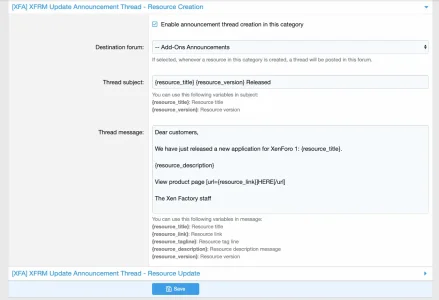
- New resources: a thread announces each newly created resource.
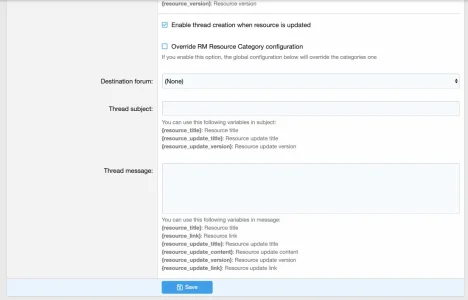
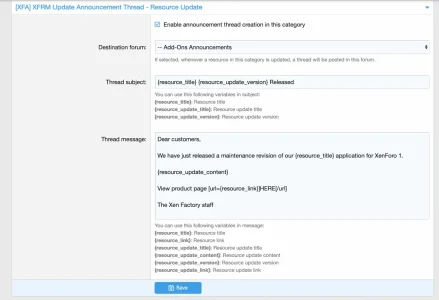
 Updates: a thread announces each resource update.
 Destination forum: choose the forum where announcements are posted, separately for new resources and updates.
 Switch on or off: enable the system globally, and for creation and updates independently.
Make every announcement yours
 Subject with variables: build the thread title from the resource title, version and update title.
 Message with variables: build the message from the resource title, link, tagline, description and version for new resources, or the update title, content, version and link for updates.
- Cover images: a different cover for new products, maintenance updates and fresh features.
- Announcement type: a simple selector in the resource update form.
- Prefixes: applied to the thread when the prefix can be used in the destination forum.
Control per category
 Per resource category: enable announcements only in the categories you want, with their own destination forum, subject, message and prefix.
 Global override: when you prefer one configuration for everyone, a single option makes the global settings win over the categories.
 Quick facts
 Requires: XenForo Resource Manager.
 Install: step by step instructions are in the readme.
 Support: visit the support forum.
 Ready to announce your next release?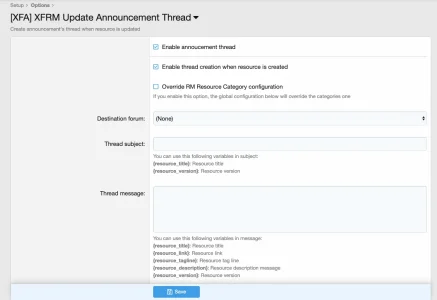

![[XFA] RM Marketplace/Shop - XF2](/community/data/resource_icons/6/6064.jpg?1791757902)
![[XFA] RM Marketplace/Shop - XF2 - Cart plugin](/community/data/resource_icons/9/9784.jpg?1745174668)
![[XFA] RM Marketplace/Shop - XF2 - Affiliate system plugin](/community/data/resource_icons/9/9866.jpg?1743350593)
![[XFA] RM Donations - XF2](/community/data/resource_icons/7/7072.jpg?1792622301)
![[XFA] RM Multiple Categories Resources - XF2](/community/data/resource_icons/7/7863.jpg?1792619019)