- Compatible XF 2.x versions
- 2.3
- Additional requirements
- An Orboni account (orboni.com) with at least one wallet added. PHP 7.2 or later, as XenForo 2.3 itself.
- Visible branding
- No
Take crypto for account upgrades: USDT, USDC, BTC, ETH, SOL, TON, TRX and more, 17 coins on 16 networks. The money goes straight to the wallets you add in the Orboni dashboard. Orboni never holds it and never has your keys: it watches the chain and tells XenForo when a payment arrives.
Orboni is a third-party service: you need an Orboni account (orboni.com) with at least one wallet added. The add-on is free, and test mode is free.
Full guide: orboni.com/docs/xenforo · Support: support@orboni.com
Orboni is a third-party service: you need an Orboni account (orboni.com) with at least one wallet added. The add-on is free, and test mode is free.
How it works
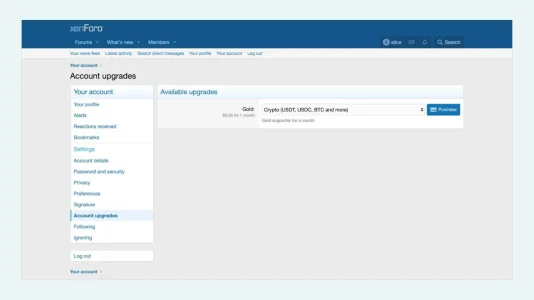
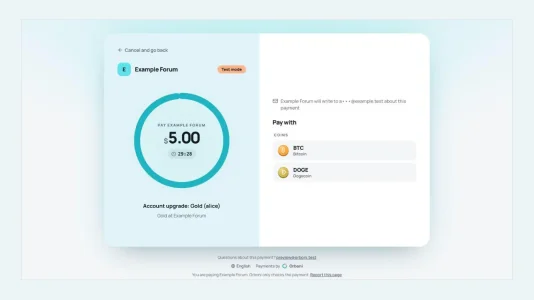
- The add-on adds Orboni to XenForo's payment providers. A member buying an account upgrade, or anything another add-on sells through payment profiles, goes to Orboni's payment page for its cost, picks a coin and pays from any wallet or exchange.
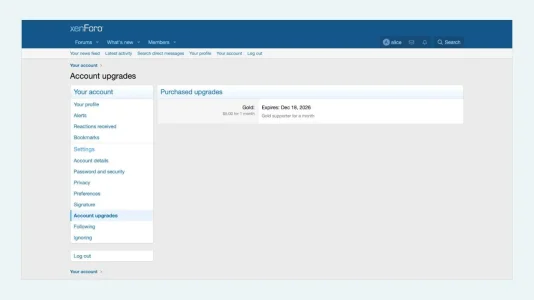
- Nothing is granted until the payment is final. Then XenForo applies the upgrade, adds the member to its user groups and emails its receipt, as with any other provider.
- Every webhook, the member's return and a cron entry read the payment back from Orboni with your secret key before anything changes, so a lost webhook keeps no one waiting and a forged one changes nothing.
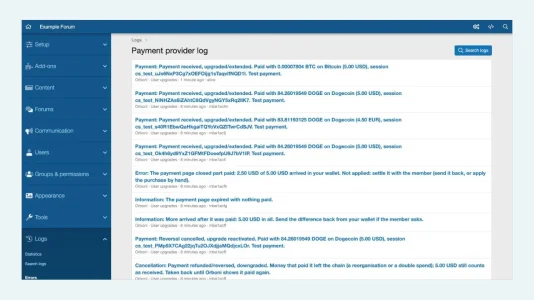
- Payments on their way, part payments, payments held for your review and money that left the chain are each handled and written to Logs → Payment provider log.
Install
- Add-ons → Install/upgrade from archive, and choose the zip. XenForo offers that page only with
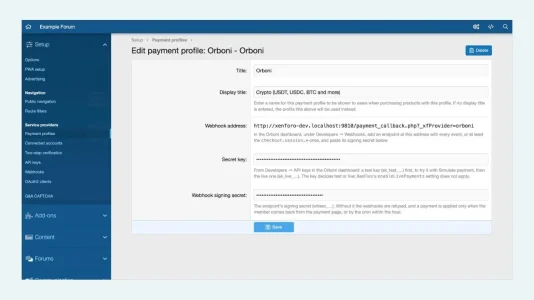
$config['enableAddOnArchiveInstaller'] = true;insrc/config.php; without it, copy the zip'supload/folder into your forum's root and install it from the Add-ons page. - Setup → Payment profiles → Add payment profile, provider Orboni. Paste a secret key from the Orboni dashboard (a test key first).
- In the dashboard, add a webhook endpoint at the address the profile shows, and paste its signing secret into the profile.
- Users → User upgrades: tick the Orboni profile on an upgrade that is not recurring.
Good to know
- XenForo 2.3 (tested on 2.3.13); PHP 7.2 or later, as XenForo 2.3 itself.
- One payment per payment page: XenForo refuses the Orboni profile on a recurring upgrade. Offer a non-recurring one, which the member buys again when it ends.
- Prices in 37 currencies; the least payment is worth $1.
- Refunds are sent from your own wallet; end the upgrade in XenForo by hand.
- The add-on calls only Orboni's API (orboni.com), through XenForo's own HTTP client: to open a payment page and to read a payment back. What it sends: orboni.com/docs/xenforo. Keys, secrets and members' emails never reach the log.
- Uninstalling removes its table and the provider; payment profiles made with it stay, hidden, until it is installed again.
- MIT licence. Source: github.com/orboni/xenforo-payment
Full guide: orboni.com/docs/xenforo · Support: support@orboni.com