

- Compatible XF 2.x versions
- 2.2
- 2.3
- License
- MIT
- Visible branding
- No
Gives every XenForo add-on a PSR-3 logger, backed by Monolog, writing to a log file and optionally sending errors by email or to Slack.
It is for add-on developers who want logging without bundling a logging library, and for forum owners whose other add-ons ask for it. On its own it adds nothing to the public side of your forum.
Requirements: XenForo 2.2 or later, and PHP 7.4 or later.
Upgrading from 4.x? See Upgrading from 4.x below — most add-ons need no change at all.
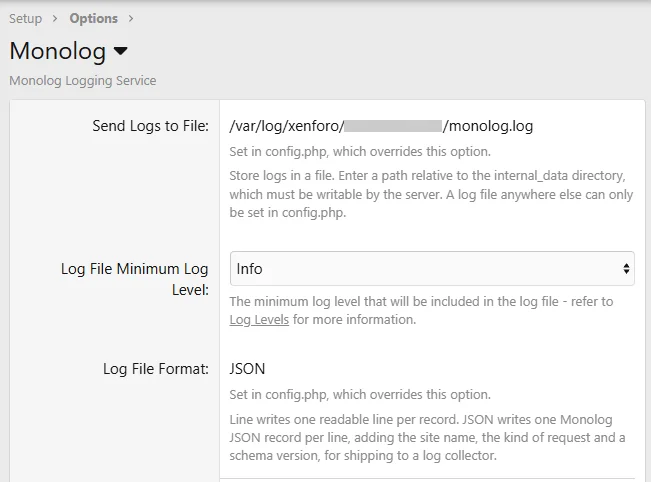
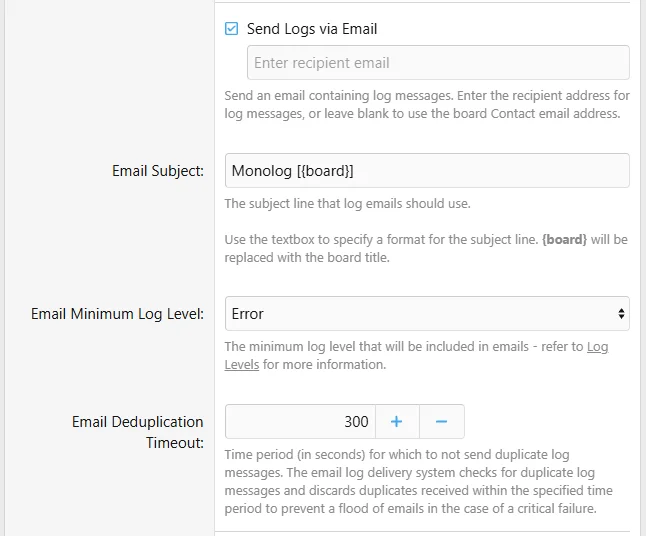
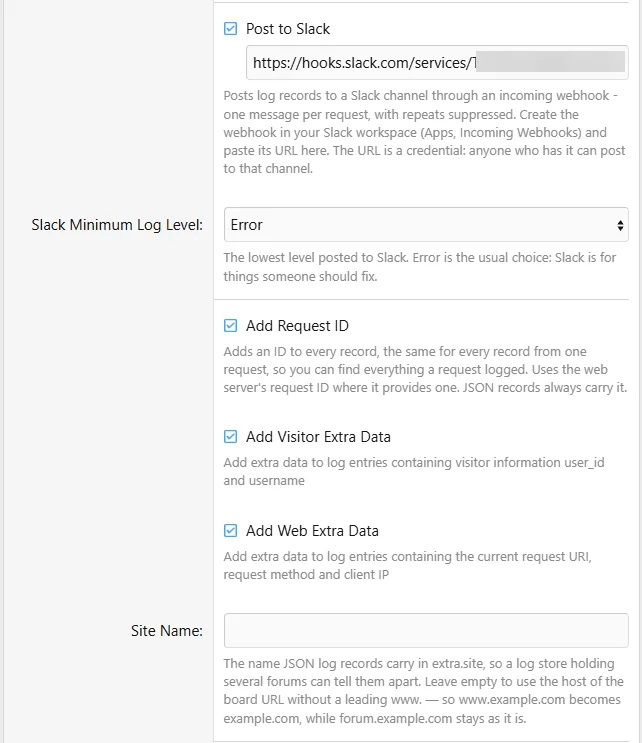
Install it as you would any add-on, then review the options under
Choosing levels: the log file at Warning, or Info if you want to confirm that scheduled work ran. Email and Slack at Error — both are for things someone should fix. Debug is for tracing one problem, briefly.
The levels apply to every add-on that logs through this one. At Debug, some add-ons record personal data or the content of the emails they send. To trace one add-on, raise only its channel in
The Slack webhook URL is a credential — anyone holding it can post to your channel. Entered on the options page, it is stored in the database and visible to every admin who can edit options; set in
Anything can be set in
Set only what you want fixed in place; anything left out stays on the options page. The README lists every key.
Checking it works: run
Ask for a channel named for your add-on. You get a PSR-3 logger:
Type against
This add-on is usually an optional dependency, so fall back to a null logger when it is not installed. To support forums still on 4.x as well, which have
Or require 5.0 in your
Keep the message fixed and put what varies in the context, with a stable
Never log secrets or message bodies, at any level, Debug included — passwords, tokens, password-reset links, email and post content. Log an id instead.
To add, remove or replace handlers and processors, listen to the
These are Monolog objects, so this is the one place your code depends on the Monolog version. A handler or processor meant to work on both Monolog 2 and 3 should leave its record parameter untyped.
The full documentation is in the README on GitHub.
It is for add-on developers who want logging without bundling a logging library, and for forum owners whose other add-ons ask for it. On its own it adds nothing to the public side of your forum.
Requirements: XenForo 2.2 or later, and PHP 7.4 or later.
Versions
- v5.x gives add-ons a PSR-3 logger, so the Monolog version underneath is no longer their concern. It uses Monolog 2, and also runs on Monolog 3.
- v4.x uses Monolog 2.
- v3.x uses Monolog 1.
Upgrading from 4.x? See Upgrading from 4.x below — most add-ons need no change at all.
Features
- Log to a file — one readable line per record, or one JSON record per line for a log collector
- Send errors by email — each request's records arrive as one email, and a repeat within the deduplication timeout is not sent again
- Post errors to Slack — through an incoming webhook, one message per request, with the same deduplication; sent with a short timeout, so a slow or unreachable Slack never holds up a page
- A minimum level for each — the log file, email and Slack each have their own, and
config.phpcan set a level for one add-on's channel alone, to trace it at Debug without turning up every other add-on - Extra data on every record — a request id shared by every record from one request, the visitor's user id and name, and optionally the URL, IP address, method, referrer and user agent
- Configure it in
config.php— every option has aconfig.phpequivalent, and the options page then shows it as set there, with no field to change it - Two CLI commands —
php cmd.php monolog:configshows every setting and where it comes from;php cmd.php monolog:validateproves the log file, email and Slack all work - A test tool —
Admin control panel > Tools > Checks and tests > Test Monologwrites one message at every level, so you can see which reach the log file, your inbox and Slack
For forum owners
Install it as you would any add-on, then review the options under
Options > Monolog. By default it writes Warning and above to internal_data/monolog.log; email and Slack are off until you turn them on.Choosing levels: the log file at Warning, or Info if you want to confirm that scheduled work ran. Email and Slack at Error — both are for things someone should fix. Debug is for tracing one problem, briefly.
The levels apply to every add-on that logs through this one. At Debug, some add-ons record personal data or the content of the emails they send. To trace one add-on, raise only its channel in
config.php:
PHP:
$config['monolog'] = ['file' => ['channels' => ['myaddon' => 'debug']]];The Slack webhook URL is a credential — anyone holding it can post to your channel. Entered on the options page, it is stored in the database and visible to every admin who can edit options; set in
config.php, it is never displayed at all.Anything can be set in
config.php, including a log file outside internal_data — for example:
PHP:
$config['monolog'] = [
    'file' => [                                 // false turns file logging off
        'path' => '/var/log/xenforo/forum.log', // absolute, or relative to internal_data
        'format' => 'json',                     // 'line' or 'json'
        'level' => 'warning',
    ],
    'email' => [                                // false turns email off
        'to' => 'admin@example.com',
        'level' => 'error',
    ],
    'slack' => [                                // false turns Slack off
        'webhook' => 'https://hooks.slack.com/services/...',
        'level' => 'error',
    ],
];
Set only what you want fixed in place; anything left out stays on the options page. The README lists every key.
Checking it works: run
php cmd.php monolog:validate from your XenForo root. It writes one record at every level and reports what arrived. Add --unattended to check without writing or sending anything. It exits 1 if anything failed and 0 otherwise, so a deploy step or cron job can depend on it; --strict also exits 2 for warnings, for a monitor.For add-on developers
Ask for a channel named for your add-on. You get a PSR-3 logger:
PHP:
$logger = \XF::app()->get('monolog')->channel('myaddon');
$logger->warning('Payment callback rejected', ['provider' => 'stripe', 'status' => 400]);
Type against
Psr\Log\LoggerInterface, not a Monolog class. The Monolog version is an internal detail of this add-on, and the logger can be passed straight to any Composer package that accepts a PSR-3 logger.This add-on is usually an optional dependency, so fall back to a null logger when it is not installed. To support forums still on 4.x as well, which have
newChannel() but not channel():
PHP:
$container['myaddon.log'] = function (\XF\Container $c)
{
    if (!$c->offsetExists('monolog'))
    {
        return new \Psr\Log\NullLogger();
    }

    $monolog = $c['monolog'];

    // channel() arrived in 5.0; newChannel() is the 4.x name, deprecated in 5.x
    return method_exists($monolog, 'channel') ? $monolog->channel('myaddon') : $monolog->newChannel('myaddon');
};
Or require 5.0 in your
addon.json if your add-on cannot work without logging:
JSON:
"require": {
    "Hampel/Monolog": [5000070, "Monolog Logging Service 5.0.0+"]
}
Keep the message fixed and put what varies in the context, with a stable
event name a search or alert can match on. Where one fixed message stands for many different occurrences, add a fingerprint, so email and Slack do not treat the second as a repeat of the first:
PHP:
$logger->error('Import failed', ['event' => 'import.failed', 'fingerprint' => "feed:{$feedId}"]);Never log secrets or message bodies, at any level, Debug included — passwords, tokens, password-reset links, email and post content. Log an id instead.
To add, remove or replace handlers and processors, listen to the
hampel_monolog_setup code event. It fires once per request, before the logger every channel shares is built:
PHP:
public static function monologSetup(\XF\App $app, array &$handlers, array &$processors)
{
    $handlers[] = new \Monolog\Handler\StreamHandler('php://stderr', \Monolog\Logger::ERROR);
}
These are Monolog objects, so this is the one place your code depends on the Monolog version. A handler or processor meant to work on both Monolog 2 and 3 should leave its record parameter untyped.
Upgrading from 4.x
newChannel()still works, as an alias forchannel(). It is deprecated.Hampel\Monolog\Helper\Logstill works, logging to thexenforochannel. It is deprecated.logger(),default(),stream()andvisitor()are gone. Build a custom handler stack with thehampel_monolog_setupcode event instead.- A log file path outside
internal_data, entered in the options, is no longer used. Move it toconfig.php. - A fresh install of 4.x emailed errors to the board's contact address until the options page was first saved, even with email switched off. 5.x does not — so if you were receiving those emails without having turned email on, turn it on to keep them.
The full documentation is in the README on GitHub.


