News Aggregator 1.1.2 fixes the Allowed categories setting on sources, so feeds that tag their articles import again, and gives the ticker its source colours back. New installs also show the news feed straight away, and branding removal moves to the shared option in [MC] Core Library.
Changelog
Improvements
New installs give View news feed to every user group that can view your forum, so the news feed, the Latest news widget and the ticker work without a permission change. Existing installs keep the permissions you have set.
Branding removal now uses the shared Remove branding option in [MC] Core Library, which covers every MC add-on at once
The Title field on the source form no longer names example sites in its hint
Bug fixes
Sources with Allowed categories fetch again. Articles in an allowed category are imported and the rest are stored as filtered, instead of the fetch failing on the first tagged article.
The source form shows a source's saved Allowed categories, so saving the form no longer clears them
Ticker dots take each source's colour when Use per-source colors is on
The News items footer shows the right count, such as "Showing 6 of 6 items"
The News items action buttons line up on every row, duplicate or not
We have a released a new update to News Aggregator bringing some new features and changes
Features and Changes:
Faster, lighter feed fetches
News Aggregator now tells each feed server what it last saw. If nothing has changed, the server responds instantly.
Parallel feed fetches. Sources are now fetched concurrently instead of one at a time. On sites with many sources, scheduled fetch runs finish dramatically faster
Flagged item retention period:
Flagged items are now pruned on their own retention schedule. News items that have been hidden, filtered by a keyword, or flagged as duplicates are automatically deleted after a short retention period of 30 days. Can be changed.
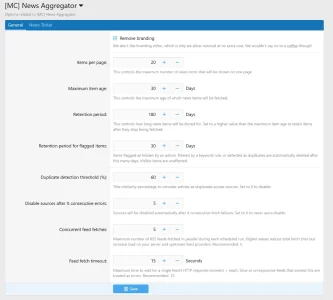
Three new admin options
Choose how long to keep flagged news items. Default is 30 days.
(adv) Choose how many feeds to fetch in parallel. Default is 5, choose up to 20.
(adv) Choose how long to wait for a single feed’s response. Default is 15 seconds, and feeds that exceed this time or are unresponsive result in an error.

![[MC] News Aggregator](/community/data/resource_icons/10/10411.jpg?1776472105)