
You are using an out of date browser. It may not display this or other websites correctly.
You should upgrade or use an alternative browser.
You should upgrade or use an alternative browser.

[MC] Infinite Scroll 1.2.0
No permission to download
- Author Matt C.
- Creation date
Infinite Scroll 1.2.0 adds infinite scrolling to search results, tag pages, member profile posts, Media Gallery and Resource Manager, each switched on separately. Lists also no longer skip or repeat items when new content arrives while a member is scrolling.
Release highlights
- Five new areas, from tag pages to Media Gallery
- A clear "Infinite scrolling is paused" state with a Resume button
- The "Write a reply…" bar slides away before it can cover the editor
Changelog
Where it works
- Search results, Tag pages, Profile posts, Media gallery and Resources are new checkboxes in Enable infinite scrolling, all off until you tick them
- Tag pages load threads, resources and media together in the tag's order
- Profile posts load only while the Profile posts tab is open, never in the background
- Media gallery covers the media index, categories, album index and album view, and keeps the gallery grid
- Resources covers the Resource Manager overview, category and author lists
Improvements
- When paused, the page says "Infinite scrolling is paused" above a Resume scrolling button
- The pause button in page dividers has a larger tap target and a hover highlight
- The "Write a reply…" bar slides away before the reply form reaches it, so it no longer covers the editor toolbar
Bug fixes
- The last items of a list now load when new content arrives while a member is scrolling, in forum lists, What's New, profile posts, direct messages, Media Gallery and Resource Manager
- Items are no longer shown twice when page boundaries shift mid-scroll, in search results, tag pages, the direct message inbox, Media Gallery and Resource Manager
Upgrade notes
- Requires XenForo 2.3.0 or later and PHP 7.4 or later
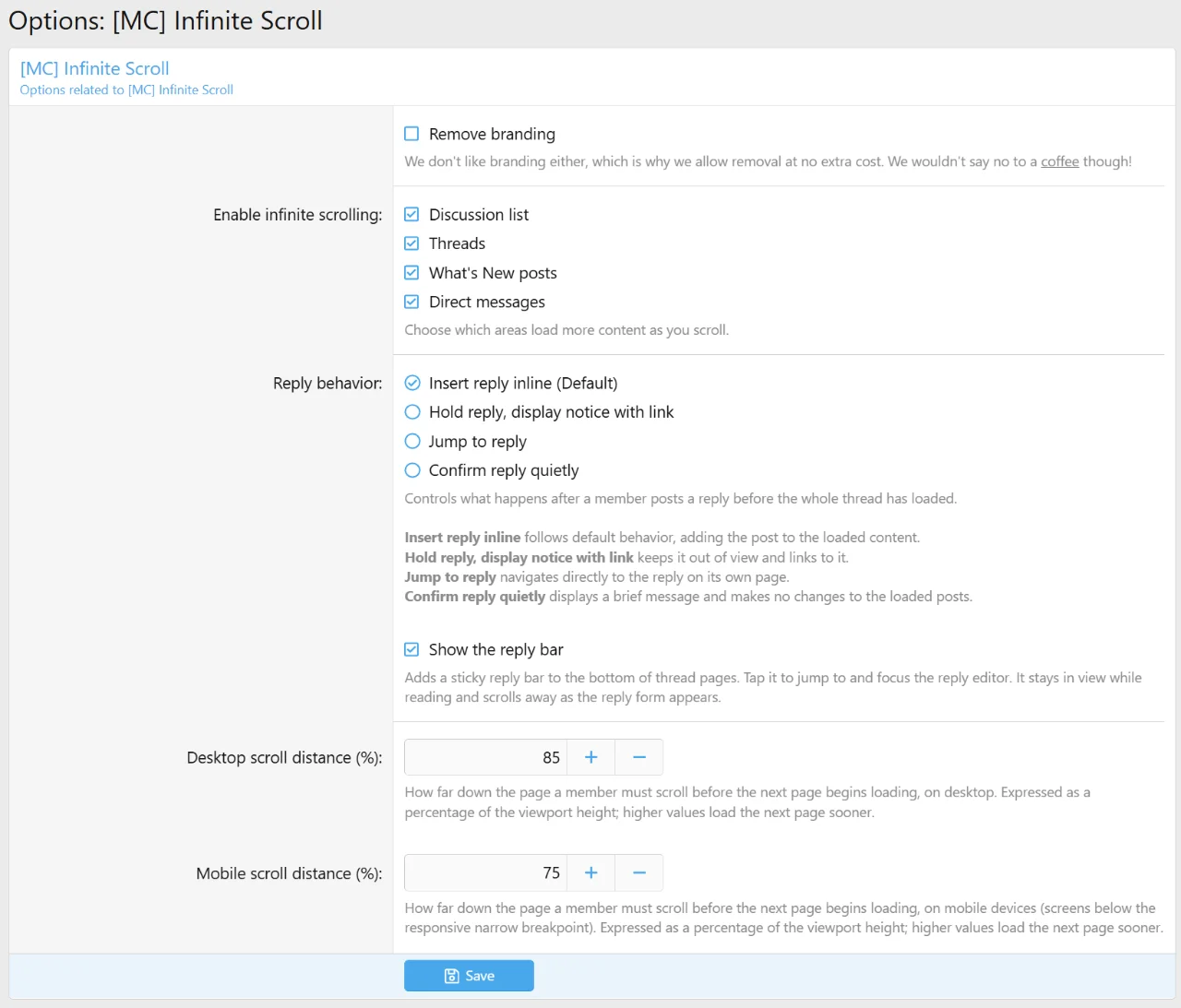
- All your settings are kept. The new areas are added switched off: tick them in Options › [MC] Infinite Scroll › Enable infinite scrolling.
Documentation
We have released a new maintenance update that fixes a critical issue with XenForo 2.3.13. Please update to the latest version before upgrading.
- XenForo 2.3.13 introduces new security measures that caused a fatal error regarding our shared copyright footer.
We have released a new version with new features and improvements.
- There is now a floating reply bar over every thread longer than 1 page that will take you to the editor when clicking on it. It has a scroll progress bar indicating scroll distance, the page number, and a play/pause button to control infinite scrolling.
- There are now four options to control reply behavior:
- Insert reply inline follows default behavior, adding the post to the loaded content.
- Hold reply, display notice with link keeps it out of view and links to it.
- Jump to reply navigates directly to the reply on its own page.
- Confirm reply quietly displays a brief message and makes no changes to the loaded posts.
- Infinite scrolling is now available in direct messages
- Fixed broken infinite scrolling in article forums
- Our shared branding is now integrated. Removal at no extra cost.


- Fixed issue where the page title on the new posts tab on the what's new page would revert to the board title.
- Removed support for [XB] Content Feeds since they have implemented their own infinite scrolling.
- Merged all JS into scroll.js
- Various performance improvements
- Fix: Whats new posts banner 'Threads below have not been updated since your last visit.' would would only display on page 1. If on page 2 or further, would not show.
- Change: 'Resume loading' button is now 'Resume scrolling'. Phrase can be changed.
- Change: Bottom pagination is now always visible.
- Change: Reorganized and renamed options slightly
- Added: Pause button is now available inside page dividers, so users may pause infinite scrolling if they need to access pagination or other reasons. Pause button will not show up on the last page. Once the user hits pause, the resume scrolling button will appear at the bottom. This change applies to discussion list, threads, and whats new posts.


Currently, the pause feature is not available for [XB] Forum Content List Tabs because the add-on does not use pagination. Will consider adding in the future.
- Added: New option to prevent the user's new reply from being inserted in the middle of a thread. This only applies if there are more pages in the thread to load. Users will receive an AJAX notification indicating their reply has been posted. If the user is at the last page of the thread, default reply behavior will resume.
- Maintenance: Code clean up and performance improvements

NOTE: Full friendly URLs is now a requirement.
- Fix: Extra query parameter in URL removed when clicking on page number in threads and posts
- Fix: Array to string conversion error occurred when filtering prefixes with Multi Prefix installed.
- Add: All text is fully phrased now for easy translation.