
![[MAG] Beyond 3D Viewer](/community/data/resource_icons/10/10850.jpg?1790755241)
- Compatible XF 2.x versions
- 2.3
- License
- Commercial proprietary license — Single site use
- Updates duration
- The purchase includes 12 months of updates. Continued access to future releases is available for a $49 annual renewal.
- Visible branding
- No
Beyond 3D Viewer brings managed 3D content directly into XenForo Forum and XenForo Resource Manager.
DEMO
Members can add supported 3D files to normal XenForo content and interact with the models directly on the page — without requiring an external model-hosting service, a separate 3D library, or custom BB Code solutions.
Supported formats
STL · GLB · glTF · OBJ · 3MF
Beyond 3D Viewer supports both standalone files and multi-file Source Packages, including:
- glTF + BIN + textures
- OBJ + MTL + textures
Related files are resolved as members of the same model package rather than being exposed as separate Viewer Items.
Interactive 3D Viewer
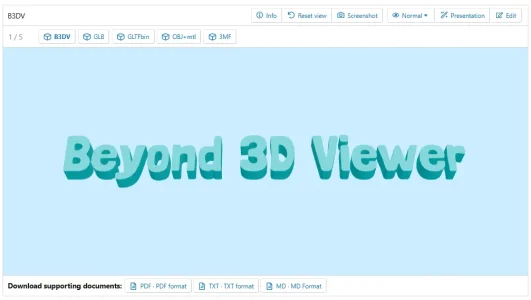
The built-in responsive Viewer supports:
- rotate, zoom and pan;
- automatic framing and Reset view;
- full-screen viewing;
- mouse, pointer and touch interaction;
- multiple models in one Model Set;
- Previous / Next and direct model switching;
- Normal, Sketch and Transparent view modes;
- model information;
- desktop and mobile layouts;
- lazy initialization and off-screen render pausing.
A single Model Set can contain multiple Viewer Items in different supported formats. Models are switched inside the same Viewer instead of creating a separate WebGL viewer for every model.
Auto-rotation
The Viewer includes configurable automatic model rotation.
- enable or disable Auto-rotation;
- Constant and Showcase modes;
- configurable idle delay before automatic rotation, from 0 to 30 seconds;
- configurable rotation speed;
- automatic pause when the Viewer is inactive or off-screen.
Rendering & Presentation
Beyond 3D Viewer uses a locally bundled Three.js runtime and its own rendering pipeline with:
- bounds-fitted studio lighting;
- environment lighting;
- tone mapping;
- soft contact shadows;
- automatic model framing;
- preservation of authored GLB/glTF, OBJ and 3MF materials where supported by the format.
- initial orientation;
- Uniform scale;
- position;
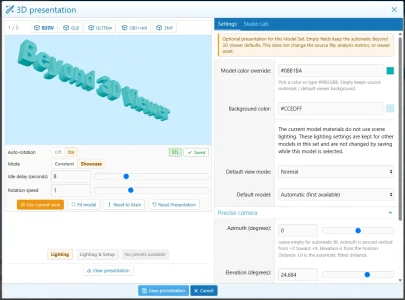
- camera azimuth, elevation, distance and focal length;
- model and background color;
- default model;
- default View mode;
- Auto-rotation mode, idle delay and speed.
Presentation is runtime-only. It does not modify the original model geometry, Source Analysis data or source file.
Studio Lab
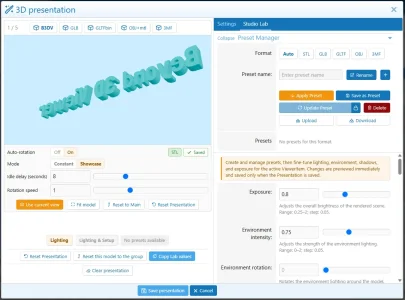
Users with the appropriate permission can access Studio Lab for advanced scene presentation controls.
Studio Lab includes control over:
- Environment Intensity and Environment Rotation;
- Ambient, Key, Fill and Rim lighting;
- Key / Fill / Rim direction;
- lighting Temperature and Tint;
- Floor Shadow;
- shadow Strength, Softness, Spread and Offset;
- Exposure.
Individual Viewer Items can have their own sparse overrides while inheriting the main Model Set presentation.
Presentation Presets
A portable file-based .mag3dpreset library is supported.
Two preset scopes are available:
- Lighting — Studio Lab values;
- Lighting & Setup — lighting plus the supported Presentation setup values.
XenForo Forum and Resource Manager integration
Beyond 3D Viewer works with XenForo's native file system.
Forum models use standard XenForo attachments.
In XenForo Resource Manager, models remain associated with the appropriate Resource Version files, and the native XFRM download flow remains authoritative rather than being replaced by a parallel download system.
Normal XenForo visibility, editing and access rules remain in effect. Dedicated MAG permissions control 3D viewing, content management, Presentation and Studio Lab access.
3D functionality can be enabled, disabled or inherited independently for Forum nodes and XFRM categories.
Model downloads
Original files remain authoritative and are not replaced by ViewerAssets.
In Forum:
- a single-file model can use the native original-file download;
- a multi-file model can be downloaded as a ZIP containing its required package members;
- all models in a Model Set can be downloaded together as a ZIP.
Supporting Documents
Documentation can be attached separately to a Model Set.
Supported document types:
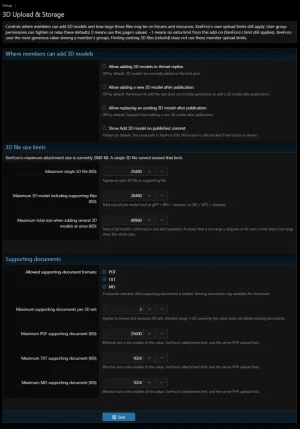
PDF · TXT · MD
Supporting Documents are presented separately below the Viewer and remain subject to XenForo access permissions.
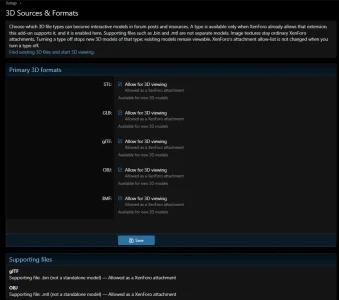
Administrators can configure allowed document types, per-set limits and file-size limits.
Source Analysis and Model Info
Managed 3D sources can be analyzed through background XenForo Jobs.
Available source metrics are stored and exposed through Model Info without inventing values for properties that cannot be determined for a particular format.
Existing 3D content
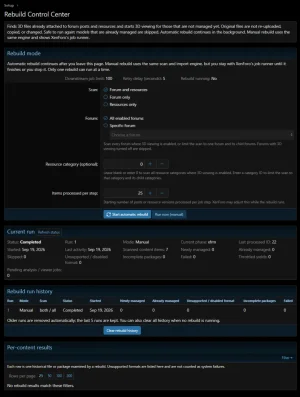
Existing Content Rebuild can discover supported 3D files that are already stored in Forum or XenForo Resource Manager and connect them to Beyond 3D Viewer.
Members do not need to upload their models again.
Rebuild processing uses XenForo Jobs and can continue in the background.
Administration
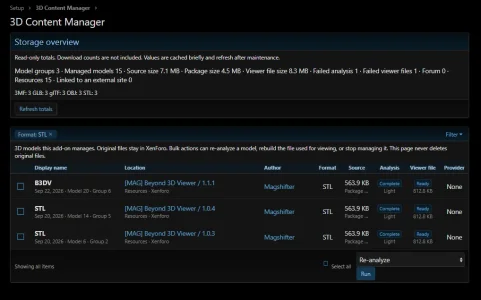
The 3D Content Manager and Rebuild Control Center provide ACP tools for:
- Viewer Item and Model Set management;
- 3D content filtering and search;
- Source Analysis;
- ViewerAsset generation;
- bulk maintenance;
- missing-source diagnostics;
- storage statistics;
- re-analysis and rebuild operations;
- Existing Content Rebuild monitoring and control.
The Core Viewer does not require a CDN, Node.js or an external 3D viewing service.
Important format limitations
Automatic model rotation is supported.
The documented animation limitation refers to a different feature: Beyond 3D Viewer currently does not play animation clips embedded inside GLB/glTF files. This does not affect the configurable Viewer Auto-rotation described above.
For glTF/GLB:
- files that require Draco, Meshopt or KTX2 decoding are currently unsupported;
- arbitrary external HTTP/HTTPS URIs embedded in a model package are blocked;
- OBJ/MTL dependency inspection has a 64 MiB processing ceiling — this is not an upload-size limit.
The current supported profile does not cover, among others:
- 3MF Production;
- Beam Lattice;
- Boolean;
- Volumetric;
- parts of the advanced Materials & Properties extensions.
-
 Screenshot 2026-09-30 104106.webp
 -
 Screenshot 2026-09-30 104001 copy 02.webp
 -
 Screenshot 2026-09-30 103615.webp
 -
 Screenshot 2026-09-30 103505 copy 01.webp
 -
 Screenshot 2026-09-30 103318.webp
 -
 Screenshot 2026-09-30 103250.webp
 -
 01.webp
![[MAG] Doc&Guide](/community/data/resource_icons/10/10947.jpg?1792867396)
![[MAG] XF Unlocked](/community/data/resource_icons/10/10919.jpg?1792275241)
![[MAG] Global Links Favicons](/community/data/resource_icons/10/10843.jpg?1790672960)
![[MAG] ACP Enhancements](/community/data/resource_icons/10/10847.jpg?1790693321)
![[MAG] Tag Synchronizer](/community/data/resource_icons/10/10848.jpg?1790705957)