- Compatible XF 2.x versions
- 2.3
- Additional requirements
- No required dependencies.
Optional: integrates cleanly with [LocalXen] - Thread Owner Badge when both add-ons are enabled.
- License
- LocalXen Free Use License. Included in the download package. Free to use, modify and distribute for personal or commercial XenForo installations, provided the copyright and permission notice are retained.
- Updates duration
- Leave blank for free resource.
- Visible branding
- No
[LocalXen] - Horizontal Postbit
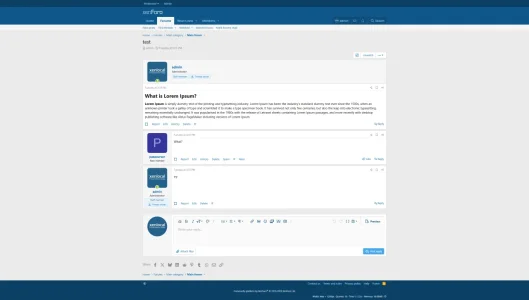
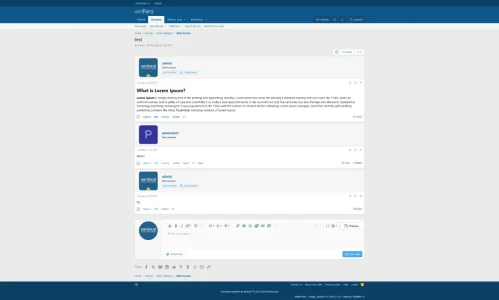
Horizontal XenForo postbits with native message flow.LocalXen - Horizontal Postbit modernizes XenForo's standard thread post layout by moving the author area into a polished horizontal identity band on desktop screens. All while keeping XenForo's native attribution, message content, footer flow, and mobile behavior completely intact.
This add-on is designed for administrators who want a cleaner and more contemporary post presentation without turning XenForo into something it is not. The goal is refinement, not reinvention. Furthermore,
it contains no visible front-end branding.
 Key Features
- Desktop-First Horizontal Layout: For standard thread posts, the traditional left-side user column is reorganized into a horizontal identity band above the message body. Avatar, username, titles, user banners, and user metadata are presented in a cleaner horizontal structure.
- Native Mobile Behavior: The add-on leaves mobile users entirely alone. On mobile devices, XenForo's native, compact view continues exactly as intended.
- Unchanged Message Experience: It focuses specifically on the postbit (author) presentation layer. The message content, footer controls, and thread behavior remain unchanged.
 Comprehensive ACP Controls
From the admin control panel, you have practical controls over how and where the add-on operates:
- Horizontal Postbit Mode: You can disable it entirely, apply it to all thread posts, or limit it to the first post only (thread starter).
- Forum Scope: Activate the layout everywhere, only in selected forums, or everywhere except selected forums.
- Visual Presets: Choose from Balanced, Compact, or Relaxed spacing presets without altering XenForo's overall visual language.
- Saved Preview: A built-in ACP preview helps you instantly test and confirm your active configuration.
- Compatibility Health Panel: Inspects active post_macros template modifications and highlights potential compatibility risks from third-party add-ons.
 Design & Style Support
Includes a dedicated
Style Properties group making it highly suitable for communities running multiple custom styles. You can customize each theme individually without manually editing templates:
- Avatar radius
- Identity band vertical and horizontal padding
- Primary column gap and row gap
- Username size
- User details minimum width
- Wide desktop breakpoint
- Wide meta max width
 Compatibility & Integrations
- Version: Built specifically for XenForo 2.3.x.
- Target: Targets standard thread posts rendered by post_macros (compact/simple user info variants are intentionally left untouched).
- Add-on Compatibility: Designed to coexist more safely with badge-style add-ons by using scoped classes rather than attribution rewrites.
- [LocalXen] - Thread Owner Badge Integration: If you also use our thread owner badge add-on, the two are designed to coexist cleanly. The compatibility reporting recognizes and supports this known integration.
 Installation
- Upload the contents of the release package to your server.
- Install the add-on from the XenForo Admin Control Panel.
- Open the add-on options page and choose your preferred mode, scope, and preset.
- (Optional) Adjust the included Style Properties for per-style fine-tuning.
Release Philosophy:This resource is released free of charge for the XenForo community. It is intended to be lightweight, practical, and extensible.
-
screencapture-localhost-index-php-2026-03-26-15_49_56.webp
31.4 KB
· Views: 15
-
screencapture-localhost-index-php-2026-03-26-15_42_30.webp
29.8 KB
· Views: 15

![[LocalXen] - Thread Owner Badge](/community/data/resource_icons/10/10365.jpg?1774389592)
![[LocalXen] RM Market UI ( Portal / Layout )](/community/data/resource_icons/10/10357.jpg?1774020040)