

- Compatible XF 2.x versions
- 2.3
- Additional requirements
- [DD] Core 1.6.2
- Visible branding
- No
[DD] Font Manager - High-Performance Web Font Management
[DD] Font Manager provides high-performance, 100% GDPR-compliant local web font management for XenForo 2.3. Host your fonts locally, import from Google Fonts with one click, and seamlessly integrate fonts across your forum, style properties, and post editor.Key Features
- GDPR-Compliant Local Hosting: Serve web fonts entirely from your own server. Visitors never contact third-party CDNs or transmit their IP addresses to external services.
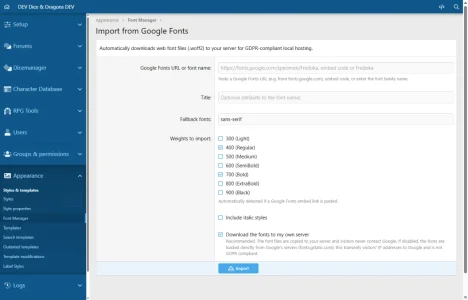
- Google Fonts 1-Click Downloader: Paste any Google Fonts URL, embed link, or font name. Font Manager automatically parses available weights and formats, downloads the optimized
.woff2files directly to your server, and generates clean local@font-facerules. - Flexible Font Ingestion Sources:
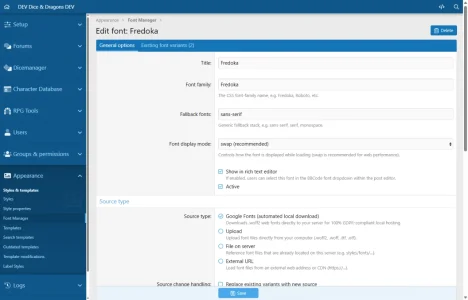
- File Upload: Upload
.woff2,.woff,.ttf, or.otffiles with automatic weight, style, and font family detection from filenames. - File on Server: Reference existing font assets located in your XenForo directory tree (e.g.
styles/fonts/...). - External URL: Stream fonts from external CDNs, backed by automated CORS header validation and ACP warning badges.
- File Upload: Upload
- Smart On-Demand Loading (Lazy Loading): Modern web browsers only download font files over the network when an element currently rendered on the page actually uses that font family. Defined but unused fonts generate zero HTTP requests.
- Zero Flash of Invisible Text (FOIT): Configurable
font-display: swapprevents blank text while loading and guarantees fast Core Web Vitals scores. - Selective Preload: High-priority above-the-fold fonts can be flagged for automated
<link rel="preload">header emission in HTML<head>. - Dedicated Heading & Accent Typography:
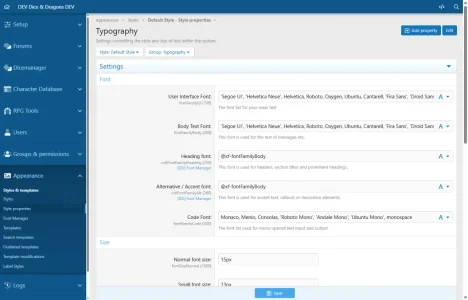
@xf-cv6FontFamilyHeading(Style Property: Heading font): Effortlessly customize page titles (.p-title-value), block headers (.block-header), and section headings (h1). Zero CSS overhead when using default fallback.@xf-cv6FontFamilyAlt(Style Property: Alternative / Accent font): Style decorative badges, counters, and callout blocks.
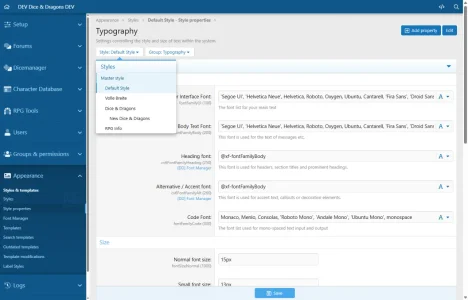
- AdminCP Quick-Pick Selector: Typography style properties (
fontFamilyBody,fontFamilyUi,fontFamilyCode,cv6FontFamilyHeading,cv6FontFamilyAlt) feature a joined button addon to preview and select fonts in one click. - CSS Extra Field Insertion: In any style property's freeform CSS
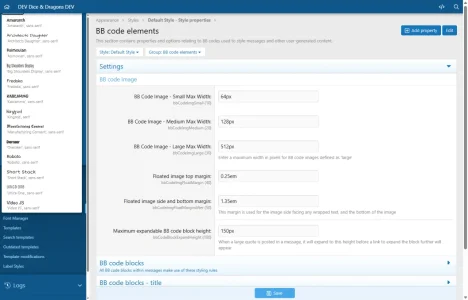
extrabox, use the compact Insert font dropdown to pastefont-family: 'FontName', fallback;or replace an existing font-family declaration. Includes tabbed selection for System Font Variables and Custom Font Families. - Rich Text Editor Integration: Enable Show in rich text editor to let members pick the font from the XenForo BBCode
[FONT]dropdown toolbar. - Zero Database Overhead: Font stacks, preloads, and editor configurations are compiled into XenForo SimpleCache. Page loads require zero database queries for font handling.
Requirements
- XenForo 2.3.0+
- [DD] Core Library 1.6.2+ (
cv6/Core) - PHP 8.2.0+ (optimized and ready for PHP 8.4)
Installation
1. Upload Files
Upload the contents of the release archive into your XenForo root directory (or install via ACP / CLI).2. Install Add-on
Install via XenForo AdminCP (Add-ons ➔ Install) or command line:
Bash:
php cmd.php xf-addon:install cv6/FontManager3. German Language Pack
A German translation file is included in the release archive underlanguage/lang-cv6-FontManager-de-de.xml. Import it under AdminCP ➔ Appearance ➔ Languages ➔ Import a language (overwrite German language).Setup & Usage
1. Adding Fonts
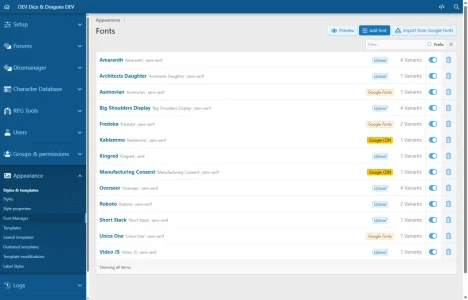
- Go to AdminCP ➔ Appearance ➔ Fonts.
- Click Add font to manually upload files or link server files/URLs, or click Import from Google Fonts.
- For Google Fonts, paste any Google specimen link (e.g.
https://fonts.google.com/specimen/Fredoka) or font name, select desired weights and formats, and click Import.
2. Assigning Typography in Styles
- Go to AdminCP ➔ Appearance ➔ Style properties ➔ Fonts.
- Click the font picker button next to
fontFamilyBody,cv6FontFamilyHeading, orcv6FontFamilyAlt. - Choose a font family from the dropdown list.
3. Writing Custom CSS
Whenever editing a style property with anExtra CSS box, click the Insert font dropdown in the section header to inject font family rules directly at your cursor.Support & Feedback
- Support Thread: https://forum.dice-dragons.de/forum/font-manager/
- Author Profile: https://forum.dice-dragons.de/mitglieder/hoffi.1/
This is the first new AddOn that is only avaiable on my Community!
- Related resources
- [DD] Core
-
 01-admin-fonts-list.webp
 -
 02-admin-google-fonts-import.webp
 -
 03-admin-font-edit.webp
 -
 04-admin-style-properties-typography.webp
 -
 05-admin-style-properties-typography-picker-open.webp
 -
 06-admin-style-properties-extra-selector.webp
![[DD] Letter Index](/community/data/resource_icons/8/8839.jpg?1738176952)
![[DD] Prefix & Label Tools - add Icons and more](/community/data/resource_icons/10/10213.jpg?1767134942)
![[DD] Admin Tools](/community/data/resource_icons/7/7697.jpg?1738176049)
![[DD] Node Icons & Tools](/community/data/resource_icons/5/5565.jpg?1738969921)
![[DD] Core](/community/data/resource_icons/8/8826.jpg?1738175900)