- Compatible XF 2.x versions
- 2.3
- Additional requirements
- Prizma Media Gallery 1.5.4.2 or a newer 1.x version (required; Floria shows Prizma's media)
PHP 8.1 or newer
- License
- Commercial licence: one licence per live forum. Development and staging copies of that forum are included.
- Updates duration
- 6 months of updates and support included. Then renews automatically at €15 + VAT every 6 months; cancel any time. Floria keeps working if you cancel.
- Visible branding
- No
Floria — your Prizma gallery, anywhere on the forum
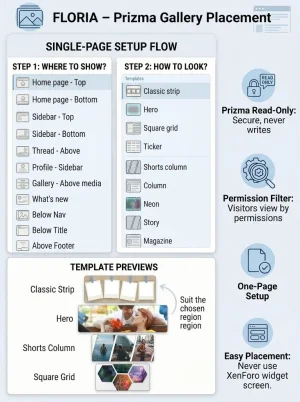
Floria takes the media in your Prizma gallery and shows it as a carousel on the rest of your forum: above the forum list, in the sidebar, at the top of a thread, between the threads of a forum, under the main menu, above the footer. It reads Prizma and never writes to it, and every card is filtered by the visitor's own Prizma permissions.
Setting one up takes a single page. Pick where it should appear, pick how it should look, and save. A live preview shows the carousel at desktop, tablet or phone width while you change it, and nothing is stored until you press Save. Floria places it for you; you never open XenForo's widget screen.
Where it goes — fifteen regions
- Home page · top and Home page · bottom (above and below the forum list)
- Home page · between categories (below the category you pick, in styles that show XenForo's category blocks on the home page)
- Forum · between threads (in a discussion forum's list of threads, after the 3rd, 5th or 10th thread)
- Thread · above the posts and Thread · below the posts
- Sidebar · top and Sidebar · bottom (on every page, or only on the pages you pick)
- Left column (on the other side of the page from the sidebar, on the pages you pick; on phones it opens from a button at the top of the page)
- Profile · sidebar
- Gallery · above the media (Prizma gallery and category pages)
- What's new · main column
- Below the navigation, Below the page title and Above the footer (every page, or only on the pages you pick)
Each region card on the setup page has a small sketch of where it sits, and a region can hold more than one carousel.
How it looks — thirteen templates
A template sets the whole look: layout, card format, how many cards, card style, hover effect, navigation and movement. Templates that suit the chosen region are listed first.
- Classic strip: wide cards side by side
- Hero: one large panoramic card at a time
- Square grid: small square cards in a grid, the newest media reshuffled on every visit
- Ticker: small square cards that flow past on their own
- Shorts column: upright cards stacked, moving card by card
- Column: wide cards stacked
- Flowing column: wide cards stacked, flowing upwards on their own; on narrow and touch screens a sideways strip that flows like the Ticker
- Neon: wide cards with a glowing ring in each media type's colour
- Story: upright cards side by side
- Magazine: wide cards in two rows
Special templates
Special templates are showpiece designs with their own layout and motion, listed in a group of their own on the setup page.
- Polaroid string: square photos in paper frames, pegged to a string. They swing when the strip moves or the mouse brushes past them, swing once when the page opens, or hang still; you choose.
- Cinema: one panoramic card in the spotlight, the cards beside it dimmed
- Cover flow: the middle card faces you, the cards beside it turn towards it
Every template uses a fixed card ratio, so the cards in a carousel are always the same size. Neon light can be added to any template. Templates outside the Special group can add a gentle idle motion (Sway, Float or Breathe), unless they flow continuously. You can save any carousel's look as your own template.
What it shows
- Six content sources: all gallery media, selected categories (with or without sub-categories), an album, one member's uploads, popular media, or a hand-picked selection you search for by title or media ID
- Newest, oldest, most viewed, random or your own order; up to 60 cards per carousel; filter by media type. Random order shuffles only the newest media of the source: four times as many as the carousel holds, at most 120
- Regions that appear on every page (the sidebars, the left column, Below the navigation, Below the page title, Above the footer) can be limited to the pages you tick: home page, forum pages, threads, member profiles, the gallery, What's new
- Any carousel can be limited to some user groups, and to a start and an end date
- The heading visitors see comes from the content ("Latest media", "Media by …", "From the gallery") unless you write your own
Managing your carousels
The Carousels page lists every carousel in every region, with a map of the regions that are in use. A switch turns a carousel on or off and the site changes right away. From the same list you can copy a carousel, show it in another region, or open it on the site: "View on site" opens the page and highlights the carousel. On the site itself, administrators see a small "Edit · Turn off" line above each carousel in a region; visitors do not.
When one carousel is shown in several regions, the edit page says so, and "Change only this region" gives that region its own copy. The setup page warns when another carousel on the same page already has the same heading.
On phones and tablets
Tablet and phone settings are separate from the desktop ones. Stacked templates become a strip you swipe sideways on phones, tablets and other touch screens, the indicator dots count pages rather than cards, and neon light shows on touch screens too. The left column opens from a button on phones.
For visitors
Carousels can be used with the keyboard and keep a visible focus ring. Anything that moves by itself has a pause button, pauses on keyboard focus and in background tabs, and stays still for visitors who ask their system for reduced motion. Media without a cover image shows its type icon on the type's colour instead of an empty card. Colours come from your style, so light and dark variations work without extra settings.
Performance
No jQuery, no third-party carousel library, no CDN request. The script (9 KB) loads only when a carousel on the page has arrows, an indicator or movement; without them a carousel is a plain scrollable list and ships no JavaScript at all. Polaroid string, Cinema and Cover flow add a script of about 3 KB, only on pages that show them. Cinema and Cover flow load a larger image for the middle card only when that file is 2 MB or smaller. A carousel that is switched off, and a region with nothing in it, add no database queries. On boards with a cache backend configured, the list of media IDs is cached per permission set; publishing or deleting media in Prizma clears it immediately.
Privacy
A card is shown only if the media is visible, its album (if it has one) is visible and public, or members-only for signed-in members, and the visitor can view its category in Prizma. Every card then passes Prizma's own view and discovery checks. Private and unlisted albums and media awaiting moderation never appear in a carousel, not even for their owner or a moderator. Floria caches media ID lists only, never rendered pages and never anything that depends on the individual visitor. The live preview stores nothing.
Languages
English, plus eleven complete translations: Turkish, German, Spanish, French, Italian, Dutch, Portuguese (Brazil), Swedish, Japanese, Korean and Simplified Chinese. Language packs are imported from Appearance → Languages; they do not install automatically.
Limits worth knowing
- The Profile · sidebar region shows the same carousel on every profile. Floria does not follow which member, thread or category is being viewed yet.
- Five regions (Below the navigation, Below the page title, Above the footer, Gallery · above the media and Forum · between threads) attach to the page through template modifications. A style that heavily rewrites XenForo's page markup can keep one from appearing; the Carousels page then tells you which style is affected.
- Home page · between categories appears only in styles that show XenForo's category blocks on the home page.
- Hover effects play only with a mouse; on touch screens the cards stay still.
- Without a cache backend the media list is queried on every page view. The Options page shows which case your board is in.
- Media marked "18+ / Sensitive content" (NSFW) in Prizma is never shown in carousels. Floria leaves it out of every source, hand-picked selections included, instead of blurring it the way Prizma's own gallery does.
Requirements
- A XenForo licence for the board you install it on
- XenForo 2.3.0 or newer
- PHP 8.1 or newer
- Prizma Media Gallery 1.5.4.2 or a newer 1.x version
Licence
€25 + VAT one-off licence. Includes 6 months of updates and support. After that, updates and support renew automatically at €15 + VAT every 6 months — first charge 6 months after purchase, cancel any time. Floria keeps working if you cancel.
Planned
These are planned, not promised, and come as free updates while your update period runs.
- 1.1.1: on wide screens, the setup form and the live preview side by side.
- 1.1.1: a new region between the posts of a thread.
- Later: more Special templates. There is no schedule for them.
Installing
Upload the contents of the upload folder to your forum root and install Floria from Admin control panel → Add-ons. Prizma Media Gallery 1.5.4.2 or a newer 1.x version must be installed and active first.
A fresh installation creates one sample carousel, "Latest media", at the top of the home page, so you see a result straight away. Turn it off or delete it under Floria → Carousels.
Language packs are in src/addons/Erkan/Floria/translations/. Import the ones you need from Appearance → Languages → Import; you can import a pack over an existing language or as a new one.
Enter your licence key under Floria → Licence. Floria checks it once a week and shows your update period there. Nothing is locked without a key; Floria's own admin pages show a one-line reminder until you enter it. The Licence page lists exactly what the check sends.
Support
Ask in the Floria support forum on erkanshi.com: https://erkanshi.com/forum/index.php?forums/floria-purchase-licensing.26/ Please mention your XenForo, Prizma and Floria versions, and a link to the page where the carousel is.
Important Note
PRIZMA MEDIA GALLERY is a natural extension of Prizma Media Gallery and is designed exclusively for Prizma users.
FLORIA is NOT a standalone add-on. It requires Prizma Media Gallery to be installed and cannot operate independently.
If you are not using Prizma Media Gallery, this add-on is not intended for your forum.
Thank you!